Offloop
Kimi

Kimi K3.1 Pro.A place on your team.

Now on Offloop

Offloop is the AI workspace for small teams. Bring Kimi’s reasoning and coding capabilities to the same place as your colleagues, files and decisions.

Model context window
1M
Text and visual understanding
Multimodal
Reasoning and tool calling
Agentic

What Kimi Builds With Code and 3D Tools

Moonshot’s examples include a game environment, an airport interior and a working engine model. The videos below show the results of its demonstrations, not work produced in Offloop.

View Moonshot’s demonstrations

A palace built for a game.

Moonshot’s demonstration combines Unreal Engine with a dragon modeled in Blender.

Video published by Moonshot AI

A rainforest inside an airport.

A Blender scene explores the structure, planting and light of an indoor rainforest.

Video published by Moonshot AI

An engine, part by part.

A FreeCAD model shows a turbofan’s assembly, internal components and rotation.

Video published by Moonshot AI

From a brief to a working result.

Moonshot describes K3.1 Pro as a model for coding, research and spatial reasoning. For a small team, those capabilities offer several starting points.

Turn a brief into a website.

Moonshot reports improvements in frontend design, coding and tool use. A product brief can serve as the starting point for an interactive site, followed by revisions to its layout and behavior.

A task to try

Build an interactive website from this product brief. Explain the design choices and identify what needs review.

Follow the evidence across documents.

The model’s long context supports work that draws on several sources. Teams can use it to compare reports, examine differences and develop questions for further research.

A task to try

Compare these company reports. Cite the source for each finding and separate established facts from open questions.

Work through a spatial problem.

Moonshot’s examples include 3D assets and interactive scenes built with creative tools and scripts. They show how the model approaches geometry, materials and spatial relationships.

A task to try

Develop a plan for an interactive product scene using these references. Describe the geometry, materials and camera positions.

Read Moonshot’s model announcement

How Moonshot measures the model.

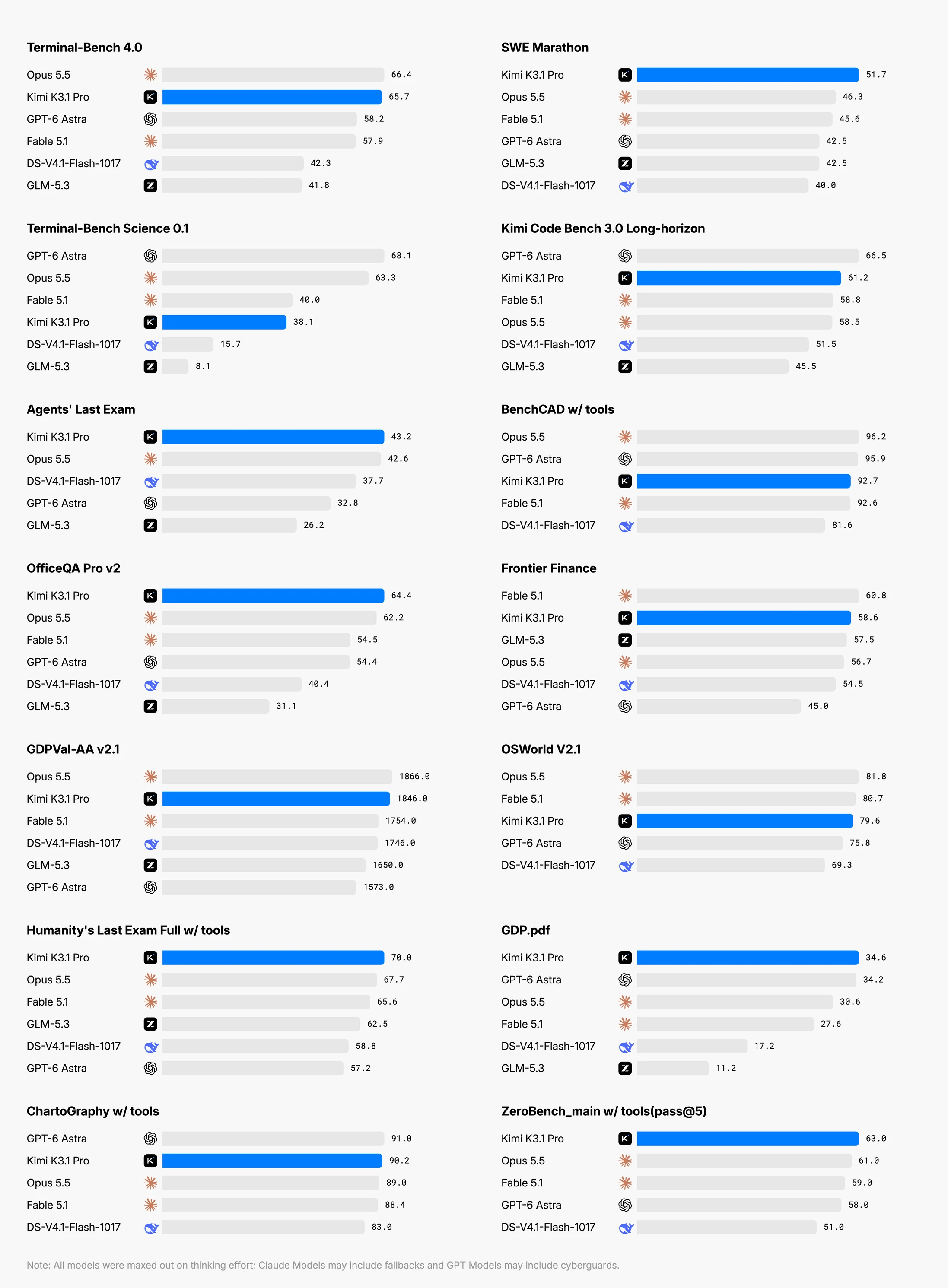
These K3.1 Pro results come from Moonshot’s own evaluations. They describe the model, rather than its performance in Offloop. The original announcement explains the methods and conditions.

Moonshot AI’s official Kimi K3.1 Pro benchmark overview across coding, research, finance and spatial tasks

Built for small teams with big ambitions.

Small teams share more than a task list. In Offloop, people and AI agents work in shared Channels, with the brief, files and discussion alongside the result.

Give the work a starting point.

Set out the goal, add the relevant files and explain the limits of the task.

Make room for review.

Discuss the work in a Channel, ask questions and review decisions with your colleagues.

Keep the next step in reach.

Keep outputs with the conversation so the team can return to the context behind them.

See how Channels work

What this means for a small team.

What should our team try first?
Choose a task you already know how to judge: a landing page from an agreed brief, a comparison of supplier proposals, or a research note for a client meeting. Give it a clear finish line and name the person who will review it. A familiar task makes it easier to see where Kimi saves work and where it needs direction.
How much background do we need to provide?
Start with the brief, the relevant files and a short account of decisions already made. Include the audience, constraints and what a useful result should contain. Keep that material in the task’s Channel so colleagues can follow the same context. A large context window helps accommodate material; a clear brief helps establish what matters.
Can a colleague pick up the work without starting over?
Offloop keeps the conversation and outputs together in a shared Channel. A colleague with access can review the brief, read the discussion and continue from there. Before handing work over, leave a short note on what has been decided, what remains open and who owns the next step.
Who checks the result before we use it?
Assign a reviewer before the work begins. For code, that means running it in the intended environment and checking its behavior. For research, it means opening the cited sources and checking the claims that matter. Keep corrections in the Channel so the team can see what changed and why.
How do we know whether it is actually saving time?
Compare a few completed tasks with your usual process. Count briefing, review and rework as well as generation time. Note whether the result was usable, how many corrections it needed and whether a colleague could take it forward. Those observations are more useful to your team than a benchmark score alone.
Where should we keep a person closely involved?
Keep a person responsible for client commitments, spending decisions and work that will be published or put into production. Kimi can help prepare a draft, examine evidence or propose a change. Your team should decide when the result is ready to use.


Your team’s next project starts here.

Open Offloop and choose Kimi K3.1 Pro in your agent’s model settings. Start with a brief, share the relevant files and bring your teammates into the conversation.

Open Offloop