
Quick verdict
Both tools are mature, secure team chat apps. The real difference is the ecosystem around them: Teams is part of Microsoft 365, while Slack is an independent hub that connects to almost everything.
Pick Slack if…

You work with clients and partners in shared channels
You rely on many third-party apps and bots
You want the fastest, simplest chat experience
Pick Teams if…

Your company already pays for Microsoft 365
Meetings, webinars and calling matter as much as chat
IT wants one admin center for security and compliance
- Messaging
- Slack
- Meetings and calls
- Teams
- AI
- Slack
- Mobile apps
- Tie
- Pricing
- Teams
At a glance
Choose by ecosystem, meeting needs and external work
Choose Teams when Microsoft 365 and larger meetings drive the decision; choose Slack when third-party apps and external shared channels matter more. The table compares the practical differences before the detailed sections.
| Criterion | Slack | Microsoft Teams | Winner |
|---|---|---|---|
| Price (cheapest paid) | Pro $7.25/user/mo annual, $8.75 monthly | Teams Essentials $4/user/mo annual | Teams |
| Microsoft 365 / higher tiers | Business+ $15 annual ($18 monthly); Enterprise+ $45 annual | M365 Business Basic $7, Standard $14, Premium $22 (annual) | Tie |
| Free plan | 90 days of history, up to 10 apps, 1:1 huddles | Meetings up to 60 min and 100 people, 5 GB storage per user | Tie |
| Meetings & calls | Huddles up to 50 people (25 on video); 2 on Free | Meetings up to 300 people (1,000 on E3/E5), up to 30 hours | Teams |
| Storage | Included with plan | 10 GB per user on Essentials; 1 TB OneDrive on M365 Business | Teams |
| AI | Summaries and recaps on Pro; Slackbot agent, AI search and workflow generation on Business+ | Copilot Chat for eligible users; Copilot bundles from $23.50; Teams Premium $10 | Slack |
| Integrations | 2,600+ apps | Microsoft 365 apps and the Teams Store | Slack |
| SSO | Google OAuth on Pro; SAML on Business+; multi-SAML on Enterprise+ | Microsoft Entra ID | Tie |
| eDiscovery | Discovery API, legal holds and audit logs on Enterprise+ | Microsoft Purview eDiscovery (Premium on E5) | Tie |
| Data residency | Business+ and Enterprise, 12 regions | Available through Microsoft 365 | Tie |
| External collaboration | Slack Connect with up to 250 organisations | External access, guest access and shared channels (up to 50 teams) | Slack |
| Moving from Slack | — | Official Slack to Teams Migration Tool: channels, threaded messages, reactions, files and membership (not DMs) | Teams |
| Platforms | macOS, Windows, Linux, iOS, Android, web | Windows, macOS, web (Linux via web app), iOS, Android | Tie |
Pricing checked Oct 2026 · Source: slack.com/pricing, microsoft.com/microsoft-teams
Start with your existing software and the work your team does most: Teams has the lower entry price and larger meetings, while Slack offers a broader app marketplace and cross-company channels. Use the detailed comparisons below to check the trade-offs that affect your team.
Interface and design
Winner: Tie
Neither interface is a universal winner
Both now offer one combined list with custom sections; Slack has a single flat channel model, Teams nests channels inside teams, and which is simpler depends on team size.
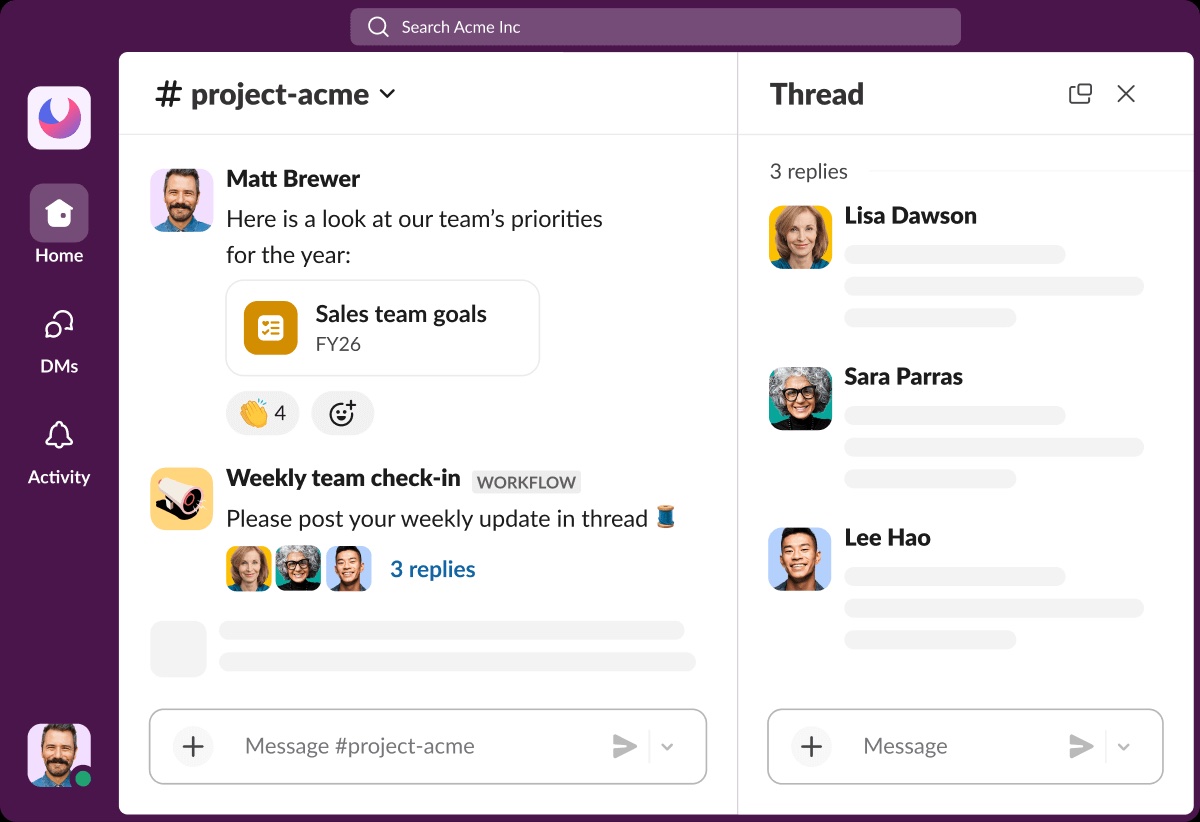
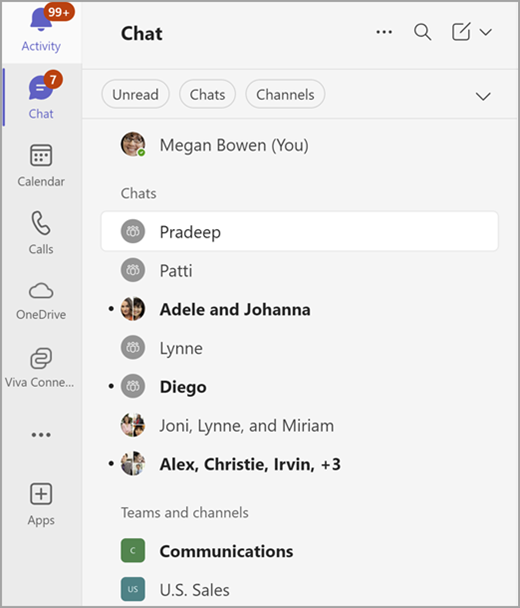
| Layout and navigation | Slack | Microsoft Teams |
|---|---|---|
| Structure | Work happens in channels; sidebar lists channels, DMs and apps | Teams = teams containing channels; plus separate 1:1/group chats Channel types: standard, private, shared |
| Sidebar views | "Unreads" and "Drafts & sent" views at top of sidebar Huddle indicator (headphones) shown next to channel names in sidebar | Choose Combined view (Favorites, Chats, Teams and channels in one list) or Separate Chat and Teams views |
| Custom sections | Custom sidebar sections to group channels/DMs (paid plans only) | Custom sections, filters (Unread, Chats, Channels, Meeting chats) and Quick views (@Mentions, Followed threads) |
Treat interface as a fit decision rather than a clear win: choose Slack for a flat channel structure, or Teams if teams containing channels match how your company is organized. Both support a combined list and custom sections.
Messaging
Winner: Slack
Slack offers stronger search and notification controls
Slack is the stronger choice for teams that rely on detailed search and notification controls; both apps cover core channels, threads, direct messages and file sharing.
Channels and threads
Both support threaded channels, DMs, group chats and scheduled send; Teams adds a choice of Posts layout, Slack keeps one consistent thread model.
| Features | Slack | Microsoft Teams |
|---|---|---|
| Threads | Conversations in channels and DMs; send in channel, DM or thread | Channels have Threads layout or Posts layout, switchable per channel Threads layout: reply in thread only, or thread and main channel |
| Scheduling and drafts | Schedule messages from desktop (arrow next to send) and mobile (long-press send); manage in Drafts & sent Unsent messages auto-save as drafts | Schedule chat messages (Actions and apps > Schedule message); must already be in a conversation with the person |
| History and limits | Free plan: 90-day history; paid plans: full history | Up to 1,000 channels per team; private chats up to 250 people Messages up to ~100 KB per post |
Formatting, emoji and clips
Both support threaded channels, DMs, group chats and scheduled send; Teams adds a choice of Posts layout, Slack keeps one consistent thread model.
| Features | Slack | Microsoft Teams |
|---|---|---|
| Text formatting | Formatting toolbar plus markup (bold, italic, strike, inline code, code blocks with ```) | Markdown formatting supported; code blocks via ``` or /code with language syntax highlighting |
| Custom emoji | Org-wide custom emoji (JPG/PNG/GIF, <128KB recommended, GIF up to 50 frames); owners can restrict; not addable from Android app | Custom emoji/reactions on by default, up to 5,000 per tenant, admin-controllable; not available for EDU tenants |
| Clips | Audio and video clips on all plans (Free, Pro, Business+, Enterprise+) | Record video/audio/screen clips up to 1 minute in 1:1, group chats and channels; auto captions; download video or transcript |
Files and docs
Both support threaded channels, DMs, group chats and scheduled send; Teams adds a choice of Posts layout, Slack keeps one consistent thread model.
| Features | Slack | Microsoft Teams |
|---|---|---|
| Co-editing and docs | Via OneDrive and SharePoint for Slack / Google Drive for Slack apps (files stay in those services); native collaborative docs = canvases (all plans; Free limited to channels and DMs) | Channel Files stored in SharePoint; open and co-author Word/Excel in Teams, browser or desktop app |
Search
Slack offers more search modifiers (thread, reaction, saved, pinned, canvas creator, exclusions) than Teams' four KQL modifiers.
| Features | Slack | Microsoft Teams |
|---|---|---|
| Search modifiers | Modifiers: in:, from:, has:, is:saved, has:pin, before:/after:/on:/during:, is:thread, with:, creator:, exclusion with - | KQL modifiers: From:, In:, Subject:, Sent: Prefix wildcard (*) and exact-phrase quotes supported |
| Filters and results | Result tabs: Messages, Files, People, Channels, Canvases (+Workflows on mobile) and Filters Search answers (AI) on Business+ and Enterprise+; Enterprise search on Enterprise+ Free plan searchable history limited to 90 days | Filters: Type (Chats/Channels), Teams and channels, From, Date, More (@Mentions, attachments, hide apps/bots) Ctrl+F / Cmd+F searches within the current chat or channel |
Notifications
Slack adds keyword alerts, a notification schedule and VIP breakthrough on top of per-channel controls that both apps share.
| Features | Slack | Microsoft Teams |
|---|---|---|
| Defaults | Default Everything or Mentions & DMs, with per-channel exceptions; separate mobile overrides Mobile notification delay after desktop inactivity is configurable | Settings > Notifications and activity: per type choose banner and feed, feed only, or off Missed activity summary emails with configurable frequency |
| Channels and keywords | Channel keyword notifications | Per-channel notifications: all new posts, include replies, channel mentions |
| Schedule and activity | Notification schedule (Every day/Weekdays/Custom) and pause via /dnd VIP messages can break through paused notifications (paid plans) | Activity feed with Unread/@Mentions/Tag mentions filters; items kept 30 days |
Slack is the stronger fit when detailed search and notification controls shape daily work. Teams still covers the core messaging needs, and its channel layouts and Office file collaboration may fit a team already working in Microsoft 365.
Meetings and calls
Winner: Teams
Teams fits larger, formal meetings
Teams supports far larger meetings (300-1,000 vs 50), native recording and events, while Slack huddles are built for quick informal calls.
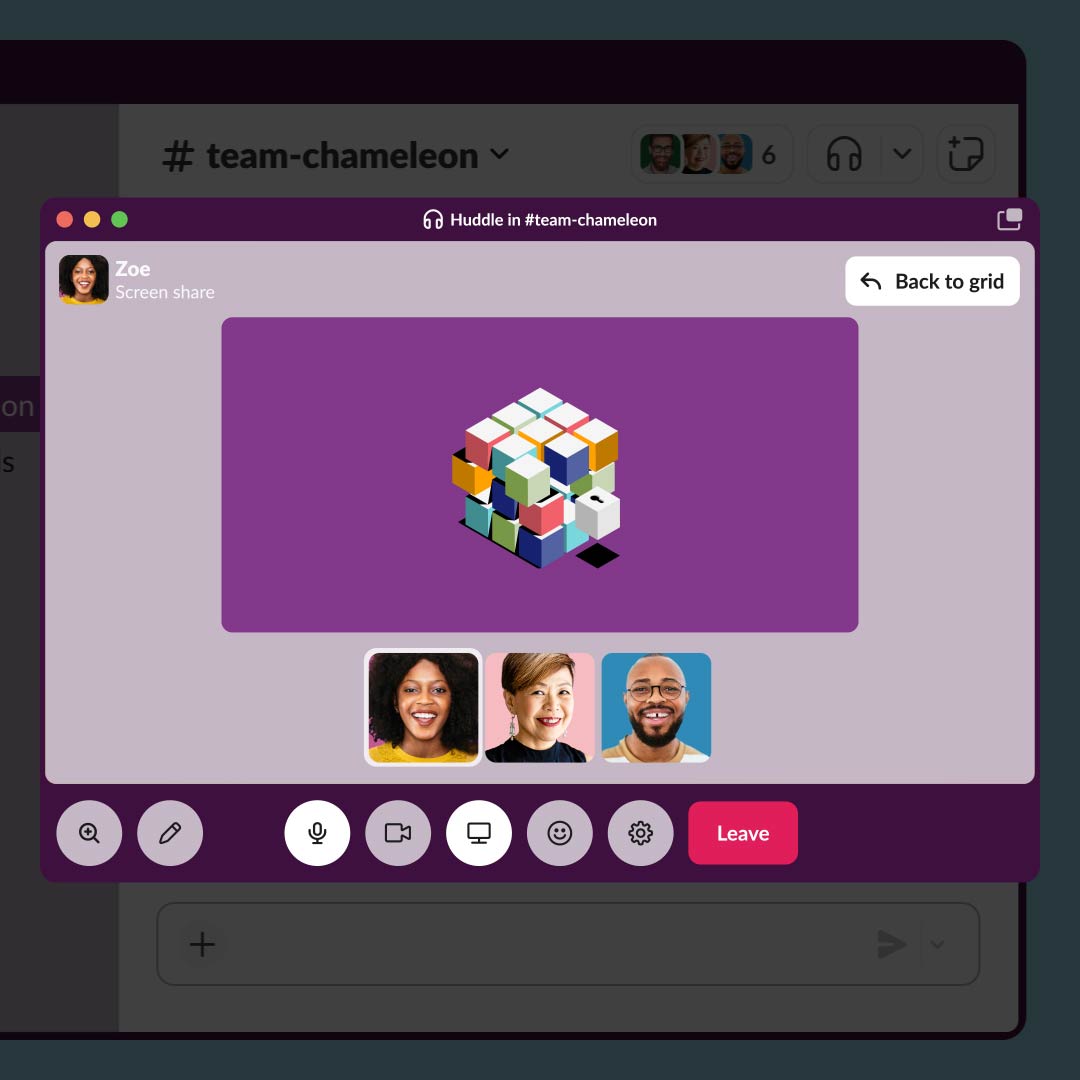
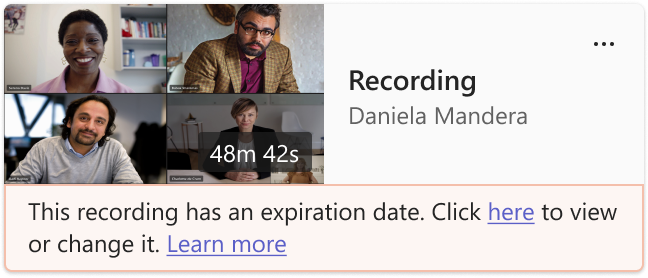
| Huddles vs Teams meetings | Slack | Microsoft Teams |
|---|---|---|
| Capacity and length | Huddles: Free 2 participants; paid up to 50, 25 with video | Meetings up to 300 (Business plans, Essentials) or 1,000 (E3/E5 etc.); 30-hour limit Free: 60-min group meetings, up to 100 participants |
| Recording, captions and notes | Live captions English only, not saved AI huddle notes with transcript (paid plans; not with guests/external) | Recording with live transcription; max 4 h or 1.5 GB per recording file, auto-restarts Recording needs eligible license (E1/E3/E5, F3, A1/A3/A5, M365 Business, Business Premium, Business Essentials) |
| Screen sharing and breakout rooms | Up to 2 simultaneous screen shares with drawing | Breakout rooms in meetings/events up to 1,000 attendees; not in events optimized for large audiences |
| Webinars and town halls | Huddles up to 50 participants | Webinars up to 1,000 (3,000 with engagement on advanced features); town halls 3,000 interactive / 10,000 view-only, up to 100,000 with Attendee Capacity Pack |
Choose Teams for large or formal meetings, recording, webinars and town halls. Choose Slack when quick informal huddles are enough and the team mainly works in chat.
AI: Slack AI vs Microsoft Copilot
Winner: Slack
Slack bundles core AI; full Copilot needs a license
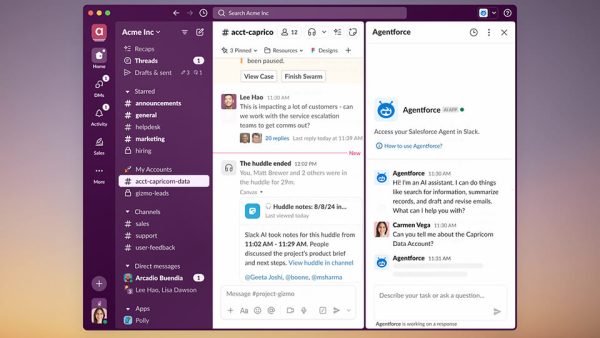
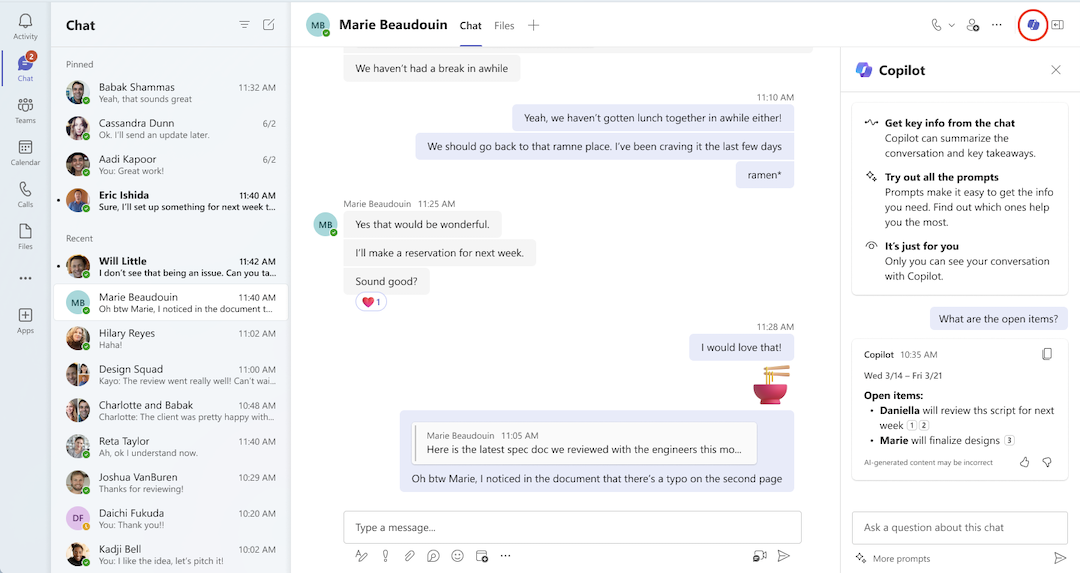
Core AI is included in paid Slack plans, while full Copilot in Teams needs a separate Copilot license or bundle.
| AI features by plan | Slack | Microsoft Teams |
|---|---|---|
| Included | Pro: conversation summaries, huddle notes | Copilot Chat at no extra cost for eligible Entra ID users |
| Summaries, recaps and search | Business+/Enterprise+: recaps, file summaries, translations, workflow generation, search answers, Slackbot Enterprise+: enterprise search | Copilot in Teams recaps meetings and highlights action items Copilot in chats and channels summarizes threads |
| Pricing | AI bundled by tier; no separate add-on price shown | Bundles: Business Standard + Copilot $23.50, Business Premium + Copilot $32.00 (annual) |
Choose Slack when you want the AI features bundled into its paid tiers. Choose Teams when Copilot is part of your Microsoft 365 workflow, while accounting for the separate license or bundle needed for full Copilot features.
Integrations and automation
Winner: Slack
Slack favors third-party apps; Teams favors Microsoft workflows
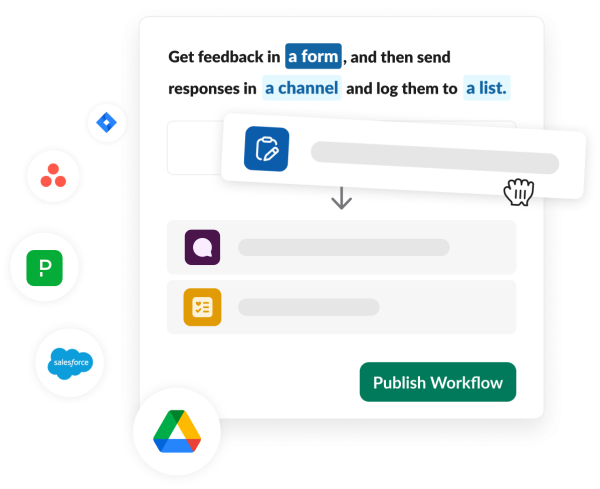
Choose Slack for the breadth of third-party apps and native workflows, or Teams when Microsoft 365 and Power Automate already underpin your work.
Apps and integrations
Slack wins on breadth of third-party apps (2,600+ stated); Teams' advantage is native Microsoft 365 integration, and its store size is not published.
| Features | Slack | Microsoft Teams |
|---|---|---|
| Ecosystem | More than 2,600 apps in Slack Marketplace Slack APIs for internal tools | Each team has a SharePoint site; files stored in SharePoint/OneDrive |
| Limits | Free plan limited to 10 integrations; unlimited on paid | Shared channels don't support bots, connectors or message extensions |
Workflow Builder vs Power Automate
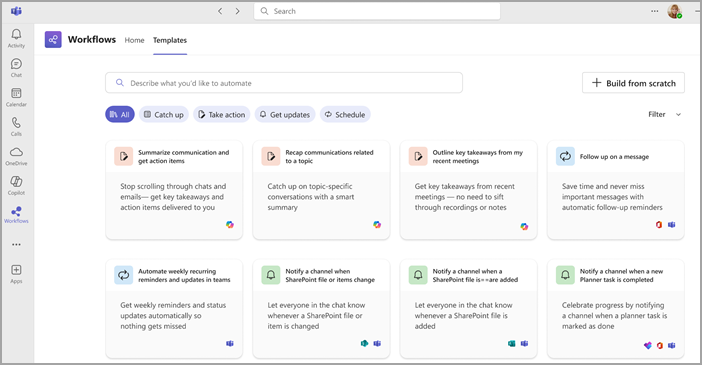
Slack Workflow Builder is simpler and native, Teams Workflows runs on Power Automate which is broader; neither is clearly better for all teams.
| Features | Slack | Microsoft Teams |
|---|---|---|
| Building workflows | Workflow Builder on Pro, Business+, Enterprise+ (not Free) Deploy apps to Slack infrastructure on Pro+ | Workflows app in Teams: create from templates, from scratch, or by describing in plain language |
| Advanced steps and AI | Custom workflow steps on Pro+; conditional branching on new Business+ and Enterprise+ AI workflow generation on Business+/Enterprise+ | Flows created in Teams are Power Automate flows in the org default environment |
Choose Slack for a broad third-party app marketplace and straightforward native workflows. Choose Teams when Microsoft 365 integration and Power Automate are central to your work; the better automation option depends on the workflow rather than a universal winner.
External collaboration
Winner: Slack
Slack fits collaboration across outside organizations
Slack Connect spans up to 250 orgs, while Teams shared channels require Entra accounts and don't support bots.
| Slack Connect vs shared channels | Slack | Microsoft Teams |
|---|---|---|
| Shared channels | Slack Connect channels with up to 250 organizations (each on paid plan) | Shared channels: 5,000 direct members, shared with up to 50 teams; Entra work/school accounts only Up to 4,000 trusted domains for external access allowlist |
| External chat and guests | 1:1 external DMs on all plans; Free limited to one-to-one | External access chat/call/meet with other Microsoft orgs, on by default Guest access via Entra B2B |
Choose Slack when shared conversations across many outside organizations are central to daily work. Teams is a fit when partners can use its Microsoft identity and shared-channel requirements; check those requirements before moving an external workflow.
Mobile apps
Winner: Tie
Mobile support is broadly comparable
Both have full iOS/Android apps with scheduling, calls and notification controls.
| iOS and Android | Slack | Microsoft Teams |
|---|---|---|
| Apps and calls | iOS 17+ and Android 11+ apps Huddles available on mobile | iOS and Android apps Start/stop meeting recording from mobile |
| Scheduling and notifications | Schedule messages via long-press on send Separate mobile notification settings and delay | Schedule chat messages on mobile |
| Offline | Messages sent offline in existing chats are queued and sent on reconnect (kept up to 24 hours) |
Mobile support alone does not separate these apps: both cover iOS and Android messaging, calls and scheduling. Base the choice on the desktop workflow and the specific mobile controls your team needs.
Security and admin
Winner: Tie
Both are enterprise-ready; compare the required controls
Both are enterprise-ready: Slack publishes its security features plan by plan, while Teams relies on Microsoft 365 and Purview for identity, compliance and eDiscovery.
| Identity and compliance | Slack | Microsoft Teams |
|---|---|---|
| Sign-in and certifications | Encryption, 2FA on all plans; SAML SSO Business+ ; access logs Pro+ Certifications incl. ISO 27001, SOC 2 Type II, FedRAMP Moderate | Microsoft Entra ID identity; core identity and access management on Basic/Standard, policy-based on Premium |
| Compliance and eDiscovery | Data residency Business+; DLP, legal holds, audit logs, HIPAA, EKM add-on on Enterprise+ | Purview eDiscovery searches Teams; Premium needs E5 or add-on Chat compliance search/hold needs Exchange Online mailboxes |
| Call encryption | Huddles: media SRTP with DTLS-SRTP, data channels DTLS, signaling TLS 1.2 (in-transit encryption) | E2EE for eligible 1:1 VoIP calls (off by default; admin enables, both users turn on); E2EE meetings need Teams Premium, max 200 participants; disables recording/transcription |
| Encryption keys and HIPAA | Enterprise Key Management: add-on on Enterprise+ only HIPAA compliance: Enterprise+ only | Teams in scope for Microsoft HIPAA BAA, included by default in Data Protection Addendum for covered entities/business associates |
Both can serve enterprise teams. Choose by the identity, compliance and administration setup you need: compare Slack’s plan-specific controls with the Microsoft 365 and Purview services behind Teams, including any extra licenses.
Pricing
Winner: Teams
Teams has the lower paid entry price
Teams wins on entry price ($4.00 Essentials vs Slack Pro $7.25, annual).
| Slack | Microsoft Teams |
|---|---|
| Free: Free | Teams (free): Free |
| Pro: $7.25/user/mo annual, $8.75 monthly | Microsoft Teams Essentials: $4/user/mo annual |
| Business+: $15/user/mo annual, $18 monthly | Microsoft 365 Business Basic: $7/user/mo annual |
| Enterprise+: $45/user/mo annual | Microsoft 365 Business Standard: $14/user/mo annual |
| Microsoft 365 Business Standard with Copilot: $23.5/user/mo annual | |
| Microsoft 365 Business Premium: $22/user/mo annual | |
| Microsoft 365 Business Premium with Copilot: $32/user/mo annual | |
| Teams Premium (add-on): $10/user/mo annual |
Pricing checked Oct 2026 · Source: slack.com/pricing, microsoft.com/microsoft-365/business
Teams has the lower paid entry price in this comparison. Compare the plan your team actually needs, including existing Microsoft 365 subscriptions and any Copilot or advanced admin requirements, rather than choosing from the entry price alone.
Frequently asked questions
Short answers to what teams ask when choosing between Slack and Teams.
Is Microsoft Teams cheaper than Slack?
Usually, yes. Teams Essentials costs $4.00 per user per month on an annual plan, and Microsoft 365 Business Basic, which includes Teams, is $7.00. Slack Pro is $7.25 per user per month billed annually or $8.75 monthly, and Business+ is $15 annually. Copilot bundles cost more, starting at $23.50.
Can I migrate from Slack to Microsoft Teams?
Yes. Microsoft offers an official Slack to Teams Migration Tool in the Microsoft 365 admin center. Admins upload a Slack export, pick channels and a date range, and map users. It moves public and private channels, threaded messages, reactions, files and membership. Direct messages aren't listed, and Slack data isn't deleted.
How many people can join a call in Slack vs Teams?
Slack huddles hold up to 50 participants on paid plans, with up to 25 on video; the free plan allows two. Teams meetings hold up to 300 people on Business plans and Essentials, and up to 1,000 on Microsoft 365 E3 and E5. Teams meetings can run up to 30 hours.
What does the free version of each include?
Slack Free keeps 90 days of message and file history, allows up to 10 apps, and limits huddles and Slack Connect to one-to-one. Teams free allows group meetings up to 60 minutes with up to 100 participants, one-to-one calls up to 30 hours, and 5 GB of cloud storage per user.
How do Slack AI and Microsoft Copilot compare?
Slack bundles AI into its plans: Pro includes conversation summaries and huddle notes, while Business+ adds the Slackbot AI agent, AI search, and workflow generation. Microsoft includes Copilot Chat at no extra cost with eligible plans; Copilot inside Teams requires a Copilot plan such as Business Standard with Copilot at $23.50.
Which is better for working with external partners?
Slack Connect lets one channel host up to 250 organizations, though each must be on a paid Slack plan. Teams offers external access for chat and calls, guest access for joining teams, and shared channels with up to 5,000 direct members. Teams shared channels require Microsoft Entra work or school accounts.
Need AI that does the work? Consider Offloop
Offloop isn’t a drop-in replacement for either tool. It’s built for small teams that want AI agents to run recurring work inside shared channels, alongside the people who own it. Offloop doesn’t import Slack history today, so it fits best as a fresh workspace for new projects. It’s free to start with 200,000 workspace credits and no card; paid plans are a flat $99 or $999 a month with no per-seat fees.
Explore Offloop for teammates →References
- Slack pricing — slack.com
- Compare Microsoft Teams business options — Microsoft Teams · microsoft.com
- Slack plans and features by plan — slack.com
- Limits specifications Teams — Microsoft Learn: Teams · learn.microsoft.com
- Slack to Teams migration tool — Microsoft Learn: Teams · learn.microsoft.com
Show all 57 sources
Microsoft
- Free — Microsoft Teams · microsoft.com
- Essentials — Microsoft Teams · microsoft.com
- Microsoft 365 business basic — Microsoft 365 · microsoft.com
- Microsoft 365 business standard — Microsoft 365 · microsoft.com
- Microsoft 365 business premium — Microsoft 365 · microsoft.com
- Microsoft 365 Copilot for business — microsoft.com
- Communicate with users from other organizations — Microsoft Learn: Teams · learn.microsoft.com
- EDiscovery — Microsoft Learn: Purview · learn.microsoft.com
- Hardware requirements for the Teams app — Microsoft Learn: Teams · learn.microsoft.com
- Explore the new chat and channels experience in Microsoft Teams — Microsoft Support · support.microsoft.com
- First things to know about channels in Microsoft Teams — Microsoft Support · support.microsoft.com
- Choose your channel layout in Microsoft Teams — Microsoft Support · support.microsoft.com
- Schedule chat messages in Microsoft Teams — Microsoft Support · support.microsoft.com
- Search for messages and more in Microsoft Teams — Microsoft Support · support.microsoft.com
- Manage notifications in Microsoft Teams — Microsoft Support · support.microsoft.com
- Manage channel notifications in Microsoft Teams — Microsoft Support · support.microsoft.com
- Explore the activity feed in Microsoft Teams — Microsoft Support · support.microsoft.com
- Start stop and find meeting recordings in Microsoft Teams — Microsoft Support · support.microsoft.com
- How to use Microsoft 365 Copilot in Teams chats and channels — Microsoft Support · support.microsoft.com
- Get started with the workflows app in Microsoft Teams — Microsoft Support · support.microsoft.com
- Teams app create — Microsoft Learn · learn.microsoft.com
- Record a video or audio clip in Microsoft Teams — Microsoft Support · support.microsoft.com
- Teams custom emojis — Microsoft Learn: Teams · learn.microsoft.com
- Use code blocks in Microsoft Teams — Microsoft Support · support.microsoft.com
- Use markdown formatting in Microsoft Teams — Microsoft Support · support.microsoft.com
- Collaborate on files in Microsoft Teams — Microsoft Support · support.microsoft.com
- Events licensing — Microsoft Learn: Teams · learn.microsoft.com
- Plan town halls — Microsoft Learn: Teams · learn.microsoft.com
- Connectivity issues — Microsoft Learn: Teams · learn.microsoft.com
- Teams encryption — Microsoft Learn: Teams · learn.microsoft.com
- Offering HIPAA/HITECH — Microsoft Learn: Compliance · learn.microsoft.com
Slack
- Message file and storage limits on the free plan — Help Center · slack.com
- Use huddles in Slack — Help Center · slack.com
- Slack Connect guide work with external organizations — Help Center · slack.com
- Data residency for Slack — Help Center · slack.com
- Slack compliance certifications — slack.com
- Slack plans and features — Help Center · slack.com
- Minimum app requirements for Slack — Help Center · slack.com
- What is Slack — Help Center · slack.com
- Schedule messages to send later — Help Center · slack.com
- Slack features: Channels — slack.com
- Search in Slack — Help Center · slack.com
- Configure Your Slack notifications — Help Center · slack.com
- Pause your Slack notifications — Help Center · slack.com
- Use AI to take huddle notes in Slack — Help Center · slack.com
- Slack features: Huddles — slack.com
- Slack features: AI — slack.com
- Slack features: Workflow automation — slack.com
- Add custom emoji and aliases to your workspace — Help Center · slack.com
- Format your messages in Slack with markup — Help Center · slack.com
- OneDrive and SharePoint for Slack — Help Center · slack.com
- Security for Slack huddles — Help Center · slack.com