If that sounds familiar, I hope this list helps you find an AI agent that suits your needs. We’ve put together seven products and compared what they can do for a small business, how they charge, and how complex they are to set up and use.
AI agents for small business at a glance
| Product | Main considerations | Main uses | Starting price and requirements |
|---|---|---|---|
| Claude Team | Usage limits and actions available in connected apps | Documents, research and code | $20 per person/month billed annually; two-seat minimum |
| ChatGPT Business | Included usage and connected-app permissions | Research, documents and shared agents | $20 per person/month billed annually; two-seat minimum |
| Offloop | Access and available features | Teamwork with AI agents | Private beta / custom team pilot |
| Zapier | Task consumption and AI-step plan requirements | Cross-app workflows | Professional from $19.99/month billed annually |
| n8n | Setup work, model costs and hosting | Flexible workflows | Hosted Starter at €20/month billed annually |
| Lindy | Active-user seats and usage credits | Email, calendars and recurring work | From $49.99 per active user/month, including 5,000 credits |
| Intercom Fin | Minimum commitments and possible helpdesk costs | Customer support | From $0.99 per billable outcome |
Prices checked on November 4, 2026. Taxes, region, billing period, usage and required licenses can affect the total.
What I look for in an AI agent for a small business
I’m a founder, a long-term paying user, and a product builder developing Offloop with my team. I subscribe to ChatGPT and Claude and have spent $10,000 on the two combined. For products I’ve personally used, I’ve put in hundreds of hours. My recommendations combine what I notice in daily use with how I think about product design and running a business.
I focus on six things:
- Task accuracy. Does a customer reply cover the questions asked and use the supplied information correctly? Does a buyer brief distinguish confirmed preferences from questions still to ask?
- Communication and revision. How much explanation does it take to get a useful result? Repeatedly correcting the tone, format or understanding of a task reduces the time saved.
- Setup and maintenance. Who builds the workflow, changes it when the business changes, and fixes it when something breaks? That matters especially for a team without IT staff.
- Fit with existing work. Can it use the email, calendar, CRM and documents your team already relies on? Can colleagues add information and continue the work?
- Control over actions. Can you see what it can read, change and send, review customer messages before sending, and follow what happened when a colleague takes over?
- Value for the total cost. I include seats, usage, API fees, hosting and the time spent checking results, then consider whether the work it completes justifies that investment.
How I evaluate these tools as a founder and paying user
- As a user, I look at the actual work. Claude handled scheduling for more than 300 people across over 20 roles on its first attempt, which shaped my view of its ability to work through complex requirements. With ChatGPT, I value careful execution of clear instructions, although I often need to make its writing less formal.
- As a product expert, I look at how the features work together. Describing a goal in conversation and configuring every branch of a workflow ask different things of a user. I consider how much learning and setup the product requires, and whether its design makes the work easier.
- As a founder, I look beyond the individual task. I consider how colleagues and agents share information, reuse working methods and keep a process running. We built Offloop and use it to run our company, so I bring both development and daily-use experience to that evaluation.
- For product conditions, I use official information. The linked sources support the features, access requirements and prices described here. The real estate, online-shop and photography-studio scenarios illustrate possible uses; my personal experiences explain my own preferences.

1. Claude Team: my first choice for everyday work
Claude is my first recommendation for everyday work. It handles writing, organizing information, data analysis, design and coding very well. I especially like its conversational style and personality: talking through a task with Claude feels more like working with a colleague. Often, a brief explanation is enough for it to understand what you need.
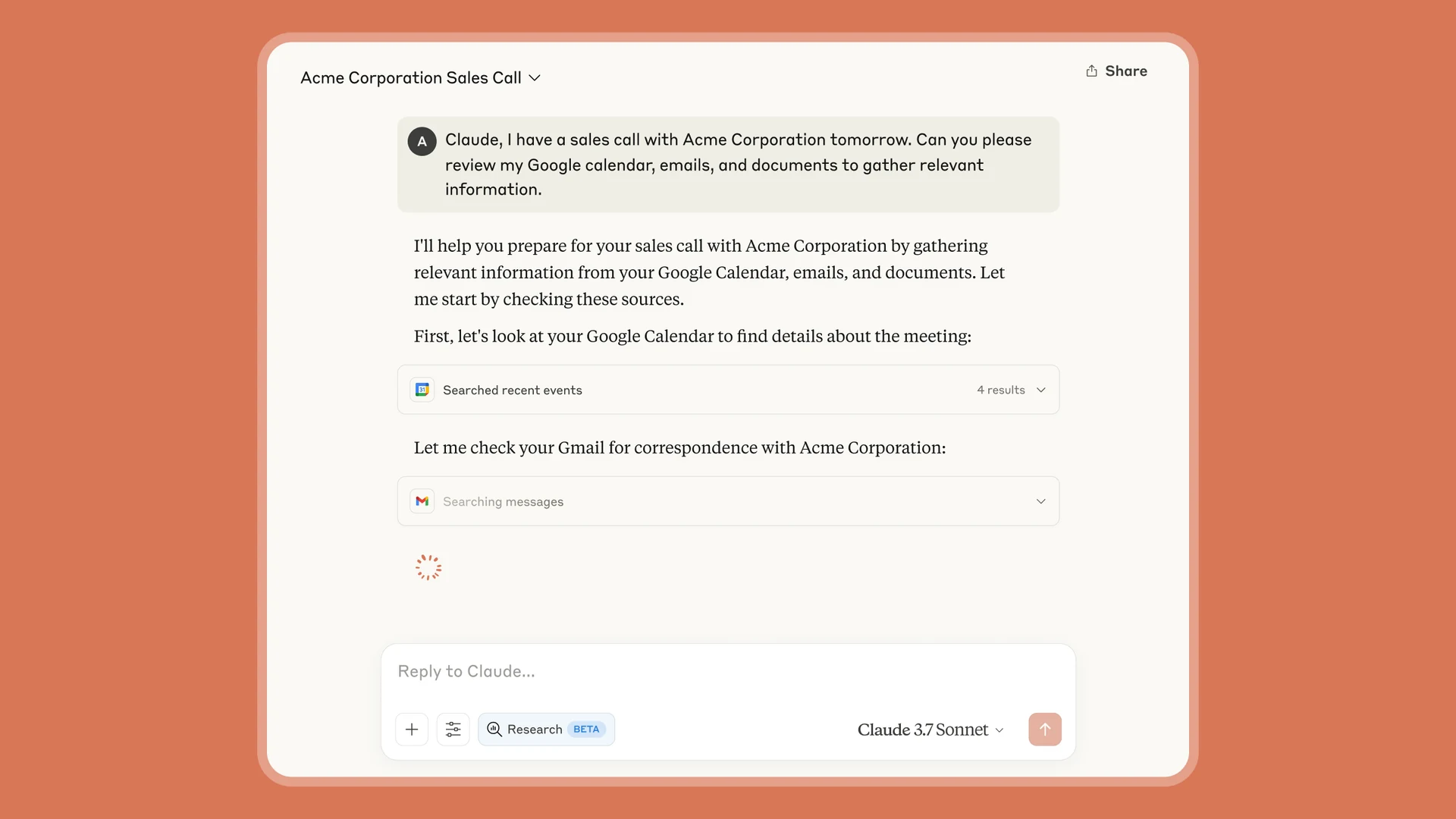
- Main uses
- Documents, research and code
- Starting price and requirements
- $20 per person/month billed annually; two-seat minimum
- Main considerations
- Usage limits and actions available in connected apps
Pros
- Easy to talk through a task with.
- Strong across writing, analysis, design and coding.
Cons
- Usage allowances are individual and cannot be shared.
- Team requires at least two seats.
How I used Claude to schedule more than 300 people
Scheduling is one task I'd recommend trying with Claude. Give it your current situation, the information you have and the requirements the schedule needs to meet, then ask it to work out a practical plan.
I've used Claude to handle scheduling for more than 300 people across over 20 different roles. It completed the task on the first attempt, and I was very happy with the result.
What your team can use Claude for
I'd also look at Claude Team's shared projects, connections to workplace apps, Claude Code and Cowork. If you regularly work with documents, research or code, consider how these features fit into your team's day-to-day work.
Claude Team pricing and usage limits
Claude Team Standard costs $20 per person per month when billed annually, or $25 per person per month on monthly billing, with a two-seat minimum. For a two-person team, the base subscription comes to $480 a year on annual billing. These are U.S. prices before tax. Official plan details
Each Claude Team member has an individual allowance. If you use yours up, you can't draw on a colleague's unused allowance. Usage rules
I recommend using an individual Claude plan for your everyday work first. Consider Claude Team when an individual plan no longer meets your usage or collaboration needs.
If you regularly hit the limits on Claude Team, you can upgrade only the people who need more usage to Premium and keep everyone else on Standard. Premium costs $100 per person per month when billed annually, or $125 per person per month on monthly billing. Seats and usage limits
Claude Team also lets you enable usage credits to keep working after your included allowance runs out. This additional usage is billed at standard API rates, and you can set spending limits. I recommend including these potential extra charges in your budget. Additional usage


2. ChatGPT Business: reliable with clear tasks, but I’d polish its writing
ChatGPT Business is my second pick, especially for replying to customer emails, organizing research and analyzing sales spreadsheets. You can chat with it directly or create a shared agent with your team's instructions, reference files and tools. For example, you can give the agent your product information and customer-response guidelines so colleagues can use it to draft replies.
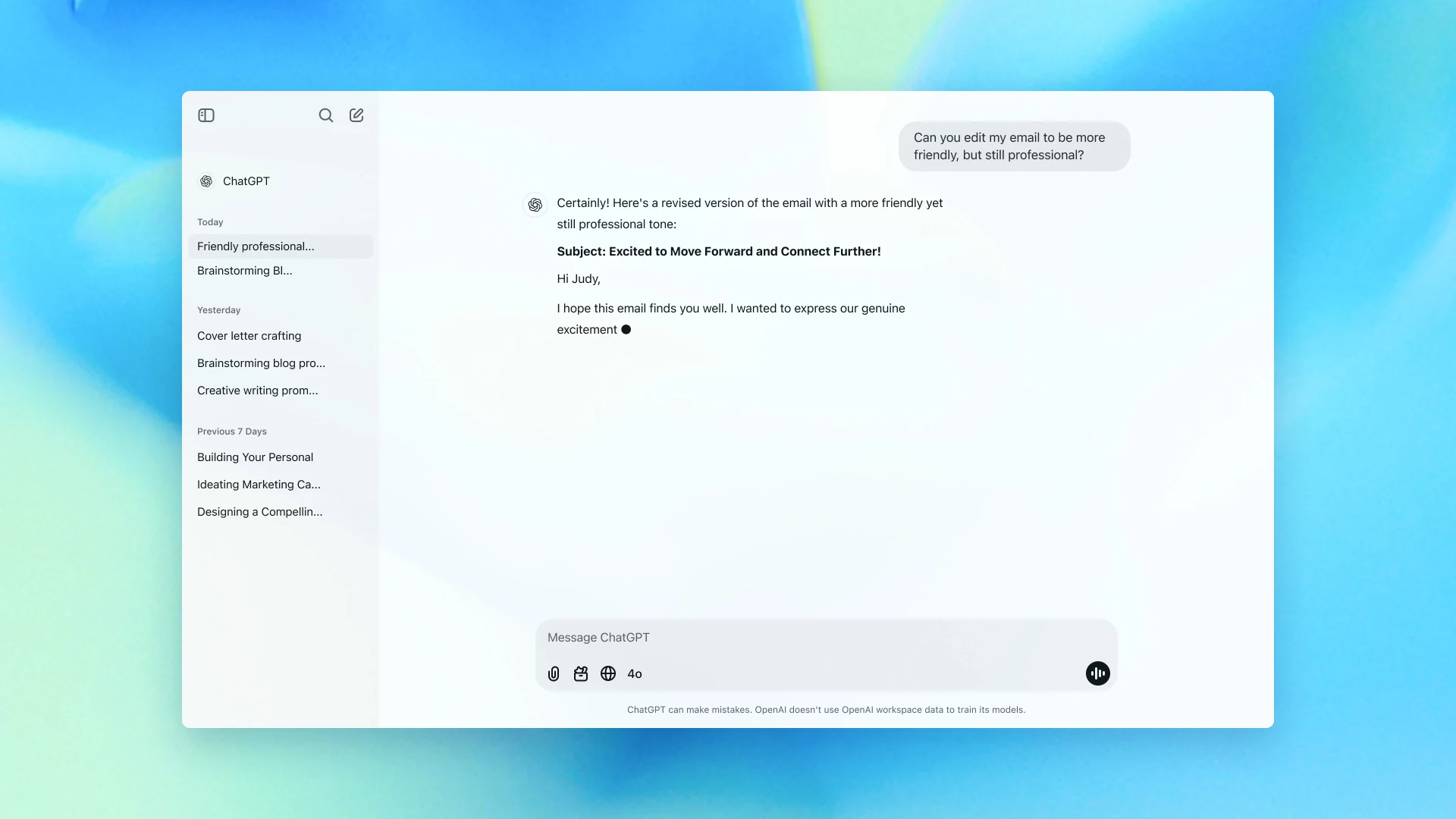
- Main uses
- Research, documents and shared agents
- Starting price and requirements
- $20 per person/month billed annually; two-seat minimum
- Main considerations
- Included usage and connected-app permissions
Pros
- Shared agents let colleagues reuse instructions and reference files.
- Sites can publish a website without separate server setup.
Cons
- I often need to adjust its overly formal writing.
- Frequent or complex work may require extra workspace credits.
When you receive a sales inquiry, preparing a reply often means checking price lists and delivery details. I recommend ChatGPT for this work because it handles clearly defined tasks well and organizes the information carefully. Once I've explained what I need, it tends to follow my instructions closely.
For example, a customer might ask about several products, delivery times and customization options in one email. Give ChatGPT the email, your price list and delivery information. Ask it to draft an answer to each question and flag anything the documents don't cover for you to confirm.
What I appreciate about ChatGPT is how faithfully it carries out the task. In my experience, it follows my instructions closely, rarely leaves out a point I've asked it to cover, and rarely uses incorrect information in its response.
I also pay attention to the tone of customer replies. ChatGPT's writing often feels too formal to me, so I usually have it organize the information and prepare a draft, then ask Claude to polish it and send the reply directly to the customer.
Use ChatGPT Sites to publish a service page
If you run a photography studio and are launching a new package, give ChatGPT the package details and portfolio photos, then ask it to create a mobile-friendly page for the offer. With its built-in Sites feature, you can have it host and publish the page directly, without buying a separate server, configuring the hosting or hiring an IT specialist. Sites documentation
When reviewing the website, I recommend checking the mobile experience first. Make sure the package price and contact options are easy to find. Tell ChatGPT what to change, such as moving the package details higher on the page or rearranging the photos.
How much does ChatGPT Business cost?
ChatGPT Business charges per member. Standard seats cost $20 per person per month when billed annually, or $25 per person per month on monthly billing, with a two-seat minimum. A two-person team pays $480 a year for the base subscription on annual billing. If you're the only user, I recommend comparing individual ChatGPT plans before paying for a team subscription. Official pricing
ChatGPT Business includes usage allowances. A short reply and a task that involves reading several documents and repeatedly revising a website can consume different amounts. Model choice and task complexity also affect usage. If you reach a limit, you can buy workspace credits to continue using supported features. I recommend including those potential charges when estimating your total cost. API calls are billed separately. Usage and cost

3. Offloop: where my team works with AI employees
If you want agents that can work alongside your team like employees, I'd recommend Offloop. It's the product we're building, and our team uses it to run our company.
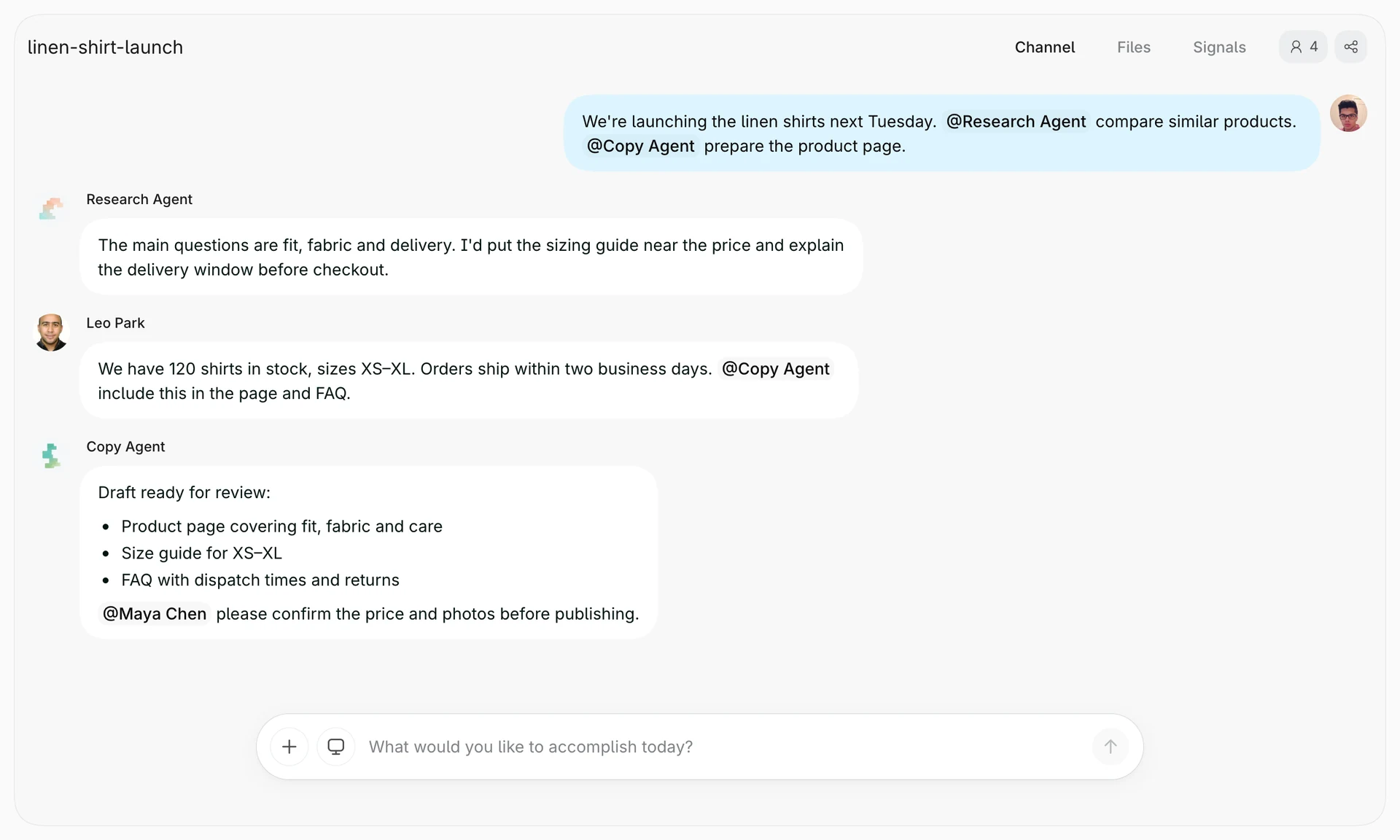
- Main uses
- Teamwork with AI agents
- Starting price and requirements
- Private beta / custom team pilot
- Main considerations
- Access and available features
Pros
- People and agents can continue work in a shared Channel.
- Shared memory and Skills carry useful information and methods into later work.
Cons
- Access is currently invitation-only.
- Team Pilot pricing requires a custom quote.
In Offloop, agents join the same Channel where you discuss customer requirements and share documents with colleagues. You can ask a research agent to investigate a question, then have a customer service agent use the findings to prepare a proposal. When a colleague adds a new customer requirement, ask the customer service agent to revise the proposal using that information and continue the work in the same conversation.
How a small team can launch a product with Offloop
If you run a small online shop with a few colleagues, you can bring agents into a product launch. I recommend sharing the product information, target customers and launch date in one Channel, then bringing in your research and copywriting agents alongside the colleagues handling operations and customer support.
Ask the research agent to compare similar products’ prices and selling points, then have the copywriting agent use those findings and your product information to draft promotional copy. Your operations colleague can add stock levels and shipping arrangements, while customer support shares the questions customers often ask. The agents can then use these updates to refine the launch plan and copy in the same Channel.
For example, if your customer support colleague notices that shoppers keep asking which size to choose, they can share that feedback in the Channel and ask the copywriting agent to prepare a sizing guide using your product information and update the page copy. After launch, you can share sales results and customer feedback with the research agent, then ask it to analyze what needs improving and suggest what to try next.
Offloop’s shared memory and Skills
You and your colleagues can save confirmed product details, your brand’s tone of voice and recurring customer questions in Offloop’s shared memory. When agents prepare the next campaign or answer a customer’s question, they can draw on that information to keep product descriptions and customer replies consistent.
I also recommend saving methods that work well as a shared Skill—a set of instructions your team’s AI agents can reuse. For example, a product research Skill can specify which details to compare, while a copywriting Skill can explain how to organize selling points and what to check before submitting a draft. When another colleague launches a product, their agent can follow the same method using the new product information.
Offloop pricing and early access
Offloop is currently in an invitation-only private beta. Its Team Pilot has custom pricing and includes shared Channels for working with AI agents, team memory, connector setup and onboarding support. Pricing and access
When you apply for access, I recommend bringing a task your team is already working on, such as customer research, a product launch or organizing customer support information. Use it to see which parts of the work your AI agents can take on and how well they collaborate with your colleagues, then expand their responsibilities from there.
4. Zapier: useful automation, but setup takes time
When you run a small business, you may handle sales inquiries, customer support and customer records yourself. Zapier can help automate the repetitive work between those jobs, such as identifying whether an inquiry needs a quote or after-sales support and routing it accordingly. But setting up these workflows takes effort: you need to configure the trigger, AI instructions, routing rules and follow-up actions separately. When your process changes, you also need to edit the affected steps. If you’re already stretched thin, that setup and maintenance can be a real burden.
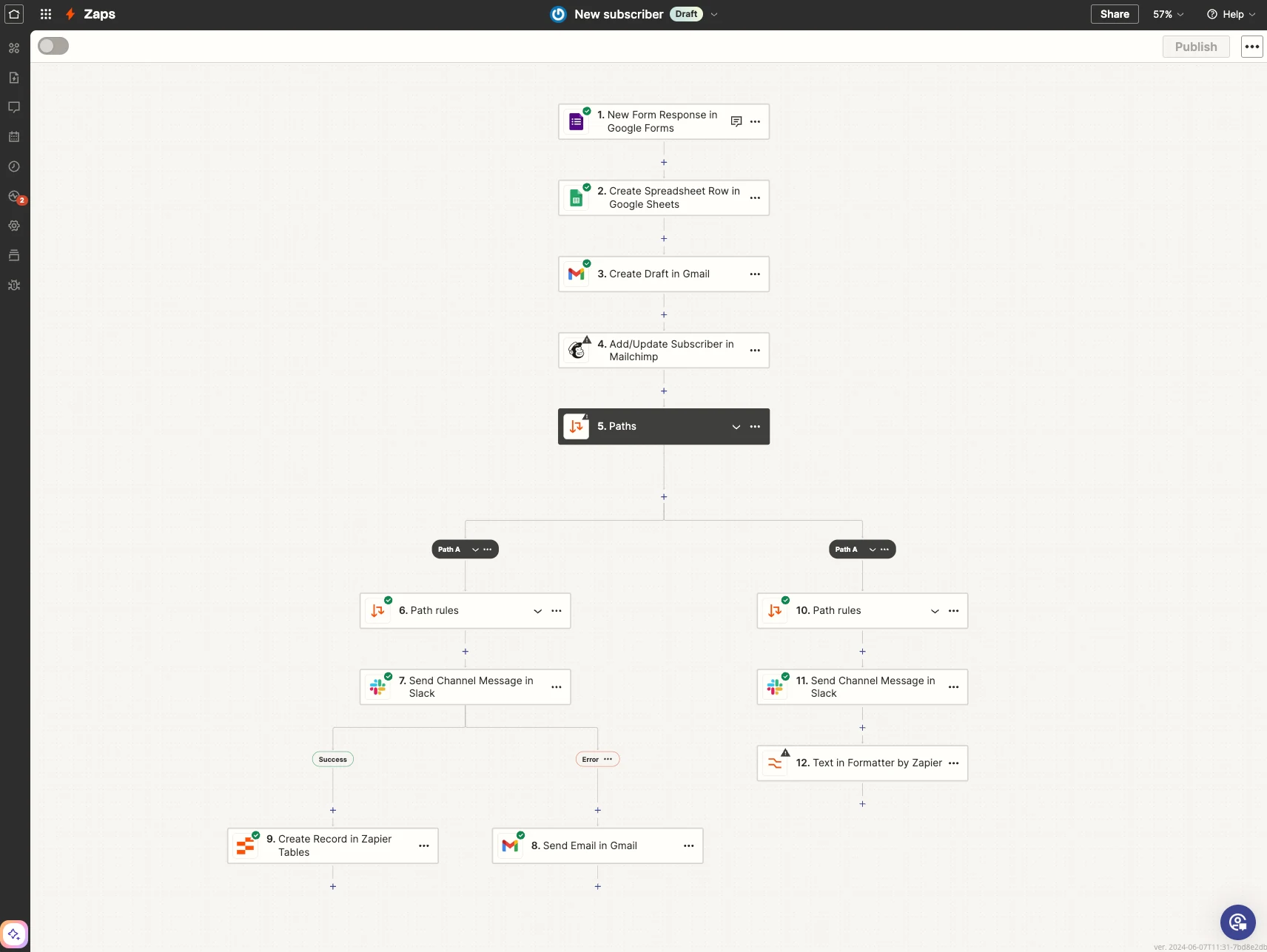
- Main uses
- Cross-app workflows
- Starting price and requirements
- Professional from $19.99/month billed annually
- Main considerations
- Task consumption and AI-step plan requirements
Pros
- Add AI to existing app connections and workflows.
- Classify inquiries before routing them to sales or support.
Cons
- Building and maintaining workflows takes time.
- AI steps need a paid plan to publish and can consume several tasks.
I rarely build these workflows from scratch now. If you don’t know how to build a workflow or want AI to take over an existing work process, Offloop is a strong option. Describe what you need or explain how you currently do the work, then ask an agent to build a Flow that automates the process. For a small team, that’s an easier starting point than configuring every step yourself.
Use Zapier to route real estate inquiries
Suppose you run a small real estate agency. The same website form receives messages from buyers asking about properties, owners looking to sell and tenants reporting maintenance issues. You or a colleague has to read each message before deciding who should handle it. You can automate the initial classification and route each inquiry to the right person.
In Zapier, you can add an AI step to classify the inquiries. For example, “I’m looking for a two-bedroom apartment near the station, with a budget of $400,000” is a buyer inquiry, while “I’d like a valuation before selling my house” is a seller inquiry. A message such as “The kitchen sink in my rented apartment is leaking” should go to property management. Ask the AI to identify the request type and extract the relevant details, such as the property address, budget and preferred viewing time, when provided.
You can then configure the workflow to record the inquiry in your connected CRM or spreadsheet and notify the appropriate colleague. Buyer inquiries can go to the agent handling viewings, valuation requests to the colleague responsible for property listings, and repair requests to property management. Each notification can include the customer’s message and the details extracted by the AI, so the person following up has the information they need. AI by Zapier features
Zapier pricing: tasks, Standard and Premium
Zapier Professional starts at $19.99 per month when billed annually, with the price increasing as you choose a larger task allowance. The free plan includes 100 tasks per month, but AI by Zapier is available only for preview on that plan. To publish a workflow using those AI steps, you need a paid plan. Official pricing
One workflow run can consume several tasks. An AI by Zapier step that doesn’t call other tools uses one task on Standard or five tasks on Premium. New AI steps default to Premium, so check the selected tier when setting up your workflow. Other billable actions, such as updating a customer record or sending a notification, count separately. AI task pricing
I recommend trying Standard with a sample of your actual customer messages. Check whether it distinguishes buyer inquiries, seller inquiries and maintenance requests correctly, and whether it captures the details provided. If Standard handles those tasks accurately, you don’t need Premium. Consider upgrading if you find recurring mistakes that Premium can resolve.

5. n8n: flexible workflows if you have IT support
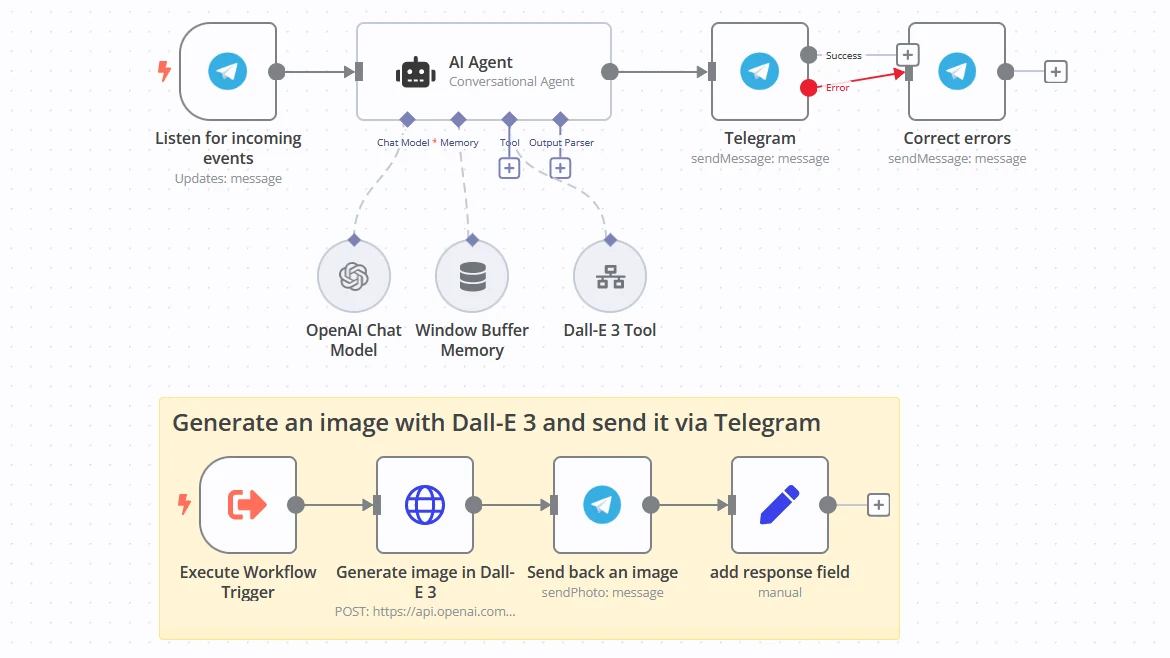
I’d consider n8n for a team with technical support that needs to connect its own business systems. Its workflows can combine an agent with API calls and code—for example, to read an emailed order, check inventory and prepare it for confirmation. But someone still needs to build the workflow, maintain the connections and handle failures. For a small business without an IT person, I wouldn’t make n8n my first recommendation.
- Main uses
- Flexible workflows
- Starting price and requirements
- Hosted Starter at €20/month billed annually
- Main considerations
- Setup work, model costs and hosting
Pros
- Community Edition has no software subscription for internal self-hosted workflows.
- Cloud execution counts cover a whole workflow run.
Cons
- Self-hosting needs server maintenance and technical support.
- Some workflow and account-sharing features require a paid edition.
I recommend starting with an order process you repeat regularly. You can have an n8n AI agent extract product specifications and quantities from a customer’s email, then pass those details to a step that checks your connected inventory system. The workflow can prepare an order for your colleague to confirm and flag any stock shortages. AI handles the written request, while calculations, inventory checks and notifications follow the rules your team has configured.
n8n pricing: self-hosting and Cloud
n8n offers a free, source-available Community Edition. If you already have IT staff and a server, you can self-host n8n for internal workflows without paying an n8n software subscription. Your team handles deployment, updates and server maintenance, and any external model API usage is billed separately. Community Edition licensing
If several colleagues need to maintain your n8n workflows together, check the edition’s collaboration features before choosing the free version. Community Edition doesn’t include workflow and credential sharing, so a paid edition may be necessary if your team needs shared access to those workflows and connected accounts. Edition differences
If you prefer official managed hosting, the n8n Cloud Starter plan costs €20 per month when billed annually and includes 2,500 workflow executions per month. n8n hosts the service, while your team still builds and maintains the workflows. Official pricing
n8n measures usage by runs of the whole workflow rather than each individual step. In the order automation example, reading the email, checking inventory and notifying a colleague count as one execution if they happen within a single workflow run. To estimate your monthly allowance, start with the number of orders you process, then add runs from scheduled workflows and any other tasks.
The n8n Cloud Starter plan supports five concurrent executions, meaning up to five workflow runs can be active at the same time. I recommend trying actual orders and checking how long they take, especially when several arrive together, before deciding whether Starter fits your workload.

6. Lindy: help with customer meetings and follow-ups
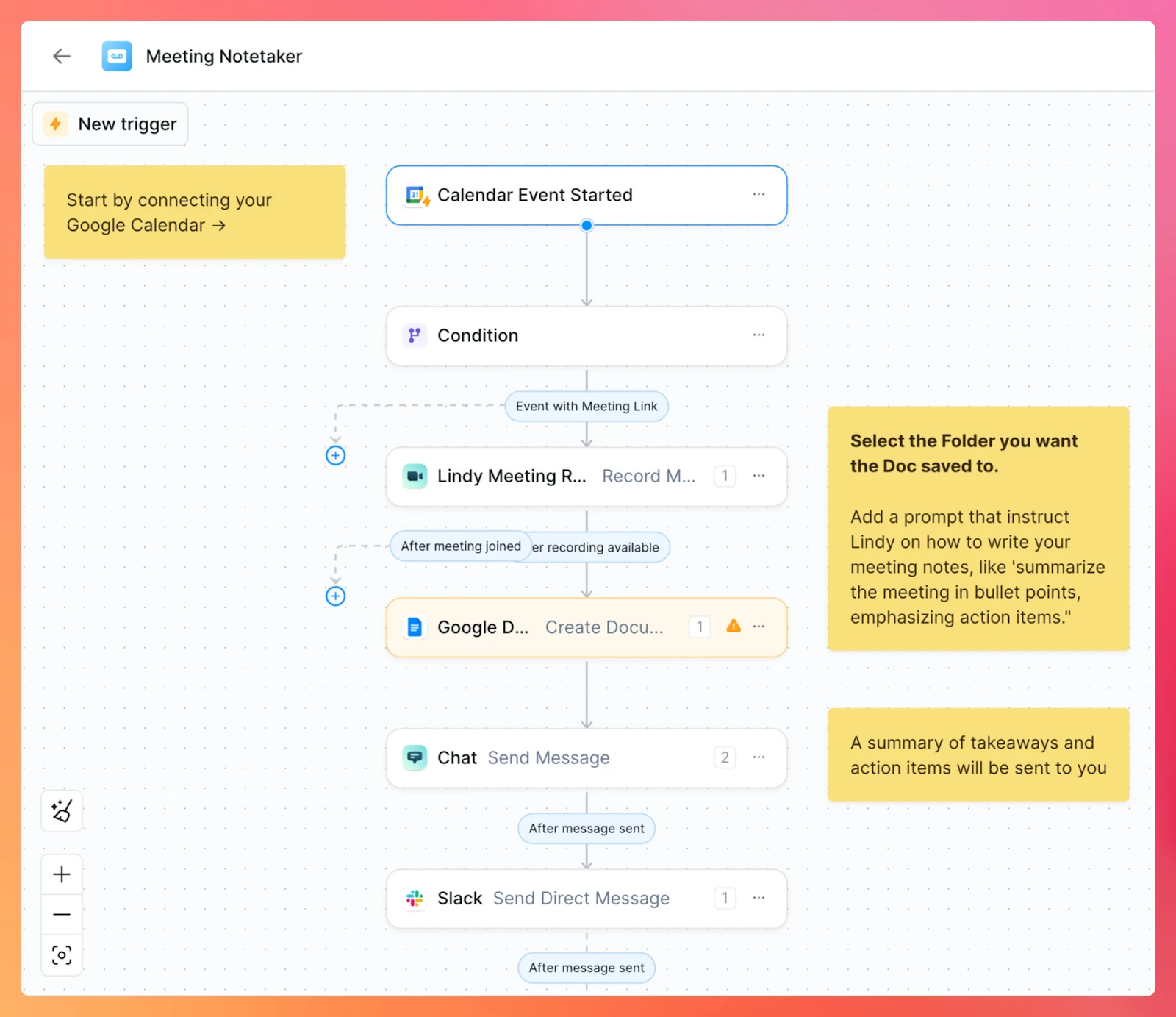
If you handle customer relationships yourself, preparing for a meeting often means searching old emails to remember what you discussed and checking your notes for what you promised to send. Lindy can help with this follow-up. It connects to your email, calendar and customer-management tools to prepare meeting briefs, summarize decisions and help with the follow-up work.
- Main uses
- Email, calendars and recurring work
- Starting price and requirements
- From $49.99 per active user/month, including 5,000 credits
- Main considerations
- Active-user seats and usage credits
Pros
- Connect meeting decisions with email, tasks and customer records.
- Team credits go into a shared balance.
Cons
- Each active teammate is billed.
- Included monthly credits do not roll over.
I recommend starting with your morning follow-up. Ask Lindy to bring together emails that need a reply, the day’s customer meetings and unfinished follow-up tasks. If you handle both sales and client service in a small team, this gives you one place to see who needs a response and what you need to prepare before your next meeting.
Use Lindy to follow up after a buyer meeting
Suppose you run a small real estate agency and have just finished a meeting with a prospective buyer. You promised to send floor plans, answer questions about the properties and arrange another viewing. After the meeting, you still need to find the documents, write the email and check everyone’s availability. Lindy can help organize those commitments and prepare the follow-up work.
Once you’ve connected your calendar and selected the meetings Lindy should join, it can record the conversation and organize the buyer’s requirements, the documents you promised to send and the agreed next steps. You can then ask it to draft a follow-up email, create tasks or update your connected CRM. Meetings and follow-up work
When following up with buyers, I recommend making each person’s next step clear in the email: which property documents you’ll send, for example, and which viewing times the buyer needs to confirm. Once you approve the draft, Lindy can send it through your connected inbox. Before the next meeting, ask Lindy to prepare a brief from the previous conversation and subsequent emails, so you can pick up where you left off. Connections and setup
Lindy pricing: active users and credits
Lindy Team starts at $49.99 per active user per month and includes 5,000 credits per user. Each active teammate is billed separately, while their credits are pooled into a shared team balance. For a small real estate agency, that means checking both how many colleagues will use Lindy and how much work the team expects it to handle. Official pricing
Lindy’s credit usage depends on the work it performs, and unused credits included in your monthly plan don’t roll over. If you need more, you can buy an additional 1,000 credits for $10. These top-up credits remain available until you use them.
I recommend using Lindy’s $50 in trial credits on actual client emails and meetings. The credits are valid for seven days, and no credit card is required. For your real estate agency, try preparing buyer follow-up emails and meeting briefs, then check the results and daily credit consumption to estimate your monthly needs. Trial and billing details


7. Intercom Fin: support for questions you answer every day
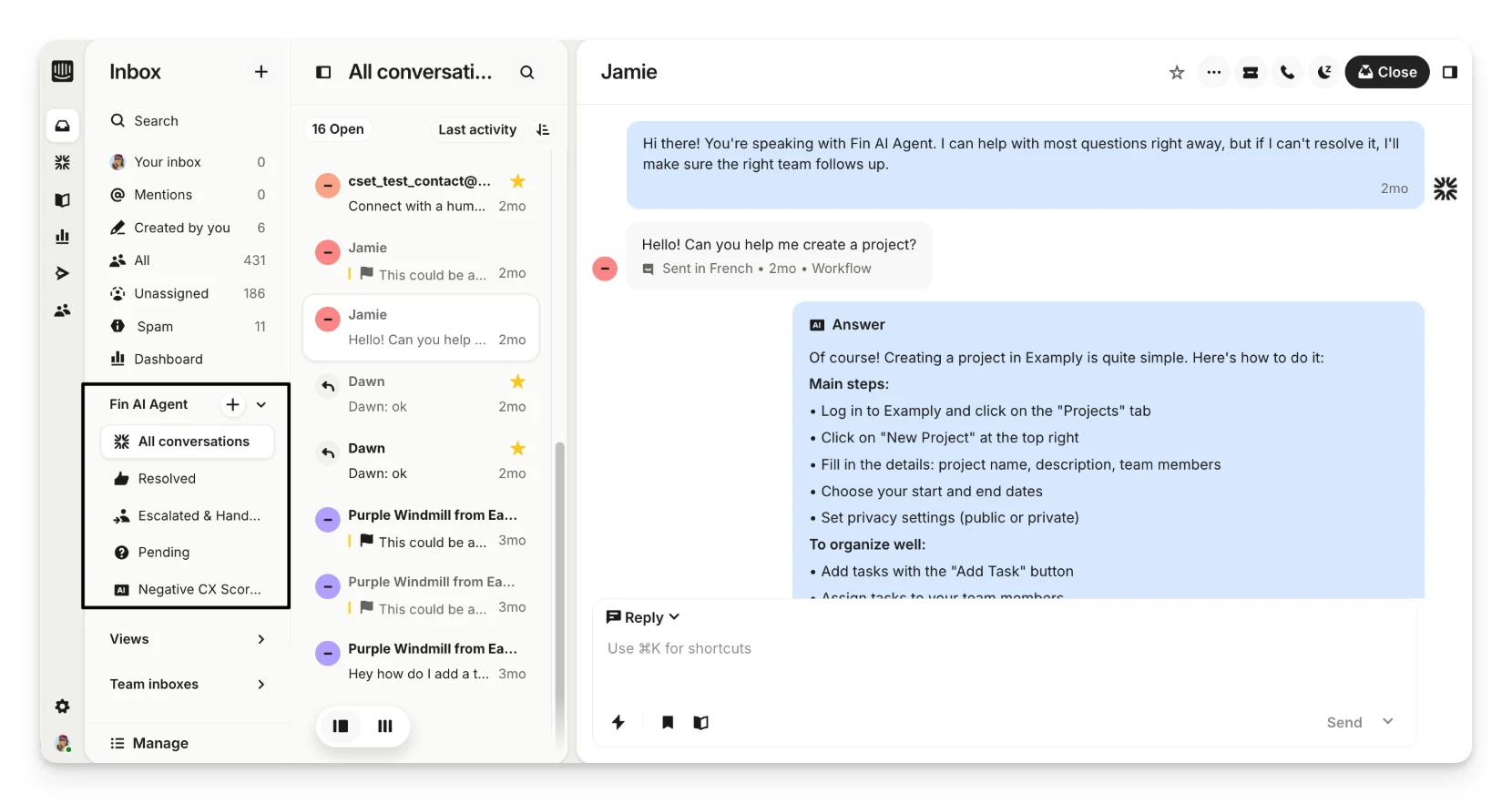
If your team spends hours answering the same customer questions, Intercom Fin is worth considering. It answers questions directly from the business information you provide. When a customer needs human help, Fin can hand the conversation to a colleague with the previous messages attached, so they can see what has already been discussed.
- Main uses
- Customer support
- Starting price and requirements
- From $0.99 per billable outcome
- Main considerations
- Minimum commitments and possible helpdesk costs
Pros
- Answer recurring questions from business information.
- Pass conversations to support colleagues with their history.
Cons
- A customer not asking for more help can also count as a billable outcome.
- Minimum commitments and helpdesk or channel costs may apply.
I recommend starting with a frequently asked question that has a clear, documented answer. Give Fin the relevant policies and FAQs, then check how it handles actual customer questions before expanding its role. If you already use a helpdesk, you can connect Fin to it, while colleagues handle conversations that need human attention in their existing workspace.
Fin starts at $0.99 per billable outcome. A billable outcome can mean a resolved question, an answer after which the customer doesn’t ask for more help, or a completed Procedure—which may include a handoff to a person. Each conversation is charged once. Connecting Fin to an existing helpdesk may require a minimum spending commitment, while Intercom’s helpdesk and some channels carry additional fees. Intercom pricing
Where I’d start with AI in a small business
Draft replies to common customer questions
Start by drafting replies to recurring customer questions. For a real estate agency, that could mean explaining how to book a viewing or which property documents are available. Give the agent your current FAQs and viewing instructions, then ask it to prepare a reply and flag anything the information doesn’t cover. Have a colleague review the reply before sending.
Prepare buyer briefs before a viewing
An agent can also prepare a buyer brief before a call or viewing. Give the agent the customer emails and notes your team is authorized to use, then ask it to summarize the buyer’s stated budget, preferred locations, property requirements and previous feedback. The brief should separate confirmed preferences from questions you still need to ask.
Turn viewing notes and follow-ups into a weekly report
To draft a weekly report, give the agent a clear date range and the records to summarize. A real estate team could use viewing notes, buyer feedback and follow-up records to see which viewings took place, which customers are waiting for a reply and which property questions remain unresolved. Ask the agent to flag missing updates rather than assume the work is complete, then review the draft with your team.
How to decide which AI agent is worth paying for
When choosing a tool, I recommend looking at both the work you want done and who will set up and maintain the tool. Decide which business information the agent will use, what result you expect and who will review its work. Then compare the subscription, usage charges and setup time against the time and money your team can commit, including who will handle problems when they arise.
Start with one job your team repeats
Start with one recurring task your team already spends time on. For a real estate agency, that could be preparing buyer briefs before viewings. Give the agent recent customer emails and notes, and ask for a brief covering confirmed preferences and unanswered questions. This keeps your first workflow specific enough to check: a colleague can compare the brief with the source material and take over anything the agent couldn’t complete.
What will a month of actual usage cost?
To estimate your monthly cost, start with how many colleagues will use the tool and how much work you expect it to handle. For a real estate agency, count the buyer briefs, follow-up emails and customer inquiries you process in a typical month, then translate that workload into the vendor’s billing units—seats, tasks, credits, workflow executions or outcomes. Your budget should also include any required helpdesk, office-software, model API or hosting fees, plus minimum spending commitments.
For example, at the Claude Team price listed above, two Standard seats at $20 per person per month on annual billing cost $480 upfront for the year—equivalent to $40 per month. That is the base subscription cost for two colleagues. Any additional paid usage would increase the total, so include it when estimating your budget.
Check what the agent can read, change and send
Before connecting an agent to your email or CRM, check its permissions: which account is connected, what information it can read and what it can change. For your real estate agency, decide whether the agent should only prepare buyer briefs and email drafts or also send messages and update customer records. Check which actions require your approval, then start with limited access and review the activity logs and results before expanding it.
After trying the agent on one task, compare the time spent preparing inputs, checking results and correcting mistakes with the time your team previously spent doing the work. Include those hours alongside subscription and usage fees when assessing costs. If the workflow produces useful results and reduces the team’s workload, you have a reason to extend it to another task or add more users.
Which AI agent would I choose for a small business?
For everyday work, Claude remains my first recommendation, with ChatGPT as my second choice. If you want agents to work alongside colleagues in shared Channels or build a Flow from your requirements, I recommend Offloop. Start with a real task your business needs done, then use the results, time saved and actual monthly cost to decide how far to expand.
Frequently asked questions
Answers to ten common questions about AI agents for small business, including cost, free options, setup and real estate use.
What are the best AI agents for small business in 2026?
For everyday small-business work, my first recommendation is Claude, with ChatGPT as my second choice. I recommend Offloop when you want agents to collaborate with colleagues in shared Channels or build a Flow from your requirements. Zapier, n8n, Lindy and Intercom Fin serve the more specific workflow, follow-up and support needs explained in this article.
What can AI agents do for a small business?
AI agents for small business can help organize research, draft customer replies, analyze spreadsheets, plan staff schedules and prepare meeting briefs. Some can also work with connected apps to update records or continue a workflow. Choose the product for the work you need done; the seven tools in this list do not all offer the same capabilities.
Can I use AI agents for my business without knowing how to code?
Yes. With Claude or ChatGPT, you can start by describing a task and providing the relevant documents. For no-code AI automation, you can ask an Offloop agent to build a Flow from your requirements or current work process. Connecting business accounts and reviewing results still need your involvement; custom integrations may require technical help.
Are there free AI agents for small business?
You can start with free plans, trials or self-hosted software. n8n’s Community Edition lets a team with IT staff and a server run internal workflows without an n8n software subscription, although maintenance and external model usage can add costs. Lindy’s seven-day trial credits provide a time-limited way to try customer emails and meetings before subscribing.
How much do AI agents for small business cost per month?
Costs depend on seats, usage and the product’s billing unit. Using the Claude Team annual-billing price listed in this article, two Standard seats cost $480 upfront for the year, equivalent to $40 per month. Other tools charge by tasks, workflow executions, credits or outcomes. Include extra usage, required software and hosting when estimating your monthly budget.
Should I start with an individual AI plan or a team subscription?
If you are the only user, I recommend starting with an individual plan and trying it on your daily work. Consider a team subscription when you need shared agents, projects or collaboration features, or when the individual plan no longer meets your needs. Check minimum seat requirements: the Claude Team and ChatGPT Business plans listed here both require at least two seats.
Which AI agents can help a small real estate agency?
For a small real estate agency, I’d consider Lindy for meeting briefs and buyer follow-up emails, Zapier for routing buyer, seller and tenant inquiries, and Offloop for collaboration between colleagues and agents. Claude or ChatGPT can help prepare buyer briefs from your customer emails and notes. Match the tool to the part of the work you want help with.
Do I need IT staff or my own server to use an AI agent?
You do not need your own server to start using hosted tools such as Claude, ChatGPT or n8n Cloud. If you choose self-hosted n8n, someone must manage deployment, updates and server maintenance. Hosted workflow tools still need someone to configure the business connections and handle problems. For a small business without IT support, I would not make self-hosted n8n my first choice.
Can AI agents automatically send emails to my customers?
Some AI agents can send email through a connected inbox. I recommend reviewing drafts first, including customer details, appointments and any promises made. Allow automatic customer follow-up only for clearly defined messages once the results meet your requirements and the tool supports your approval rules. Decide who may authorize payments or changes to customer records separately.
How do I choose and test an AI agent for my small business?
Start with one recurring task, such as a buyer brief, a customer reply or a weekly report. Give the agent the information it needs and review its output against the original records. Compare the time spent preparing inputs, checking results and correcting mistakes with the time your team previously spent on the work. Use those results and the actual cost to decide whether to expand.
Sources and pricing
- Claude Team: Email connections and sending Anthropic
- Claude Team: Official plan details Anthropic
- Claude Team: Additional usage Anthropic
- ChatGPT Business: Workspace Agents OpenAI
- ChatGPT Business: Sites documentation OpenAI
- ChatGPT Business: Official pricing OpenAI
- ChatGPT Business: Usage and cost OpenAI
- Offloop: Pricing and access Offloop
- Zapier: AI by Zapier features Zapier
- Zapier: Official pricing Zapier
- Zapier: AI task pricing Zapier
- n8n: Community Edition licensing n8n
- n8n: Edition differences n8n
- n8n: Official pricing n8n
- Lindy: Official features Lindy
- Lindy: Meetings and follow-up work Lindy
- Lindy: Connections and setup Lindy
- Lindy: Official pricing Lindy
- Intercom Fin: Official features Intercom
- Intercom Fin: Intercom pricing Intercom
- Intercom Fin: Inbox screenshot source Intercom
- Claude: Chat with Google Workspace Anthropic
- ChatGPT: Chat interface example OpenAI
- Zapier: Workflow editor example Zapier
- n8n: Agent workflow example n8n
- Lindy: Meeting workflow screenshot Lindy