Over the past year, I’ve been building Offloop with my team and trying out and researching AI products. I try to get as much done as possible with one AI assistant, then add a dedicated tool when it can’t do what the team needs.
Here are the 11 tools I’d consider for everyday work, design, knowledge management, automation, sales, and customer support. I’ll explain where each fits and when I’d pay for it separately. Offloop is our own product, and I’ve included it here too.
What makes a good AI tool for business?
- As a founder, I look at whether a tool is worth it for the company. How much work can it take on? How hard is it for the team to get started? Can something we already use do the same job? Along with the subscription, I consider usage limits and the time spent on setup and maintenance.
- As a product expert, I look for an advantage worth paying for separately. What specific problem does it solve? Where is it better than Claude, ChatGPT, or the software the company already uses? Does that advantage show up in everyday work, or only in an impressive demo?
- As a long-term user, I care about the daily experience. Does it understand what I mean and remember earlier discussions? How many rounds of corrections does a task take? Can I actually use the result? Over time, these details make a big difference to whether I keep paying.
How I evaluate these AI tools
- I’m a founder, a product expert, and a long-term paying user. I’ve spent over US$10,000 on ChatGPT and Claude combined, and I’ve spent hundreds of hours with the products I’ve used extensively. These recommendations draw on building products, running a company, and using the tools in everyday work.
- Offloop is our own product, and we use it every day. We’ve been working in it as a team for six months, so that section includes my perspective as both a product creator and a daily user.
AI tools for business at a glance
| Tool | Best for | Why I’d choose it | Pricing |
|---|---|---|---|
| Claude | Everyday writing, research, email, and analysis | My first choice before adding single-purpose apps | Pro US$20/month or US$200/year; Team standard US$20/seat/month annually or US$25 monthly, 2-seat minimum. |
| Offloop | Shared work with people and agents | Models and shared context inside team chat | Private beta; Team Pilot custom quote. |
| ChatGPT | Backend development and clearly defined tasks | Coding, data cleanup, and reusable scripts | Plus US$20/month; Business standard US$20/seat/month annually or US$25 monthly, 2-seat minimum. |
| Microsoft 365 Copilot | Large organizations using Microsoft 365 | Existing permissions and work across Office apps | Enterprise add-on US$30/user/month, paid yearly; qualifying Microsoft 365 license costs extra. |
| Gemini | Photos, video, and learning | My preference for understanding real-world scenes | Google AI Pro personal plan US$19.99/month or US$199.99/year; Workspace is separate. |
| Canva | Sales decks and marketing materials | Better design with less training | Free plan; paid subscriptions vary by region. |
| Notion AI | Teams whose documents already live in Notion | Search, edit, and link pages in the same place | Notion Business US$20/member/month billed yearly; included AI allowance, additional credits can cost extra. |
| Zapier | Recurring work with fixed steps | A defined sequence and configured approval pauses | Free: 100 tasks/month; Professional from US$19.99/month billed yearly. |
| n8n | Custom workflows with developers | Custom code, internal connections, and deployment choices | Cloud Starter €20/month billed yearly, 2,500 executions/month; free self-hosted Community Edition. |
| Intercom Fin | Customer phone support | Connected actions and handoff with call context | Fin Voice: contact sales for access and pricing; chat/email outcome rates are separate. |
| HubSpot AI / Breeze | Sales teams already using HubSpot | Research and follow-ups using existing CRM records | AI availability depends on the HubSpot plan; some agents consume HubSpot Credits. |
Prices checked on November 4, 2026. USD prices use US listings; n8n is listed in euros. Annual billing and seat requirements are noted. Canva’s paid prices vary by region; Fin Voice and Offloop require a quote.

Claude: My first choice before buying more AI tools
My first choice for everyday work before adding single-purpose subscriptions.
- Best for
- Proposals, documents, supplier quotes, email, and follow-ups.
- Pricing
- Pro US$20/month or US$200/year; Team standard US$20/seat/month annually or US$25 monthly, 2-seat minimum.
Pros
- Uses memory and project context across related work.
- Connects apps to help complete tasks.
Cons
- Duet access and background usage depend on the current preview and plan.
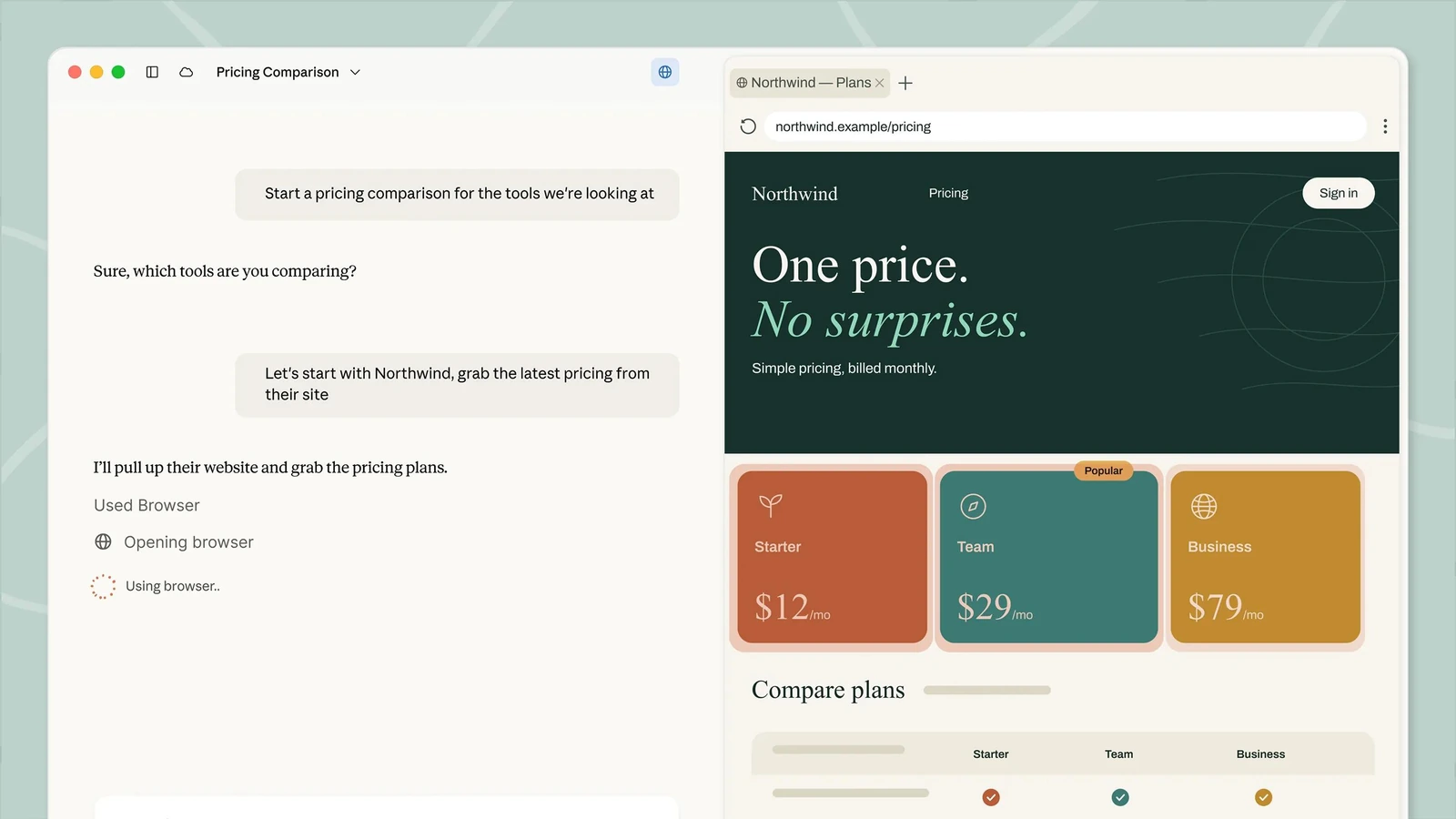
If I could keep only one AI for everyday work, I’d choose Claude. Before paying for a writing app, email assistant, or document summarizer, try giving the same job to Claude. In my experience, it can handle the vast majority of everyday tasks and replace most of these single-purpose tools.
Claude can use memory, project files, and past conversations to understand what you’re working on. Connect it to the apps you already use, and it can help with email, calendars, and documents in the same conversation. Memory · App connections
Claude memory and Projects: Keep context across tasks
With Claude memory turned on, it can remember useful details about your work and search past chats. Projects let you add product information, client requirements, and writing guidelines, including your brand voice. Claude can refer to those materials when drafting proposals or emails in related conversations. Memory and past chats · Projects
When preparing a client proposal, start by telling Claude the client’s needs, budget, and what your team can offer. Later, ask it to draft a follow-up using the same background. If the client asks about delivery, have it check earlier emails and the proposal, then include what you’ve already agreed in the reply.
I prefer to keep this work in Claude. Proposals, emails, and meeting prep often involve the same client. Switching tools means copying and pasting files and explaining the whole story again. I also find that most single-purpose tools aren’t as smart as Claude at understanding what I need and working through complex problems.
Connected apps: Let Claude work with email, files, and quotes
Say you’re comparing supplier quotes for a batch of packaging boxes. One supplier has a lower unit price but charges extra for shipping. Another includes shipping but requires a larger order. Give the quotes to Claude and say: “Compare the total cost for the quantity we actually need, and tell me what else we should ask before placing the order.”
Once you’ve connected your email and files and granted access, Claude can find the quote emails, read the attachments, and put the offers into a comparison table. If shipping costs or delivery dates are missing, it can draft questions for the suppliers and send them after you approve. Email and document actions
Claude feels close to an AI teammate here: it understands what I’m trying to solve, works through the information, checks unclear details with me, and gives advice I can use. For this order, that could mean recommending a supplier, explaining why it’s the better fit, and pointing out which terms are worth negotiating.
Claude Duet: A personal AI assistant for follow-ups
Claude Duet is a personal AI assistant from the Claude team. It uses the memory, Skills, and app connections you’ve already set up in Claude, runs tasks on its own cloud computer, and keeps working after you close the app. Each morning, it checks your connected email and calendar and pulls together the things that need your attention. Introducing Claude Duet
For overseas B2B sales prospecting, you could tell Duet: “Check my inbox for new inquiries, then look through public Instagram pages you can access for businesses that match our ideal customer profile. Note what they sell and any public contact details. For customers who’ve asked for pricing, use their requirements and our price list to prepare quotes, then draft follow-up emails for me to approve before sending.”
Compared with using one AI app to draft an email, editing it myself, then passing it to a separate translator, I much prefer the experience in Claude Duet. The customer’s background, quote, and email stay in one conversation. I can ask for a revision or translation without explaining everything again.
You can also ask Duet to check Stripe for unpaid invoices and draft payment reminders for you to approve before sending. If it needs more information or confirmation on a quote, it comes back to you. These tasks aren’t hard, but they’re easy to forget when you’re busy. Having someone get things ready and check with me makes work a lot less stressful. Tasks and app connections
Access to this personal AI assistant is still limited: Claude Duet is in research preview, with a waitlist for Claude Pro, Max, and Ultra users in the US. It isn’t available on Claude Team or Enterprise yet, and its background tasks count toward your existing plan’s usage. Availability and usage
Once Claude Duet is publicly released, I strongly recommend trying it.
Pricing: Pro US$20/month or US$200/year; Team standard US$20/seat/month annually or US$25 monthly, 2-seat minimum. Plans and pricing · Duet access

Offloop: A Slack alternative for working with AI agents
Our Slack alternative for teammates and multiple agents working in the same conversation.
- Best for
- Tasks that need several people, shared context, and reusable methods.
- Pricing
- Private beta; Team Pilot custom quote.
Pros
- People and agents can contribute in the same Channel.
- Shared memory, Skills, and Flow help teams reuse methods.
Cons
- Currently in private beta; solo work may be covered by an existing AI assistant.
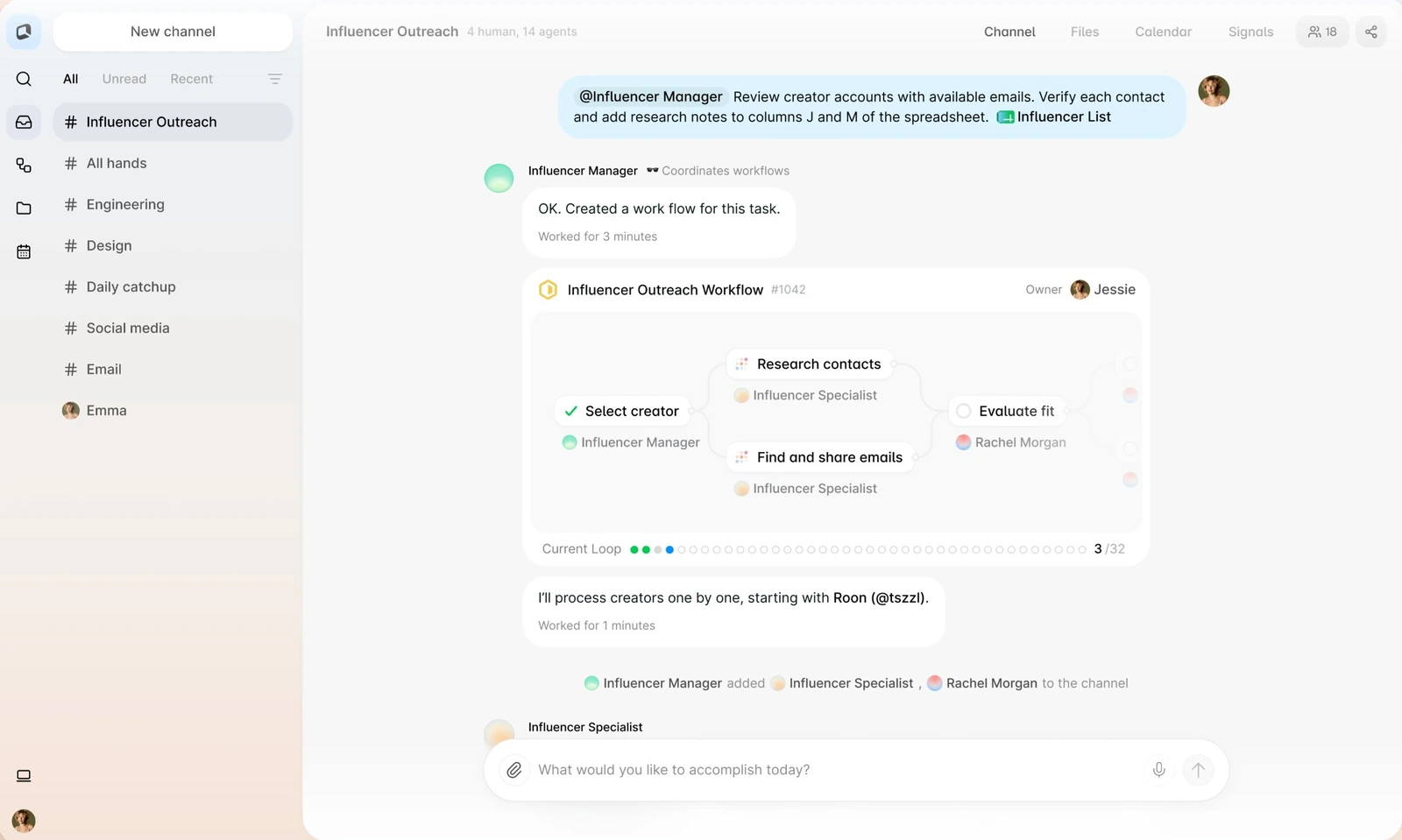
Offloop is the Slack alternative we’re building, and we use it to run our own company.
Offloop brings Claude, GPT, Gemini, and other AI models into one team chat app. Research, writing, data analysis, and task execution can happen right where the team talks.
We want working with AI agents in Offloop to feel as easy as talking to a colleague in team chat. Assign a task, add some context, check progress, or ask for a change—just say what you need. Your teammates can jump into the conversation at any point and work with the Agent to get things done.
Team chat: Work with teammates and multiple agents in one Channel
A task often needs input from several people: one knows what the client needs, another handles the product, and someone else plans delivery. In Offloop, everyone can work through it in the same Channel, with different AI agents helping with research, execution, and review. About Offloop
Say your team is rolling out software for a client who asks for an extra staff training session before launch. The salesperson can explain what was already promised in the Channel, while the delivery team adds who’s available and when. You can then use an AI agent for contract review to check the agreed scope against the new request and current plan, flag what needs to change, and list the questions to confirm with the client.
Once the person in charge confirms the training schedule and scope, an AI agent can update the delivery plan and draft the client email. Another Agent can check that everything matches what the team agreed. If something needs changing, teammates can ask in the same Channel and keep the work moving.
After the training session, give an AI teaching assistant the course materials in the Channel. Employees can come back whenever they have questions, ask it to explain something again, or get help applying what they learned at work.
What I like about Offloop is that everyone can add their own information and judgment, just as they would when working with a colleague. The agents stay involved throughout the task, with the context of what the team discussed, what it decided, and what needs to happen next. We’ve been working in Offloop as a team for six months now.
Shared memory, Skills, and Flow: Reuse your team’s methods
Offloop supports shared memory and shared Skills. When a teammate figures out a good way to do something, they can capture that method so other teammates’ agents can use it too.
For example, your delivery lead might have a project launch checklist covering the client information to confirm, common things people miss, and how to tell whether a project is ready to go live. Turn that know-how into an AI Skill, and other AI agents can use the same method to review similar projects.
For recurring work, Offloop Flow lets you turn the steps and methods that worked into reusable workflows, then improve them as you go.
That’s the agentic workflow we’ve built for the AI era: people and AI agents share context, work through tasks together, and reuse what the team learns.
Offloop pricing and early access
If you mainly work alone on writing or analysis, I’d start with Claude. I’d suggest Offloop when your team needs people and multiple agents to work together, follow tasks through, and reuse methods they’ve developed.
Offloop is currently in private beta, with custom pricing for pilot teams. You can apply with a task your team is already working on and try it out together. Pricing and access
Pricing: Private beta; Team Pilot custom quote. Pilot pricing


ChatGPT: My go-to for coding and clearly defined tasks
My go-to for backend development and internal work with clear requirements.
- Best for
- Code, customer-list cleaning, and reusable scripts.
- Pricing
- Plus US$20/month; Business standard US$20/seat/month annually or US$25 monthly, 2-seat minimum.
Pros
- Useful for coding and implementing clear requirements.
- Can turn agreed rules into a reusable script.
Cons
- Communication can take repeated explanations, and writing can feel too formal.
Like Claude, ChatGPT can replace plenty of single-purpose tools. I use it for development and internal work. It’s been involved in almost every project I’ve built, and it’s my go-to for backend development.
When I give ChatGPT clear requirements, it usually follows through carefully. I like that it’s willing to finish the whole job without skipping steps to save effort. That makes it useful for work with clear rules and results I can check.
ChatGPT for data cleanup and reusable scripts
Say your team comes back from a trade show with several customer lists in different formats. The same customer might appear in more than one spreadsheet, and salespeople have added their own contact notes. Simply combining the files could mean contacting someone twice or losing track of earlier conversations.
Give ChatGPT the files and ask it to put everything in the same format, flag possible duplicates, and keep the contact notes. If it can’t tell whether two records belong to the same company, have it set those aside for you to check. The result can be saved as a new spreadsheet. File handling and analysis
If this comes up regularly, ask it to write a script using the rules you’ve agreed on. Next time, you can run the new lists through the same process. For a straightforward job like this, I wouldn’t pay for a separate data-cleaning tool.
Developers can also use AI coding assistants such as ChatGPT and Codex to read code, investigate bugs, and help with code review. For a customer import feature, for example, you can first work out how to identify duplicates and preserve contact history, then have them help implement and review the changes. Code review
ChatGPT’s main drawback: Repeated explanations and edits
Communicating with ChatGPT can be frustrating. Sometimes it follows exactly what I said without understanding what I’m trying to achieve. Its writing can also feel too formal. Getting what I want takes repeated explanations and edits, sometimes more time than I expected.
For everyday communication and customer-facing copy, I still prefer Claude. But for internal tasks where I’ve already worked out the requirements, and for backend development, I’m happy to use ChatGPT.
Pricing: Plus US$20/month; Business standard US$20/seat/month annually or US$25 monthly, 2-seat minimum. Plus pricing · Business pricing

Microsoft 365 Copilot: My top pick for large Microsoft-based organizations
My top enterprise choice for large organizations with complex permissions and Microsoft workflows.
- Best for
- Teams already working in Microsoft 365.
- Pricing
- Enterprise add-on US$30/user/month, paid yearly; qualifying Microsoft 365 license costs extra.
Pros
- Works with existing identities and access permissions.
- Keeps work in Excel, Word, PowerPoint, Outlook, and Teams.
Cons
- The main advantage depends on already using Microsoft’s apps.
For a large company with complex permissions, especially one already using Microsoft’s apps, I think Microsoft 365 Copilot is the best enterprise AI agent to start with. If your company already pays for it, try that license before buying something else.
Microsoft 365 permissions and enterprise administration
Different access permissions make choosing a company-wide tool more complicated. Sales might be allowed to see a client’s project records but not the finance team’s budget. Managing one project doesn’t mean you can read every other department’s files.
Copilot works with the identities and access permissions already set up in Microsoft 365. It can answer questions using the emails, files, chats, and meetings that the person asking is allowed to access. Information access and permissions
That’s a big point in Copilot’s favor for large companies. Connecting information and maintaining permissions takes more work as the organization grows. IT can also manage Copilot’s security policies through existing Microsoft tools. Enterprise security and management
Copilot in Excel, Word, and PowerPoint
Take a workbook your team already uses. Say you’re checking monthly department expenses. The budget and actual spending are already in Excel, and you want to know which departments went over budget and where the extra money went.
Ask Copilot in Excel to compare the numbers, calculate the differences, highlight overspending, and group it by expense category. If travel spending is up, keep going: “Which departments account for the increase? What changed from last month?” It can work with formulas, pivot tables, and charts, with the results staying in an editable workbook. Copilot in Excel
Claude and ChatGPT can do similar work. But for teams that use Microsoft’s apps every day, Copilot is more convenient. You can analyze the data in Excel, write up the explanation in Word, and prepare the presentation in PowerPoint. Your teammates can check, edit, and add to the same files as you go.
Copilot in Outlook and Teams
In Outlook, Copilot can summarize long threads and draft a reply. If someone adds you halfway through a discussion, ask what’s been agreed and what’s still open before writing your response. Copilot in Outlook
In Teams, Copilot can pull together meeting notes with the main points, different views, and follow-up tasks. If you want to ask about the meeting after it ends, you need to turn on transcription during the meeting. Copilot in Teams
If you already have a Copilot license, try it on daily tasks: finding project information, catching up on meetings, handling email, and editing documents. Find out how much of that work it covers before paying for another subscription.
Pricing: Enterprise add-on US$30/user/month, paid yearly; qualifying Microsoft 365 license costs extra. Enterprise pricing · Business plans

Gemini: My pick for understanding photos, video, and unfamiliar topics
Worth trying when photos and videos are needed to understand what a customer is doing.

- Best for
- Site photos, product images, process videos, and learning.
- Pricing
- Google AI Pro personal plan US$19.99/month or US$199.99/year; Workspace is separate.
Pros
- Strong world knowledge and real-world understanding in my experience.
- Combines photos, video, and documents in a conversation.
Cons
- Hallucinations can be serious; check interpretations and specifications.
Claude and ChatGPT come first for most of my daily work. Both can analyze photos too, but in my experience, Gemini does a better job of making sense of real-world scenes. Its world knowledge is strong, and it often connects what’s in an image with the context behind it. It can also work with videos, so you can discuss photos, videos, and documents in the same conversation. Supported uploads
Learning is another strength. When I’m trying to understand an unfamiliar industry or a technical concept, I like how Gemini connects the explanation to things I already know.
Gemini image and video analysis for customer research
Say you sell packaging equipment and a customer wants to speed up their packing line. They send photos and a short video of the setup. Gemini can help you understand the work that a few sentences in an email don’t explain.
Give Gemini the material and ask: “Walk me through the steps you can see. Which parts are being done manually? What should we ask the customer before recommending equipment?”
Use its explanation as a starting point for follow-up questions. If workers repeatedly turn a box before labeling it, ask what that step might be for and what you’d need to check with the customer. The point is to understand the work well enough to ask better questions before preparing a proposal. Video understanding
Gemini hallucinations: Check the analysis before using it
In my experience, Gemini also hallucinates quite a lot. I check its explanations of images and videos even when they sound convincing.
Before using that analysis to prepare a quote, I’d check the description against the footage, confirm dimensions and production requirements with the customer, and verify the equipment specifications.
If your team regularly receives site photos, product images, or process videos, try Gemini on those materials. Use the results to decide whether it’s worth paying for alongside the AI assistant you usually use.
Pricing: Google AI Pro personal plan US$19.99/month or US$199.99/year; Workspace is separate. Google AI plans · Workspace plans
Canva: Worth paying for better design with less effort
Worth a separate subscription for better design without learning professional design software.
- Best for
- Sales decks, promotional graphics, and reusable brand templates.
- Pricing
- Free plan; paid subscriptions vary by region.
Pros
- Design results are stronger than the AI assistants above.
- Brand assets and templates help teammates keep a consistent style.
Cons
- For an occasional presentation, try the AI you already have first.
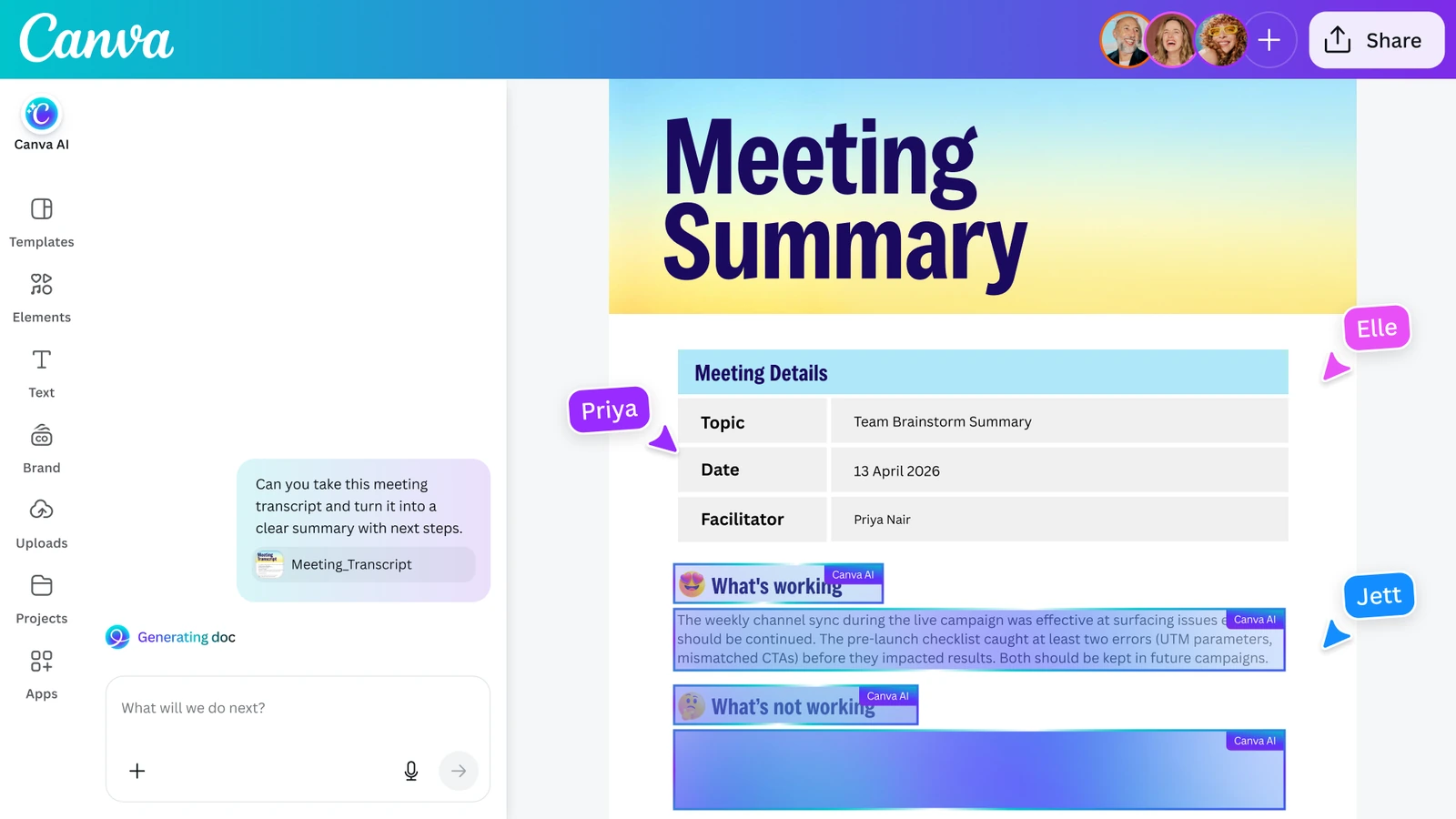
If your team regularly makes sales decks, promotional graphics, or product overviews, I’d recommend Canva. Its AI generation, templates, and editing tools let people in marketing and sales make useful materials without being designers.
Canva AI for sales presentations
Say your company needs a distributor recruitment deck covering the products, partnership terms, and after-sales support. Give Canva AI the content you’ve prepared, let it generate a draft, then add your actual product photos and adjust the text and layout. Canva AI and brand templates
Salespeople can adapt that deck for different distributors. Some want to know which customers the products suit. Others care more about who handles support. Edit the relevant pages before sending it.
In my view, Canva is significantly better at design than the AI assistants above. Its layouts, fonts, and overall visual style get closer to something I’d send to a customer, and making changes is easier. If you want better-looking materials without learning professional design software, I think it’s worth a separate subscription.
Canva Brand Kit and reusable brand templates
Canva Brand Kit keeps company logos, fonts, colors, and images together. Brand templates give teammates a starting point, and Canva AI can use those materials when generating designs. Brand materials and templates
A designer can set up the basic presentation in Canva, then salespeople can adapt it for each customer. Update the product pages when the product changes, or the partnership details when the terms change. Everyone can keep using the same style.
If you only need a presentation occasionally, I’d try the AI assistant you already use first. But when several people regularly create and update marketing materials, I’d pay for Canva’s design tools.
Pricing: Free plan; paid subscriptions vary by region. Plans and regional pricing


Notion AI: For teams already working in Notion
Start here when the team’s project documents and internal knowledge already live in Notion.
- Best for
- Finding project history, editing pages, and linking supporting material.
- Pricing
- Notion Business US$20/member/month billed yearly; included AI allowance, additional credits can cost extra.
Pros
- Search and edit team information in the same place.
- Page links and backlinks connect supporting documents.
Cons
- I would not move the team’s documents just to get the AI features.
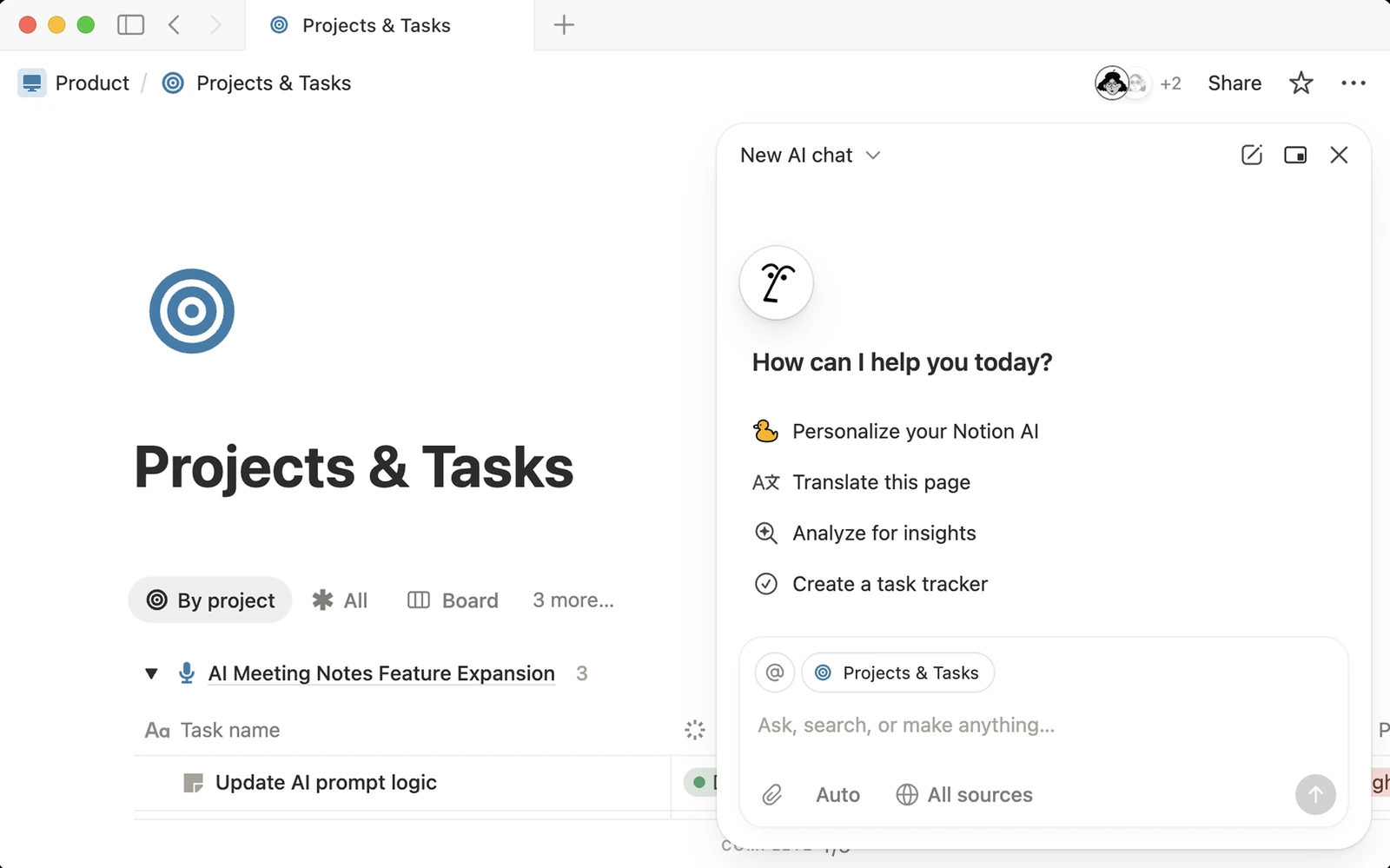
If your project documents, customer case studies, and internal knowledge base are already in Notion, I’d try Notion AI first. Finding information and updating it in the same place is a big part of the appeal. Notion Agent
Notion enterprise search and source references
Say a customer with several factories asks a salesperson for examples of phased software rollouts. Your team has done similar projects, but the details are scattered across proposals, delivery notes, and project reviews.
Use Notion AI’s enterprise search to find those projects, then ask how the rollouts worked, what went wrong, and how the team handled it. I want to see where an answer came from; Notion includes sources, so the salesperson can check the original pages and choose what’s useful for the customer. Enterprise search and sources
Notion Agent: Edit pages and connect documents with backlinks
If these questions keep coming up, ask Notion Agent to turn the existing material into a phased rollout case study and organize the projects in a database. As new projects finish, you can keep adding to it. The Agent can create and edit pages and databases directly. Page and database actions
Link the case study to the original plans and reviews so colleagues can find the supporting material too. Notion backlinks work in the other direction: open a source page and you can see which pages reference it. Page links and backlinks
Claude and ChatGPT can also connect to Notion and work with its contents. But if I were already working in Notion every day, I’d prefer using Notion AI there. Searching team information is faster, you can edit the page directly, and linking related documents feels natural.
When Notion AI is worth paying for
I wouldn’t move the team’s documents just to get Notion AI. If you already use Notion heavily and need help finding and maintaining company information, there’s a clearer reason to pay.
Business and Enterprise plans include an AI usage allowance. You may need extra AI credits for usage beyond that allowance or custom Agents billed to the workspace. AI usage
Pricing: Notion Business US$20/member/month billed yearly; included AI allowance, additional credits can cost extra. Plans and pricing · Business plan details
Zapier: My choice for workflows that need a fixed order
My choice when recurring work must follow a defined sequence with configured approval pauses.
- Best for
- Repeatable procedures in work such as law and accounting.
- Pricing
- Free: 100 tasks/month; Professional from US$19.99/month billed yearly.
Pros
- Steps and conditions are defined in advance.
- Can pause for human review before proceeding.
Cons
- Traditional workflows take configuration; AI assistant is more convenient for one-off work.
In my view, traditional workflow automation is already very outdated. But it’s still hard to replace for work that doesn’t need much judgment but has to run consistently. The method and order are already decided. You need the same steps followed every time.
When I need workflow automation, Zapier is my choice. I’ve used it before and had a good experience with it.
Zapier workflows with fixed steps and human approval
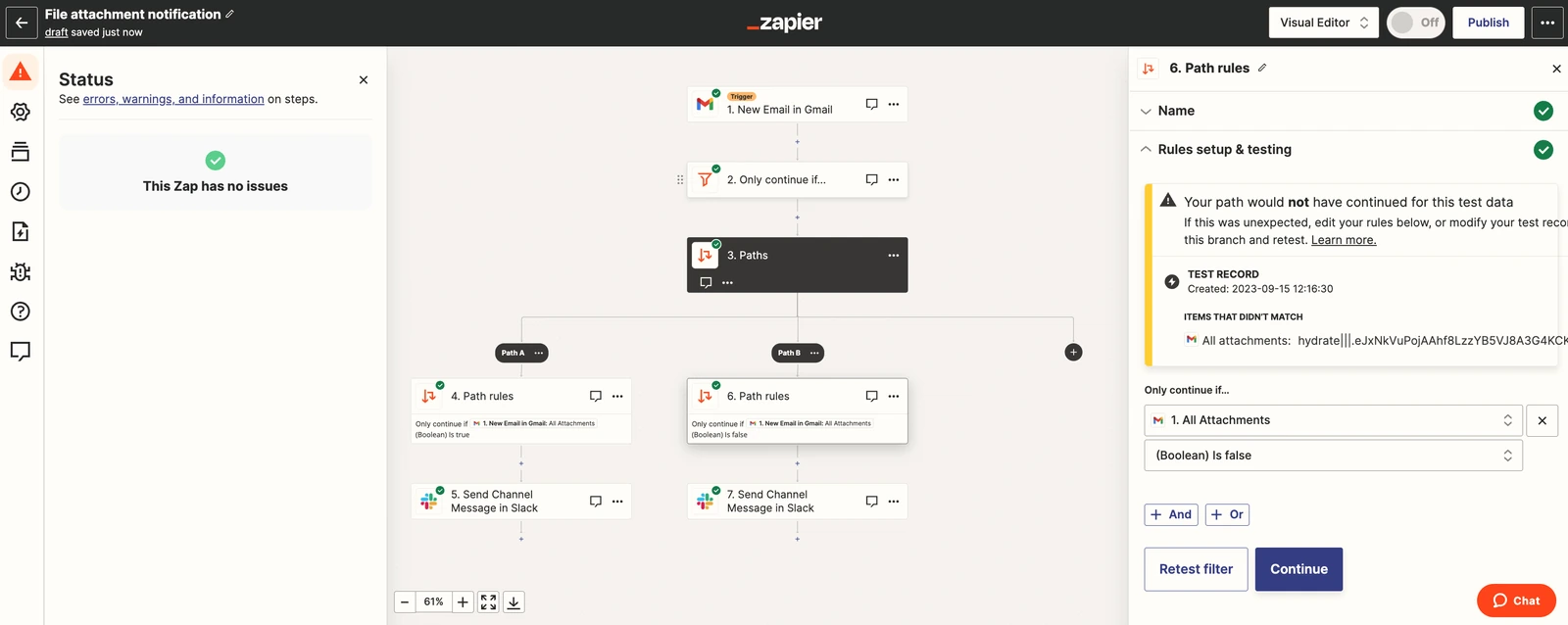
An agent can interpret a request and decide what to do next. With Zapier, you define the steps and conditions in advance: when to read the information, when to check it, and when to wait for someone’s approval.
In law or accounting, accuracy and procedure matter. Rather than put every requirement into a Skill and have Claude carry out the whole thing, I’d fix the required sequence in a workflow.
An accounting team could receive supporting documents from clients, use AI to extract information, check for missing details against fixed rules, and send everything to an accountant for review. Filing and notifications happen only after approval. If approval is declined or hasn’t arrived, configure the workflow to stop and wait for a decision or correction. Zapier Human in the Loop lets you pause a workflow and decide whether it continues based on the review result. Human approval
For work like this, I’m willing to spend time configuring Zapier.
Add AI to existing Zaps
If your company already uses Zapier, keep the app connections and steps that work. Add AI where it helps with reading, extracting, or interpreting text, then pass the result to the next step. There’s no need to rebuild the whole process. AI by Zapier
For one-off research, writing, and discussion, I find Claude more convenient. Zapier fits recurring work that needs to follow a defined procedure.
Pricing: Free: 100 tasks/month; Professional from US$19.99/month billed yearly. Plans and pricing · Usage rates

n8n: For developers who need custom workflows and deployment control
An option when developers need to customize integrations, logic, and deployment.
- Best for
- Internal APIs, custom rules, and recurring repair-request handling.
- Pricing
- Cloud Starter €20/month billed yearly, 2,500 executions/month; free self-hosted Community Edition.
Pros
- Developers can add code and custom integrations.
- Source code can be modified within the license terms.
Cons
- Self-hosting needs maintenance; license and edition restrictions still apply.
Like Zapier, n8n is a workflow tool. I’d consider it when developers need more control over how the workflow is built.
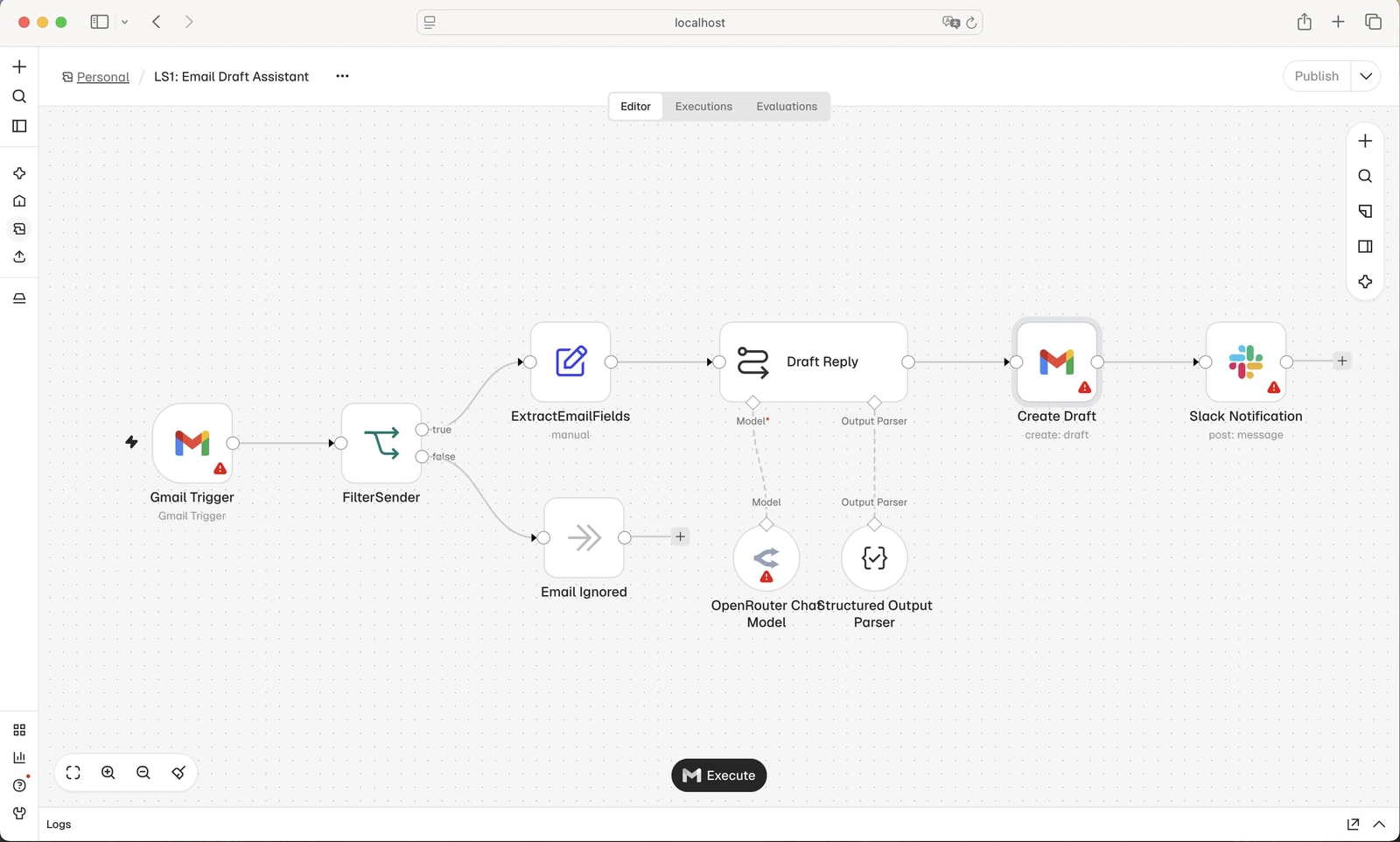
Developers can add code, connect internal systems through APIs, and use AI where information needs to be read or interpreted. Code · API connections
n8n for internal APIs and custom business rules
Say an equipment company receives repair requests by email. Before deciding what to do, the support team needs the equipment model, purchase date, and repair history. Those details might live in email, an internal order system, and a repair database.
With a developer involved, you can build a workflow in n8n to extract the equipment details, look up the records, and prepare a recommendation based on the company’s warranty rules for someone to review. If the serial number is missing, it can prepare an email asking for it before the process continues.
If repair requests arrive every day and take up a lot of staff time, I think that workflow is worth building. If they only come up occasionally, I’d still try Claude first.
n8n source code and custom integrations
Developers can build their own n8n nodes and integrations. Within the license terms, they can also modify the source code.
A developer could build an integration for the repair system once and let other teammates reuse it in their workflows. As the business changes, the team can keep extending it.
n8n is a source-available workflow automation tool, with usage restrictions. Its license permits internal business use and modification; uses such as offering commercial services to others need a separate check of the terms. License
n8n self-hosting and Community Edition limits
n8n offers a cloud service and a free Community Edition for self-hosting. Running it yourself means handling the servers, backups, and upgrades. I’d only consider this if someone will keep looking after it. Self-hosting
The free Community Edition has limits on sharing workflows and credentials. If several teammates need to maintain the workflows together, check which edition supports that. Edition differences
I’d choose n8n when developers need custom connections and business rules, and the team is willing to maintain what it builds.
Pricing: Cloud Starter €20/month billed yearly, 2,500 executions/month; free self-hosted Community Edition. Cloud pricing · Community Edition


Intercom Fin: For AI phone support and human handoff
Worth a look when the task is answering customer calls and handing them to the team with context.
- Best for
- Phone support with connected systems and human handoff.
- Pricing
- Fin Voice: contact sales for access and pricing; chat/email outcome rates are separate.
Pros
- Can answer calls using support material.
- Supported system actions and context help with handoff.
Cons
- Sales enablement is required; chat and email pricing is not phone pricing.
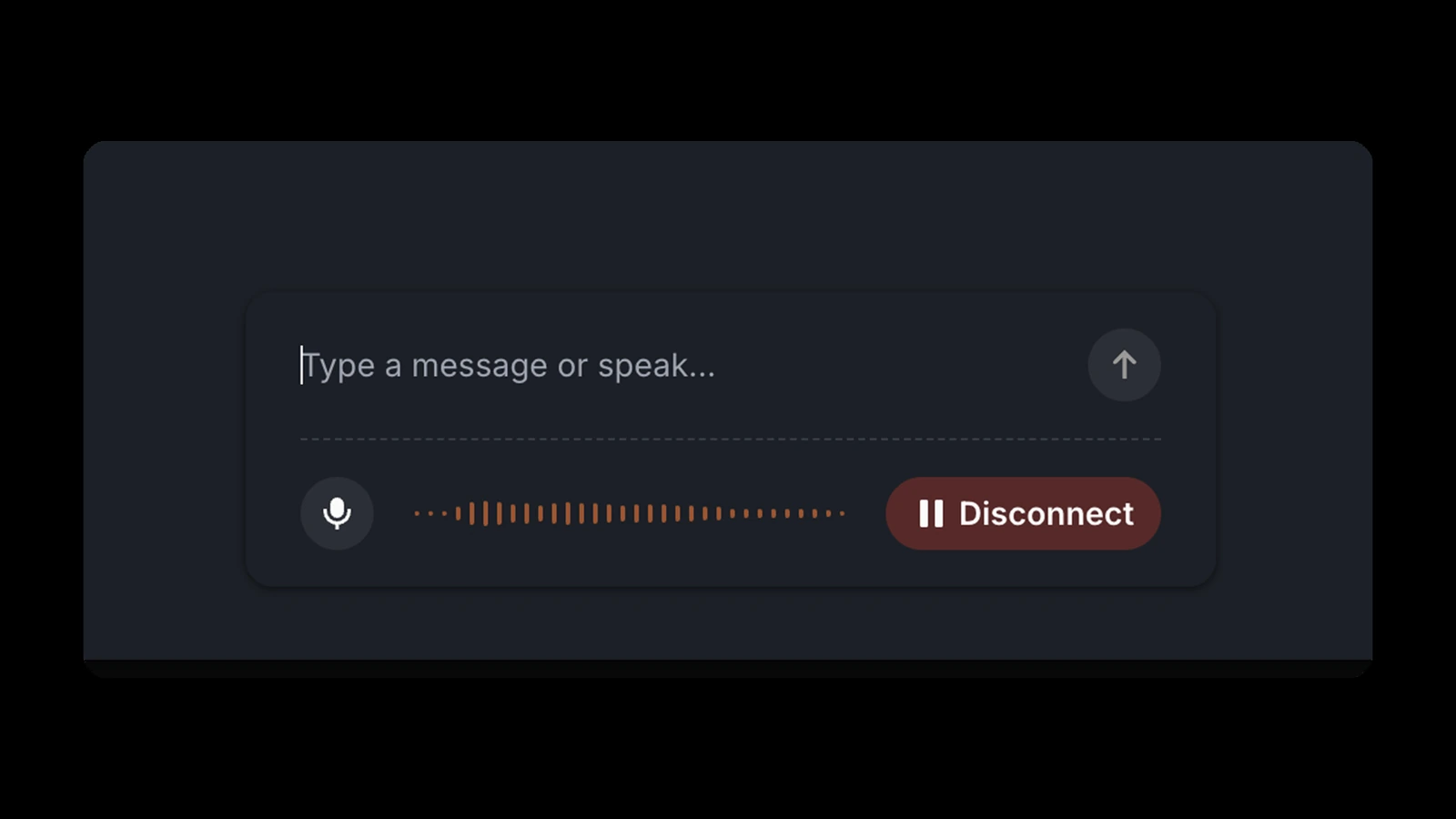
For looking up information and drafting replies, I’d start with Claude or ChatGPT. Fin Voice is worth a look when you need to answer customer calls: it can use your support content and hand a call to a person with the conversation context. Fin Voice
Say a customer calls to change a delivery date. With the right system connections and instructions, Fin Voice can look up the order, check the details with the customer, and make supported changes. If someone needs to step in, Fin can transfer the call with the context collected so far.
I’d judge Fin Voice on three things: can it handle the call, complete the useful steps, and make the handoff easier for your team?
Fin Voice currently requires sales-assisted access and separate phone pricing. Don’t treat the chat and email outcome rate as the price of a phone call. Availability and pricing · Chat and email outcome pricing
Pricing: Fin Voice: contact sales for access and pricing; chat/email outcome rates are separate. Voice access and pricing · Chat and email pricing

HubSpot AI: For sales teams already using HubSpot
Try the tools around the customer records your sales team already maintains.
- Best for
- Customer history, prospect research, and reviewed follow-up emails.
- Pricing
- AI availability depends on the HubSpot plan; some agents consume HubSpot Credits.
Pros
- Uses existing CRM history to prepare the next conversation.
- Prospecting emails can be reviewed before sending.
Cons
- I would not migrate the CRM just to get the AI features.
If your team already manages customers in HubSpot, I’d start there before buying another sales tool. Customer details, past conversations, and deal progress are already there, so you can work with that information directly.
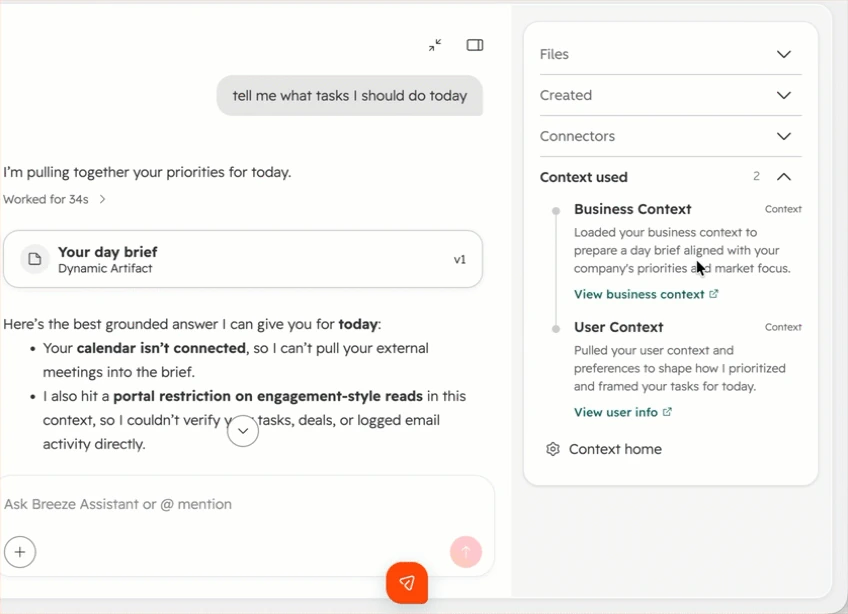
HubSpot’s AI sales tools sit under the Breeze name. Breeze Assistant helps with everyday tasks, while specialized Agents handle work such as prospecting. Breeze and business context
HubSpot AI for customer history and CRM summaries
When you take over an account or reconnect after a few months, ask HubSpot to help you catch up on the records: Why did the deal stop moving? What did the customer ask for? Which questions still need an answer?
Breeze Assistant can summarize the notes and activities in a CRM record before the next conversation. Record summaries
Say you sell corporate training and want to follow up with a customer who asked about courses last year. Review the summary to check the group size, course requirements, and why they put the purchase on hold, then write an email that picks up where the conversation left off.
Claude can analyze those materials too. The convenience of HubSpot AI is that you can work directly with the customer record your team already maintains.
HubSpot Prospecting Agent for customer outreach
HubSpot’s Prospecting Agent can research target customers and use CRM information to draft personalized outreach. You can choose to review the emails before they go out. Prospecting Agent
I’d start with review enabled. Check whether the reason for reaching out makes sense and whether it understood earlier conversations. For a team already following up with a list of customers, this is more useful to me than a separate tool that only writes the message.
HubSpot AI plans and Credits
Availability of HubSpot’s AI sales tools varies by feature and plan, and some Agents use HubSpot Credits. Having AI in your subscription doesn’t mean every feature is unlimited. Credits and billing
Start with what your current plan includes. See how much time it saves on research, preparing conversations, and follow-ups before paying for more.
I wouldn’t move the whole CRM just to get HubSpot’s AI features. Choose the system that works for your sales team first, then decide whether its AI is worth the extra cost.
Pricing: AI availability depends on the HubSpot plan; some agents consume HubSpot Credits. Credits and billing · Product catalog
Final thoughts
When choosing the best AI tools for business, I’d start with Claude and give it the work the team actually needs to get done. Before buying another tool, find out where it falls short. If your company already pays for Microsoft 365 Copilot, or has AI features available in Google Workspace, Notion, or HubSpot, try those too.
Add a dedicated tool when you have a clear reason: better design with Canva, phone support with Fin, or working with teammates and multiple agents in Offloop. For recurring work with fixed steps, consider Zapier. If developers need custom connections and business rules, look at n8n.
If Claude already does the job well, I wouldn’t pay for another subscription just to do the same thing.
Frequently asked questions
Answers on AI tool basics, evaluation, and when to choose particular products.
What is an AI tool?
An AI tool is software that uses AI to help with tasks such as writing, research, data analysis, design, or customer support. It can be a standalone app like Claude, an AI feature inside software such as Notion, or an agent that uses connected apps to carry out a task. Not every AI tool is an agent.
What makes a good AI tool for business?
A good tool does the work well enough that you can use the result, without spending too much time explaining and correcting it. It should fit the apps your team already uses and offer an advantage over what you already pay for. I value consistent results and a manageable bill more than a long feature list.
How should a business evaluate AI tools before paying?
Give the tools the same real task, files, and requirements. Check the result, count the corrections you need, and try the task more than once. Include the subscription, extra usage, setup, and maintenance in the cost. For customer-facing work, review the output before using it. I’d pay when the improvement is useful enough to justify the total cost.
How did I evaluate the AI models and tools in this article?
I’m a founder, a product expert, and a long-term paying user. I’ve spent over US$10,000 on ChatGPT and Claude combined, and hundreds of hours with the products I’ve used extensively. I consider both company-level value and daily details: how well they understand a request, retain context, and produce usable results. Offloop is our own product, and we’ve worked in it as a team for six months.
When is an AI tool worth paying for?
We’re willing to pay for AI because it helps us make money. I look at whether it helps us deliver work, follow up with customers, or free up time for more business. For a second subscription, I also want a clear improvement over the AI we already use. If Claude already does the job well, I wouldn’t buy another app for the same work.
Can Claude replace separate writing, email, and translation tools?
In my experience, Claude can handle most everyday writing, email drafting, and translation. Its memory and project files let related tasks use the same background. Reading your inbox and taking actions in other apps require the relevant connections and authorization. I’d try it on the work before buying separate tools.
When should a company choose Microsoft 365 Copilot over Claude?
I’d start with Copilot in a large organization with complex permissions and daily work in Microsoft 365, especially if the company already pays for it. It uses existing access permissions and works across Excel, Word, PowerPoint, Outlook, and Teams. Outside that setup, Claude remains my first choice for everyday work.
How is Offloop different from using Claude or ChatGPT alone?
Offloop is our Slack alternative for people and multiple agents working in the same chat. It brings models such as Claude, GPT, and Gemini into team conversations, with shared context, memory, and Skills. I’d consider it when several teammates need to discuss, carry out, and review the same task. For solo work, I’d start with Claude.
Is Canva worth paying for if I already use Claude or ChatGPT?
Yes, if your team regularly makes sales decks and marketing materials and wants better design without learning professional software. I find Canva’s layouts, templates, and editing tools stronger for that work than the AI assistants above. If you only need a presentation occasionally, try the AI you already have first.
Should I choose Zapier or n8n for business automation?
Both run workflows with predefined steps. I’d start with Zapier for recurring work that needs a fixed order. Consider n8n when developers need custom code, internal integrations, or control over deployment, and will maintain what they build. Its free Community Edition has limits on workflow and credential sharing; self-hosting also needs server maintenance.
Sources
- Memory and past chats support.claude.com
- Email and document actions support.claude.com
- Projects support.claude.com
- Introducing Claude Duet claude.com
- Duet access support.claude.com
- Plans and pricing claude.com
- About Offloop offloop.org
- Pilot pricing offloop.org
- File handling and analysis learn.chatgpt.com
- Code review learn.chatgpt.com
- Plus pricing help.openai.com
- Business pricing help.openai.com
- Information access and permissions support.microsoft.com
- Enterprise security and management learn.microsoft.com
- Copilot in Excel support.microsoft.com
- Copilot in Outlook support.microsoft.com
- Copilot in Teams support.microsoft.com
- Enterprise pricing microsoft.com
- Business plans microsoft.com
- Supported uploads support.google.com
- Video understanding ai.google.dev
- Google AI plans one.google.com
- Workspace plans workspace.google.com
- Canva AI and brand templates canva.com
- Brand materials and templates canva.com
- Plans and regional pricing canva.com
- Page and database actions notion.com
- Enterprise search and sources notion.com
- Page links and backlinks notion.com
- AI usage notion.com
- Plans and pricing notion.com
- Business plan details notion.com
- Human approval help.zapier.com
- AI by Zapier help.zapier.com
- Plans and pricing zapier.com
- Usage rates zapier.com
- Code docs.n8n.io
- API connections github.com
- License github.com
- Self-hosting docs.n8n.io
- Community Edition docs.n8n.io
- Cloud pricing n8n.io
- Fin Voice fin.ai
- Voice access and pricing fin.ai
- Chat and email pricing fin.ai
- Breeze and business context knowledge.hubspot.com
- Record summaries knowledge.hubspot.com
- Prospecting Agent knowledge.hubspot.com
- Credits and billing knowledge.hubspot.com
- Product catalog legal.hubspot.com
- Canva pricing and plan details canva.com
- Claude Cowork working through a pricing comparison with a browser. claude.com
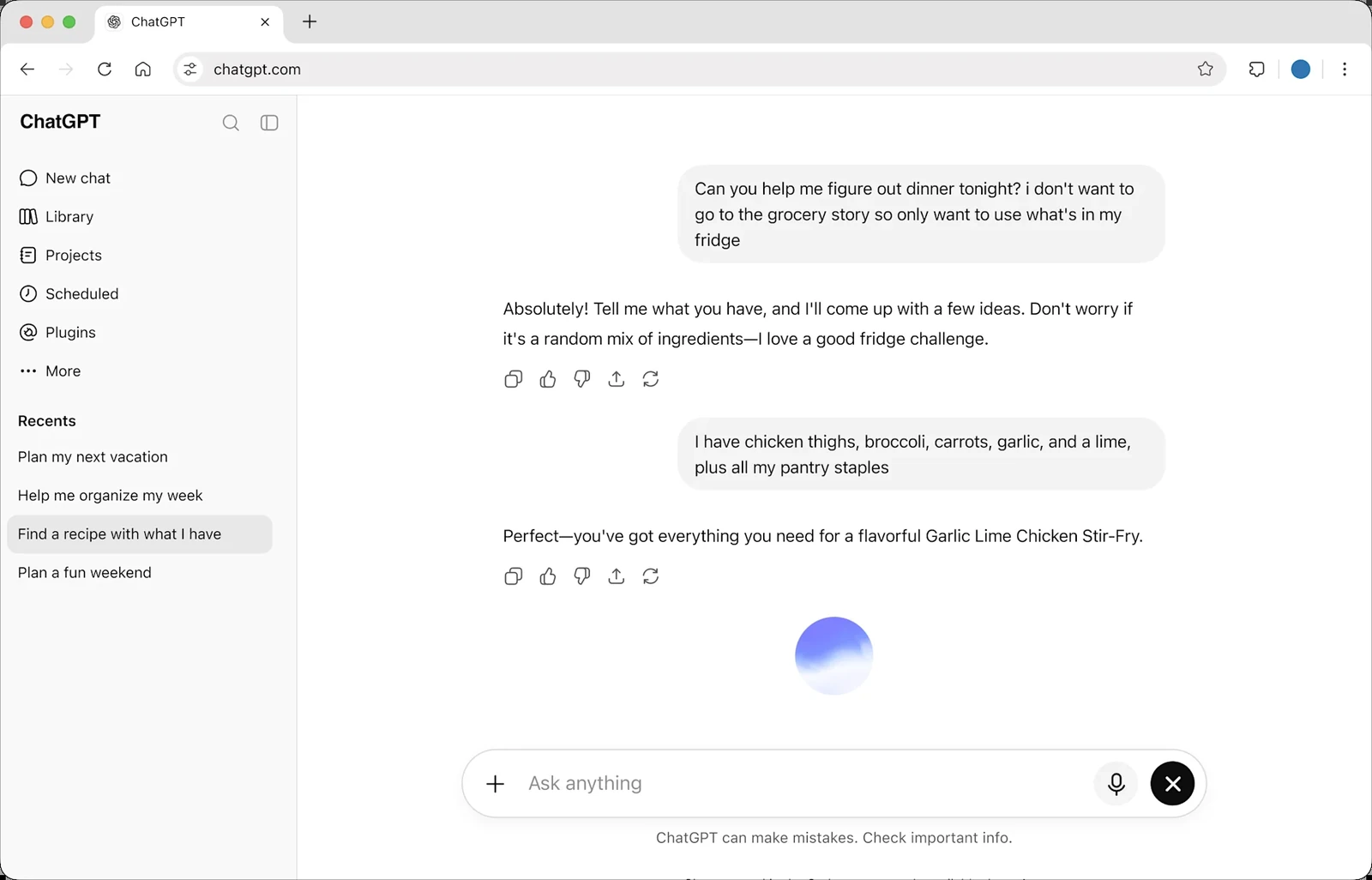
- A conversation in ChatGPT. chatgpt.com
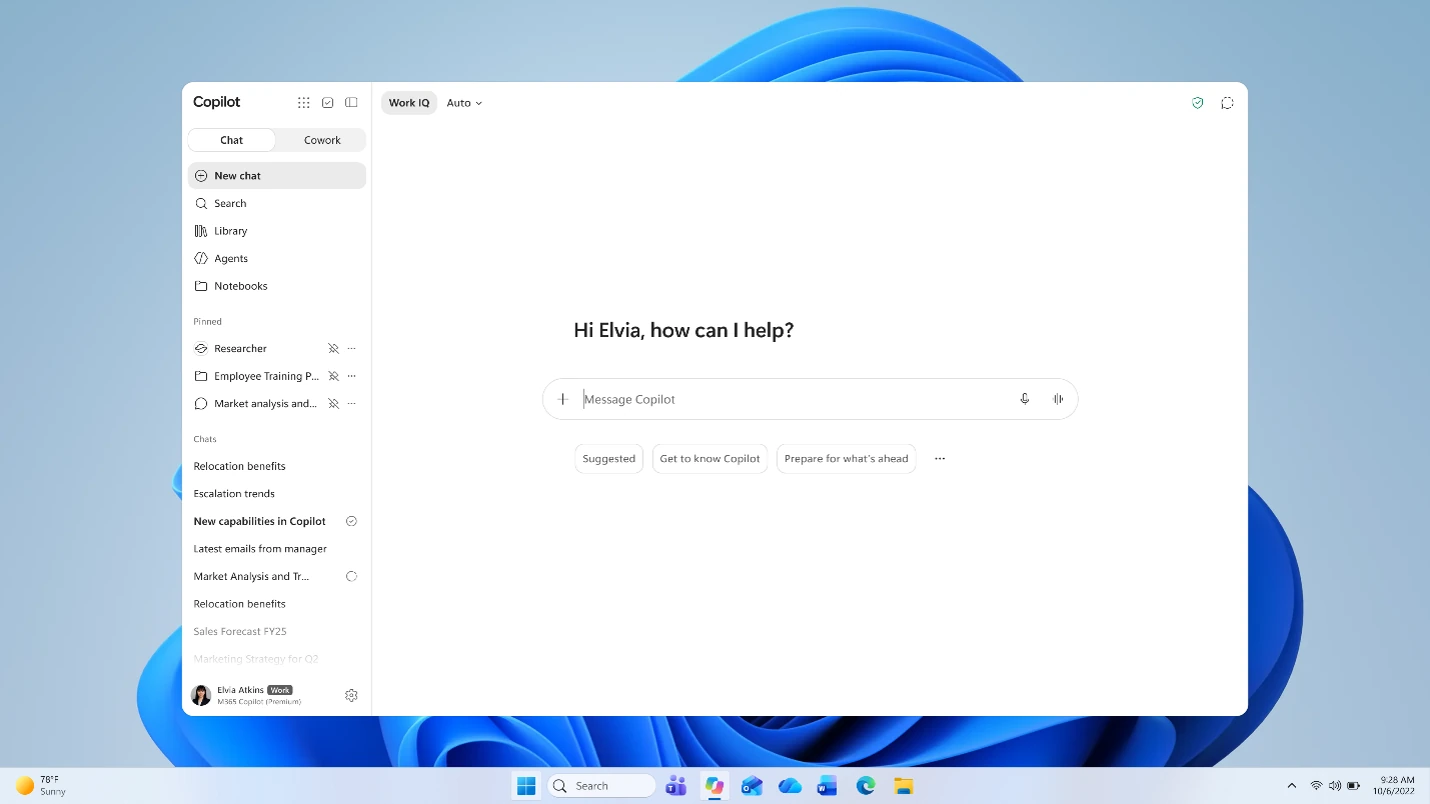
- Microsoft 365 Copilot app and its chat interface. support.microsoft.com
- Google’s example of Gemini turning notes into a study guide. blog.google
- Canva AI turning a meeting transcript into an editable document. canva.com
- A branching workflow in Zapier’s visual editor. help.zapier.com
- An n8n workflow connecting email, AI processing, and notifications. github.com
- Fin Voice preview with voice and text input. fin.ai
- Breeze Assistant showing the context used for its response. knowledge.hubspot.com