
AI marketing tools can create images and short videos for ads, automate ad delivery, run email campaigns and analyze sales leads.
When Alya Health wanted to make video ads, finding creators and briefing them used to take about a week. The team began using Higgsfield to generate drafts for a designer to refine, substantially cutting its prep time. Alya Health case study
The right tool depends on where your team spends its time. If you regularly make ads, try Seedream for images or Higgsfield for video. If you run your own online store and want to recover abandoned carts, consider Klaviyo. If marketing work involves product, sales and operations, consider Offloop.
My team and I build Offloop, and I follow other AI products closely. Here are nine AI marketing tools worth looking at in 2026, with what they do, who they suit, what they cost and what to check before using them.
Compare 9 AI Marketing Tools
| Tool | Main use | Pricing |
|---|---|---|
| Seedream | AI product images and ad backgrounds | API from $0.045 per image |
| Higgsfield | AI video ad generation | Starter from $15/month |
| Meta Advantage+ | AI ad delivery and optimization | Based on ad spend |
| Klaviyo | Email marketing, audience segmentation and abandoned cart recovery | Free plan, paid plans from $20/month |
| Offloop | AI agents for marketing collaboration and product launches | Team Pilot pricing on request |
| Semrush Content Toolkit | SEO research and content briefs | $60/month equivalent, billed annually |
| HubSpot Breeze | AI email drafting and customer follow-up | Some features require Marketing Hub Professional or Enterprise |
| CallRail | Call tracking and AI call analysis | From $50/month |
| Google Ads Performance Max | Automated ad delivery and lead generation | Based on ad spend |
Pricing reflects official information checked on November 10, 2026. Costs vary by plan, region and usage.
AI Tools for Creating Ads

1. Seedream — Product images and ad backgrounds
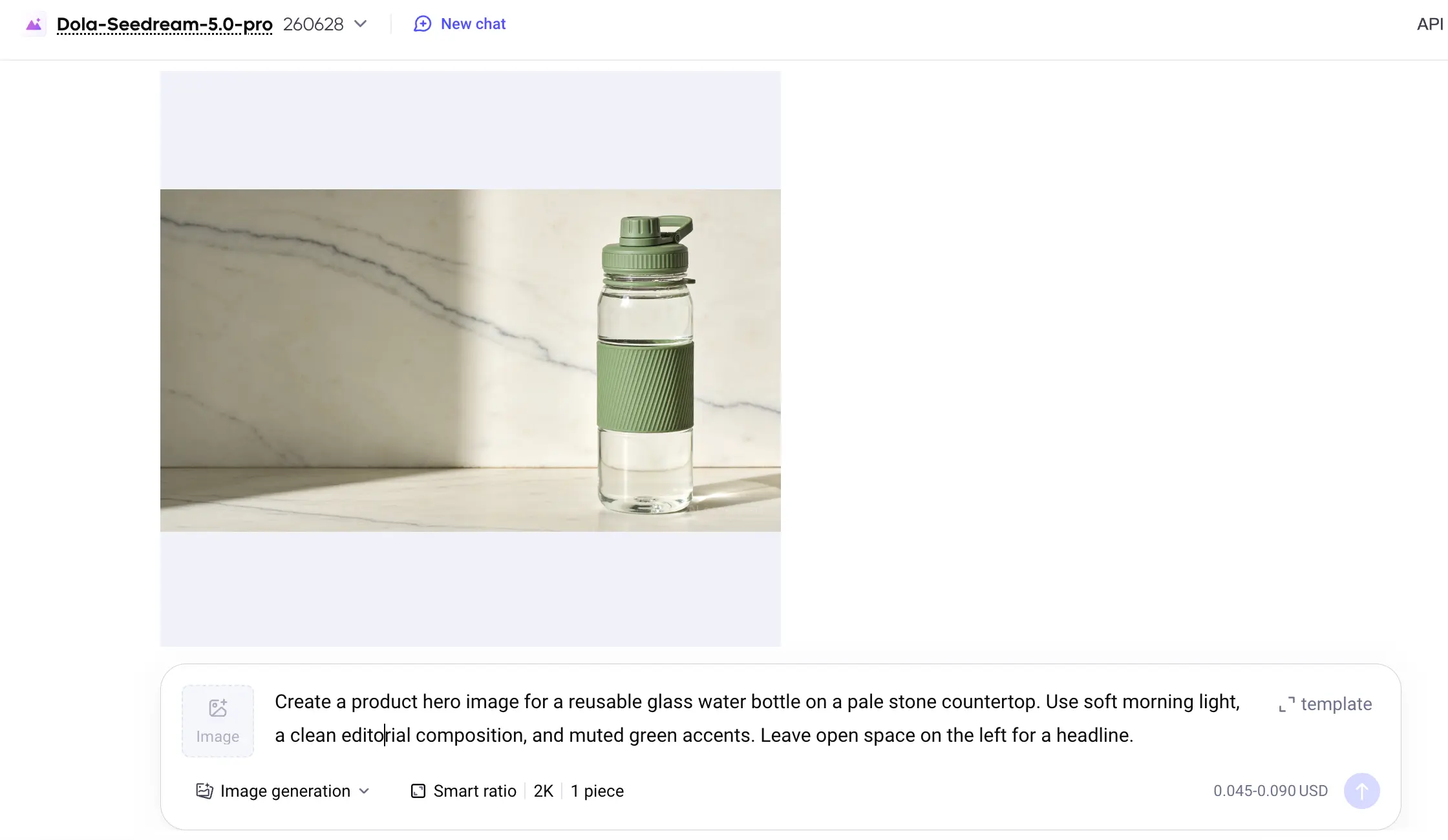
Seedream is ByteDance’s AI image generation tool. Ecommerce teams with product photos can use it to test different settings for ads and cut down on repeat shoots.
- Best for
- Ecommerce teams that have product photos and frequently update ad creative.
- Pricing
- The first input image is free when generating a single image with the Seedream 5.0 Pro API through BytePlus ModelArk. Output costs $0.045 per image at 1.5K or below and $0.09 per image at higher resolutions.
Pros
- Try different settings and compositions with one reference photo.
Cons
- Check lids, colors and logos against the real product.
Say you have a front-facing photo of a travel mug. With Seedream 5.0 Pro, you can try a desk setting and an outdoor scene, then compare which image fits the ad. Seedream suits teams that update product visuals often and have a limited photography budget. During ad testing, it lets you try several compositions with the same reference photo. (Seedream 5.0 Pro overview)
Check generated product details against the original photo before running an ad. The shape of a lid, the color of a product or the appearance of a logo can change. For images that need to show exact product specifications, use photographs.

2. Higgsfield — Short-form video ads
Higgsfield is worth considering if you primarily make short-form video ads.

- Best for
- Teams testing multiple short video ad concepts.
- Pricing
- Higgsfield’s October 2026 plan guide lists Starter at $15 a month with 200 credits and commercial use. Model availability varies by plan.
Pros
- Start a video ad from a product image or link.
Cons
- Check visuals and voiceover. Changing a shot usually means generating it again.
Its Marketing Studio has video ad templates. You can upload product images or start with a product link. That makes it easier to test multiple ideas without arranging a new shoot for each version. (Higgsfield Marketing Studio guide)
Alya Health uses Higgsfield to draft different ads, then has a designer refine the selected versions. The team can try new directions faster by starting with those drafts.
Higgsfield can get you to a draft quickly. Check for products changing shape in motion shots and inaccurate information in the visuals or voiceover. Changing a generated shot in Marketing Studio usually means generating it again. Include credits spent on discarded versions and new attempts when estimating your cost.
AI Marketing Tools for Ecommerce

3. Meta Advantage+ — Automated ad delivery and optimization
Meta Advantage+ brings AI automation to Meta ads. Advertisers can use it to optimize delivery and run campaigns with product catalogs, images and videos.

- Best for
- Merchants with their own online store, ad creative and purchase records.
- Pricing
- Advantage+ has no separate subscription fee. Set your budget in Meta Ads Manager and pay based on ad delivery.
Pros
- Optimize delivery with catalogs, images and video.
Cons
- Duplicate purchase events can overstate results.
It can reduce some manual adjustments for merchants who already have their own online store, ad creative and purchase records.
Before using it, check that purchase events are recorded correctly. If a shop receives one order and Meta counts the purchase twice because the event was sent twice, the campaign report can overstate performance. Once your ads are running, compare purchases reported by Meta with paid orders in your store. (Meta Blueprint course)
Footwear retailer The Athlete’s Foot ran Meta campaigns using a product catalog, images and videos. The team also changed the budget and the purchase flow on product pages, leaving AI’s share of the improvement unclear. (The Athlete’s Foot case study)

4. Klaviyo — Email marketing and abandoned cart recovery
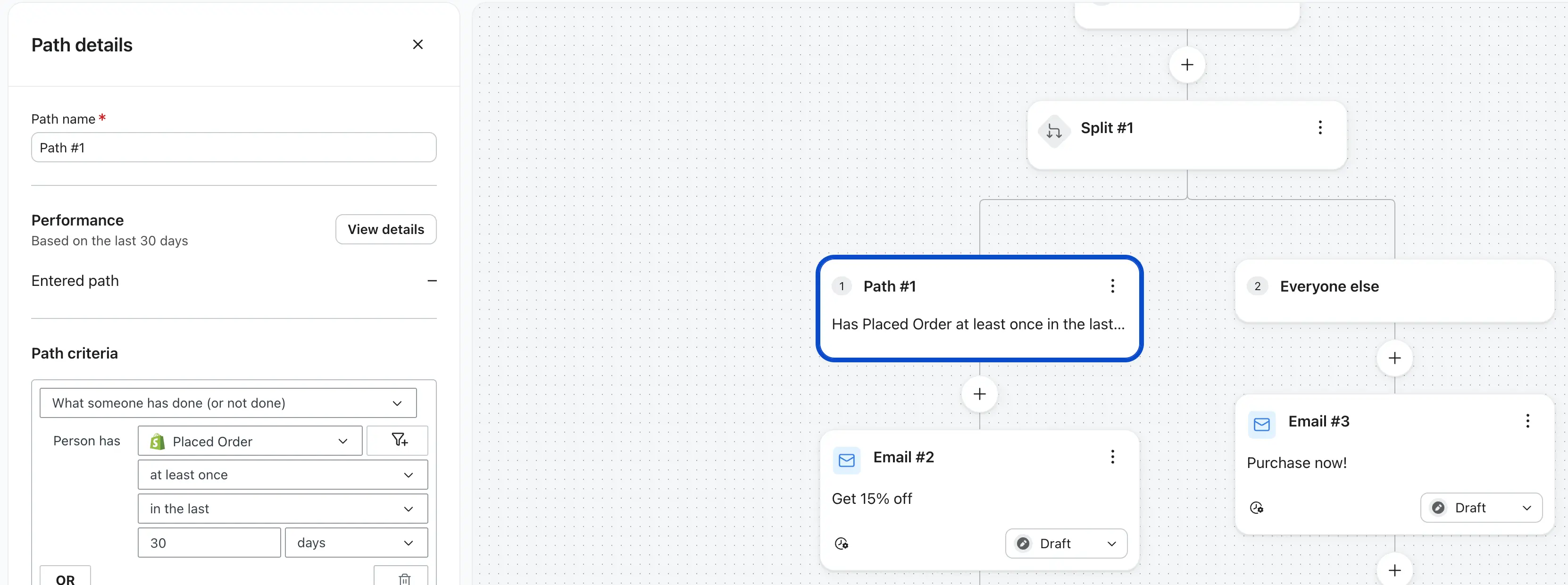
Klaviyo is built for ecommerce marketing. Teams can send emails based on customer behavior, create audience segments and manage automated flows.
- Best for
- Ecommerce teams sending behavior-based emails to recover abandoned carts.
- Pricing
- The free plan includes up to 250 active profiles and 500 emails per month. The $20 monthly US Email tier includes 500 active profiles and 5,000 emails. AI segmentation in the campaign editor requires a paid plan.
Pros
- Set up cart and checkout reminders and audience segments.
Cons
- Flows depend on complete cart, checkout and order records.
A shopper who adds a product to their cart and leaves before checkout can get a reminder about the items in their cart. Someone who starts checkout and leaves before paying can get a separate series of reminders. A filter can stop the remaining reminders once the shopper places an order.
Unclaimed Baggage already had two cart recovery flows, yet both missed shoppers who added items without starting checkout. That is a reason to check which events your store sends and which shoppers each flow covers. (Unclaimed Baggage case study)
Klaviyo also offers AI segmentation. For example, you can find shoppers who bought shampoo in the last 30 days and have yet to buy the matching conditioner, then follow up with that group. Segments and automated emails depend on the data your store sends. Missing add-to-cart, checkout or order events can make those emails and segments less reliable. (Abandoned cart flow guide · AI segmentation guide)
AI Marketing Tools for B2B SaaS
5. Offloop — Coordinate marketing work with AI agents
Product launches often involve the product, marketing and sales teams updating the same set of materials.
- Best for
- SaaS teams coordinating launches across product, marketing and sales.
- Pricing
- Offloop is in private beta. Team Pilot pricing is available on request.
Pros
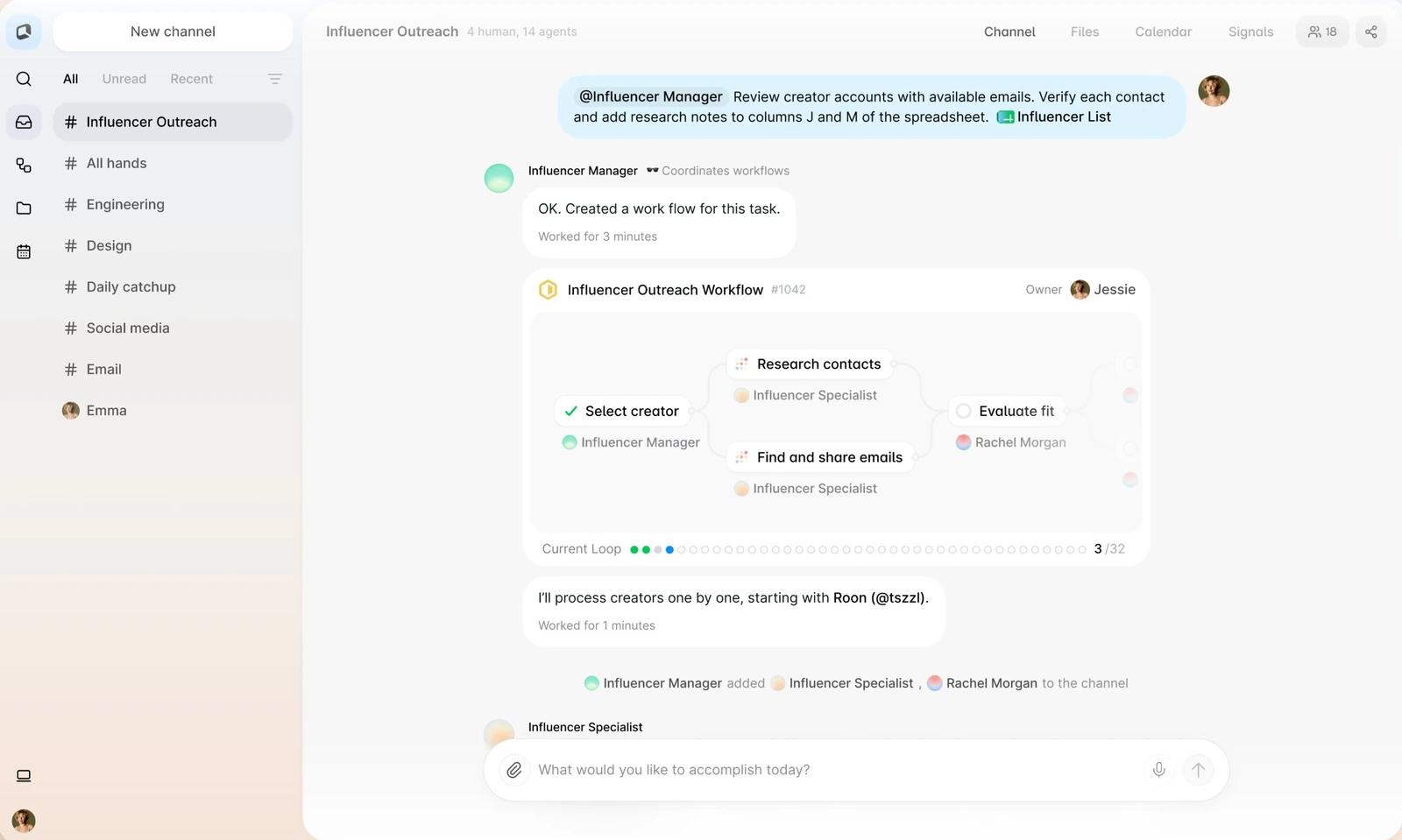
- Prepare briefs, write drafts and review them with AI agents in a shared channel.
Cons
- Record decisions in the channel and review before publication.
If the product team moves the launch date, marketing has to update the announcement, emails and social posts. Sales needs the latest information too. When edits are scattered across chats and documents, teams can end up using different versions.
Offloop is the AI-native collaboration tool our team builds. It gives people and AI agents shared channels where they can work together. During a launch, the team can ask an agent to organize the brief, draft marketing emails and LinkedIn posts, and send the drafts back to the channel for review. If product information changes, the team can request edits in the original discussion.
Offloop is a better fit than a standalone AI writing tool for marketing work with several contributors, revisions and handoffs. Discussions, requirements and generated files stay in the channel so colleagues can pick up the work. (Offloop for marketing teams)
The team needs to record new decisions in the channel. An agent may keep using old information if an important change goes unrecorded. The person responsible for publication should still review the material.
If your team mainly needs help with brand voice and marketing copy, consider Jasper. It can generate content using your brand voice and audience information. (Jasper Brand Voice)

6. Semrush Content Toolkit — SEO research and content briefs
Semrush Content Toolkit suits marketing teams that publish SEO content regularly.
- Best for
- Marketing teams publishing SEO content regularly.
- Pricing
- Content Toolkit includes SEO briefs and costs the equivalent of $60 per month when billed annually.
Pros
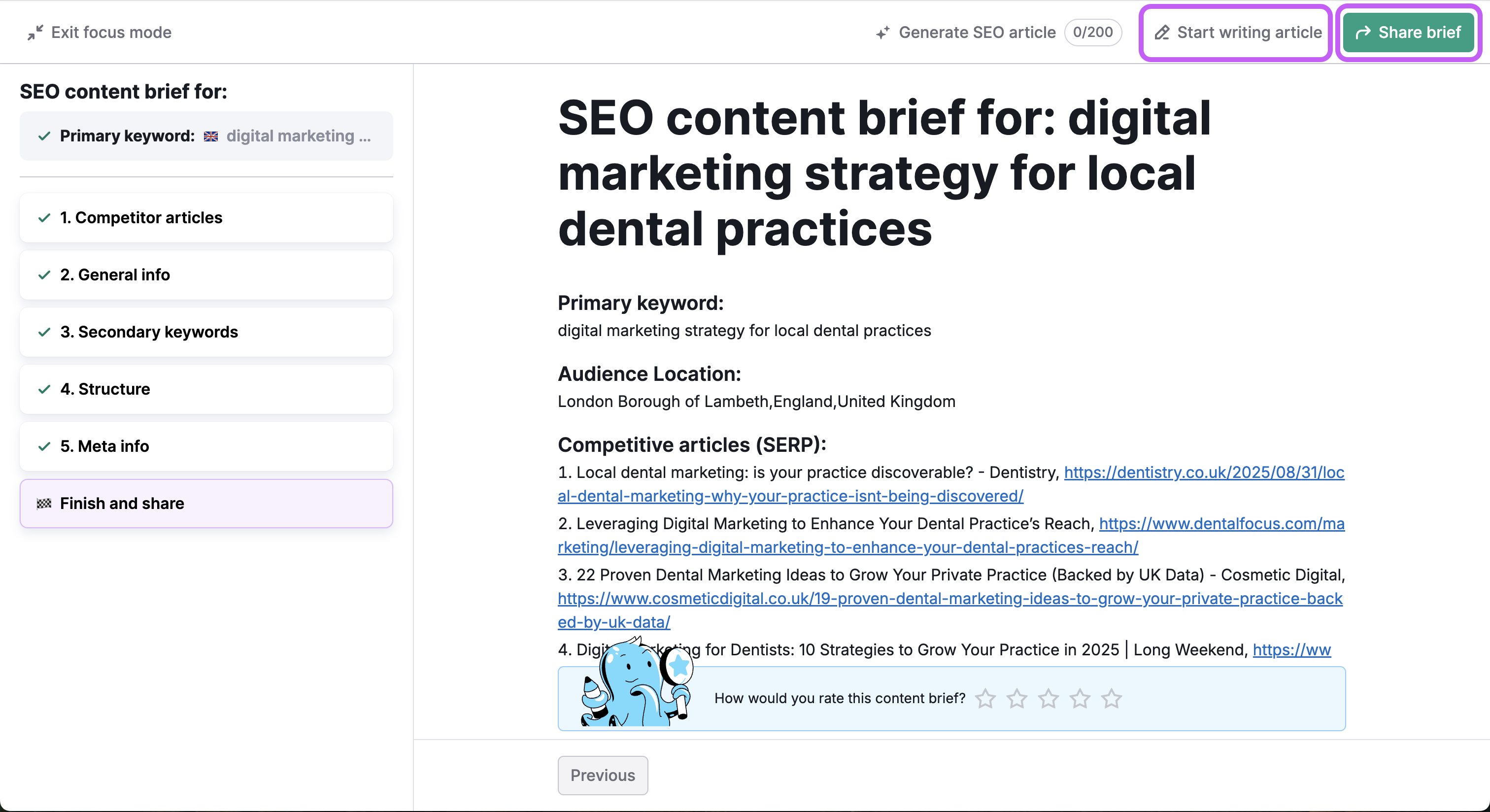
- Pull top-ranking pages, related keywords and a suggested outline into one brief.
Cons
- Generated outlines still need editorial judgment.
Its SEO Brief Generator takes a target keyword and location, then gathers top-ranking pages, related keywords and a suggested outline for the editor. (SEO Brief Generator overview)
For a team publishing many SEO articles each month, repeating keyword research and gathering references takes time. Semrush brings that information together so writers can get started sooner.
The generated outline still needs an editor’s judgment. Take an article comparing customer support software. Alongside pricing and features, an editor can ask the writer to check each product’s single sign-on support, plan restrictions and extra charges. The initial AI outline may miss those questions. Semrush is most useful for the research and planning an editor can build on.

7. HubSpot Breeze — AI email drafting and customer follow-up
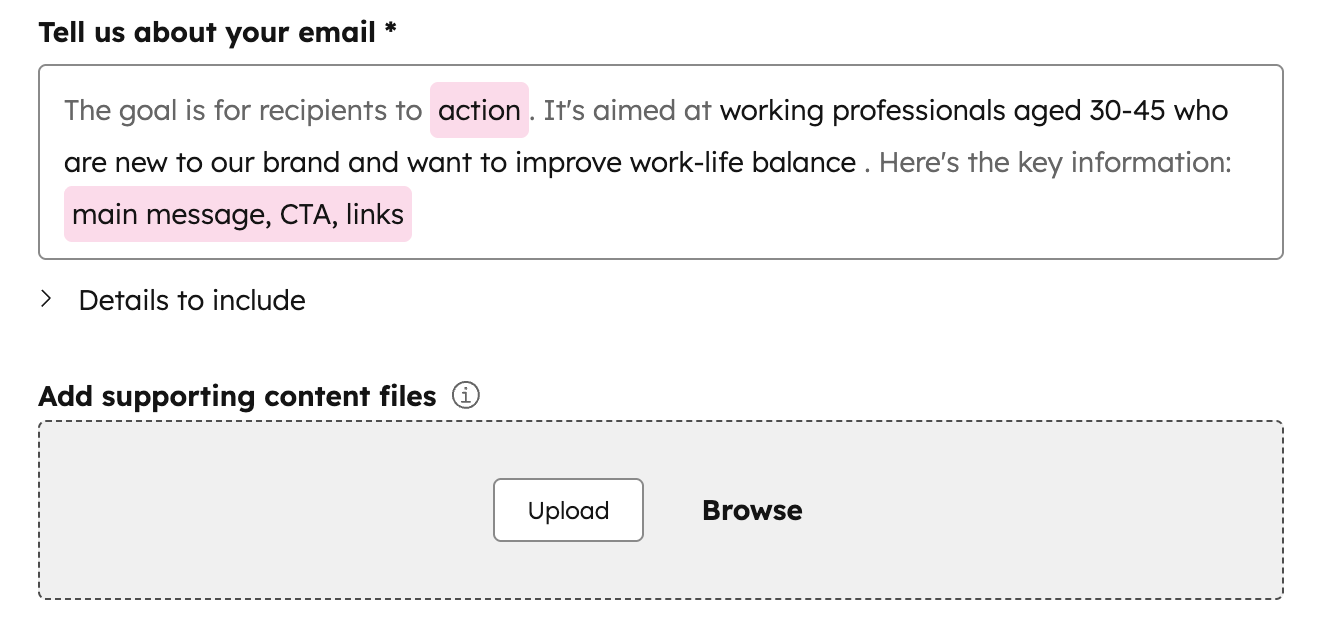
Breeze adds AI to HubSpot’s marketing tools. It can help write emails and improve subject lines using the team’s existing contact data and email workflows.
- Best for
- HubSpot CRM teams running email marketing and follow-up.
- Pricing
- In the US, Marketing Hub Professional starts at the equivalent of $800 per month with annual billing, plus a one-time $3,000 onboarding fee. The number of marketing contacts also affects the bill.
Pros
- Use existing contacts and email click data for follow-up.
Cons
- Full email generation is in beta and requires an eligible plan.
After a SaaS webinar, the marketing team can use Breeze to draft an email with the webinar recording and check who clicked the link before following up. For example, send supporting materials to people who clicked the replay link. Sales can then use replies and bookings to decide whom to contact again. (HubSpot AI content generation · Email recipient analysis)
Breeze is convenient if you already use HubSpot CRM because your contacts and marketing data are available in the same system. Some AI features depend on your plan. Full marketing email generation is still in beta and requires Marketing Hub Professional or Enterprise.
If your plan includes Breeze, try the features you already have. Email generation alone may be too small a benefit to justify a higher-priced plan.
AI Lead Generation Tools for Local Service Businesses

8. CallRail — AI call analysis and ad attribution
For local businesses that rely on phone inquiries, such as repair and remodeling services, the number of calls alone tells you little about how many could lead to bookings or sales.
- Best for
- Local service businesses with high call volume across ad channels.
- Pricing
- In the US, Lead Tracking starts at $50 a month and includes 5 numbers and 250 minutes. Lead Conversion with advanced conversation analysis starts at $150 a month. Extra usage is billed separately.
Pros
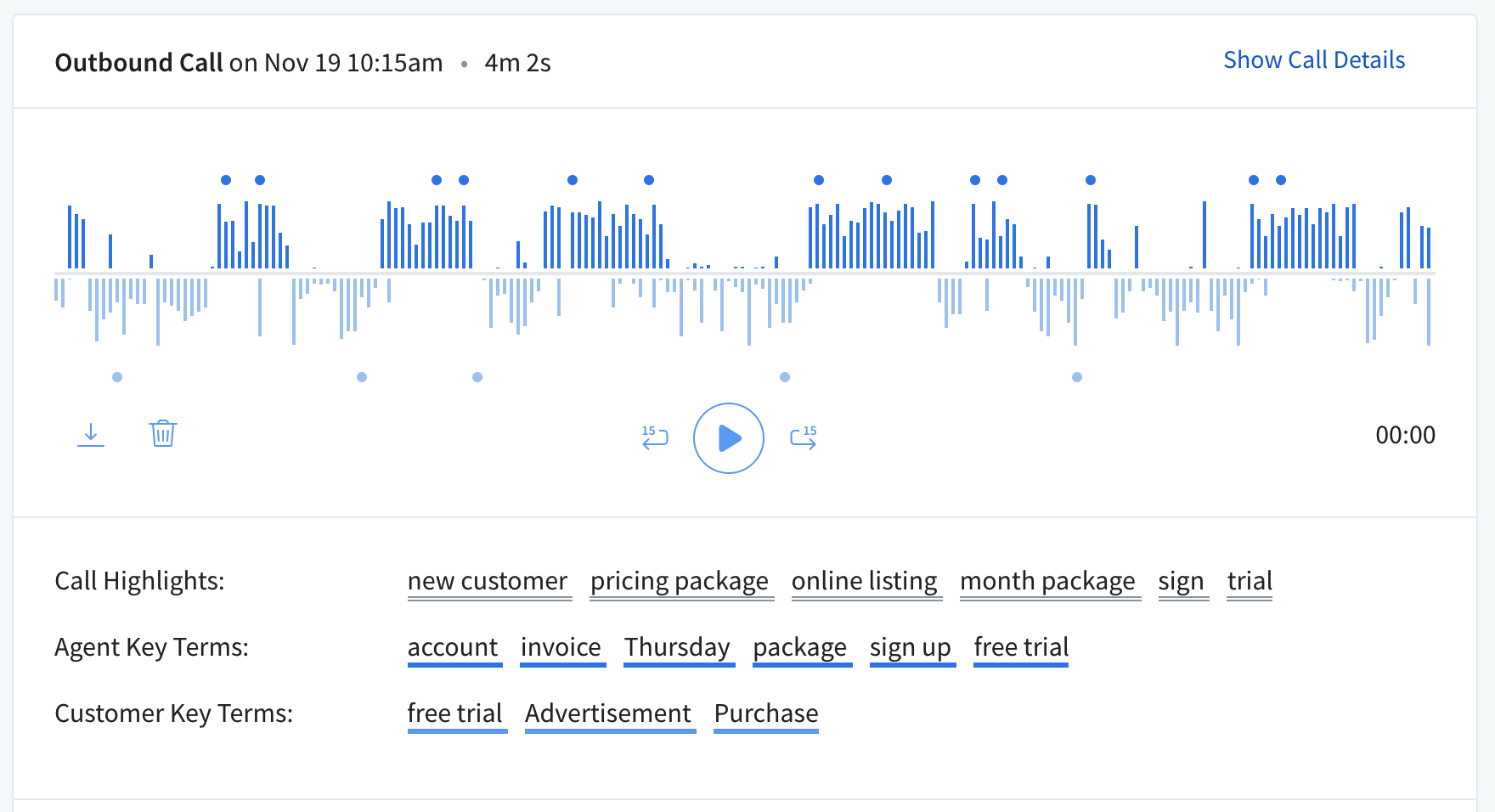
- Review call sources, recordings and transcripts. Advanced conversation analysis adds call summaries.
Cons
- Check flagged conversions against bookings and sales.
CallRail can track where calls come from, save recordings and provide transcripts. Advanced conversation analysis can summarize calls and flag possible conversions, helping teams see which ads brought in promising inquiries.
One US heating and air conditioning company used to spend four to five days listening to recordings and measuring sales performance. With CallRail, the manager can review transcripts and analysis first, then compare them with internal records, spending less time listening to calls one by one. (CallRail heating and air conditioning case study)
CallRail suits service businesses that handle many calls and advertise across multiple channels. Teams can use call records to distinguish general inquiries, irrelevant calls and promising leads. Compare any conversions flagged by AI with actual bookings and sales records. CallRail is primarily available in supported markets including the United States, Canada, the United Kingdom and Australia.

9. Google Ads Performance Max — Automated bidding for lead generation
Google Ads Performance Max uses Google AI to optimize ad delivery and bids. It suits businesses that already have some campaign data.
- Best for
- Teams with reliable conversion tracking and steady campaign data.
- Pricing
- There is no fixed subscription fee. Set an average daily budget or a total campaign budget. Charges depend on ad delivery.
Pros
- Optimize toward goals such as bookings, qualified leads or sales.
Cons
- Qualified lead optimization depends on reliable offline conversion data.
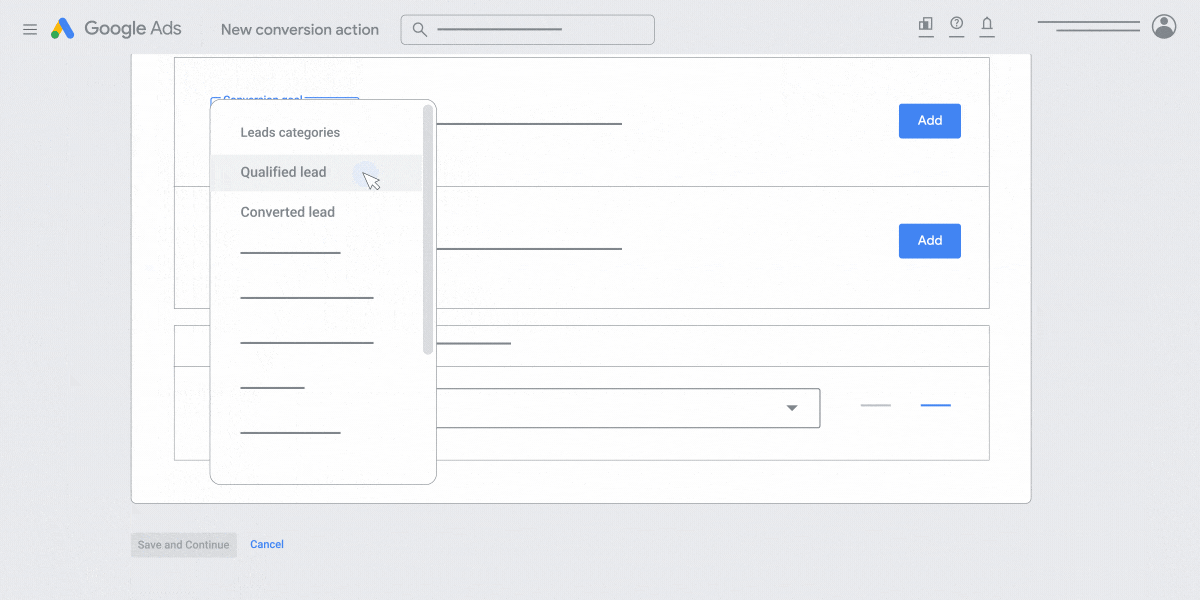
Local service businesses can use form submissions, bookings, qualified leads or closed sales as conversion goals to guide campaign delivery. Each goal measures a different business outcome. Say a repair business gets 30 inquiries through a form. Of those, 8 prospects meet its service criteria and 3 book a visit. Optimizing for form submissions may bring in more inquiries without increasing the number of qualified leads.
If you can reliably record qualified leads and send them back to Google Ads, you can measure your cost per qualified lead. (Google Ads guide to qualified leads)
Performance Max is a better fit for teams that can track conversions and have a steady stream of campaign data. If you only track ad clicks and call counts, improve your customer records before relying more heavily on AI bidding.
How to Choose an AI Marketing Tool
Start with the work your team needs to get done. If you test ad creative often, try Seedream for images or Higgsfield for short videos.
If you already get traffic to your own store and you want more shoppers to buy, consider Meta Advantage+ for ad delivery and Klaviyo for segmentation and email follow-up.
For B2B SaaS, Semrush can help plan SEO content and HubSpot Breeze fits email marketing in an existing CRM. Consider Offloop if several people need to work with agents on launches, marketing content or tasks that span teams.
Local service businesses can choose between CallRail and Google Ads Performance Max based on how they get leads.
Try a tool on a recurring task. Record how long that task takes today, then compare the time and the result after adding AI. Include editing, review, setup and extra usage in your calculation alongside the subscription.
AI Marketing Tools FAQ
Answers on free plans, setup, automation and when to pay.
What are AI marketing tools?
AI marketing tools use artificial intelligence to help with work such as making ad images and videos, creating SEO content, writing emails, automating ad delivery, segmenting customers and analyzing sales leads.
They can be standalone products or features in marketing platforms such as Meta, Google Ads and HubSpot.
Which AI marketing tools are free?
Klaviyo has a free plan with up to 250 active profiles and 500 emails per month. It also includes $5 of Composer usage each month, which you can use to try AI email generation.
Advanced features such as AI segmentation require a paid plan.
What are the best AI marketing tools for small businesses?
With a limited budget, start with the problem you need to solve. Try Seedream for product images or Higgsfield if you make video ads often. If you run your own online store, Klaviyo’s free plan can help you set up basic automated emails.
If you already advertise with Meta or Google Ads, look at the AI features in your account before buying another tool.
Can I use AI marketing tools without coding?
Yes. Higgsfield has video templates, HubSpot Breeze can draft in the email editor, and Semrush can generate SEO briefs through its interface.
You may need developer help to connect order, payment and customer behavior records from a custom-built store to a marketing platform.
Can AI marketing tools automate all marketing work?
They can handle tasks such as sending cart reminders based on rules, drafting content and adjusting ad bids.
Keep checking product information, claims in ads, customer data and actual conversions. Have someone review decisions that involve multiple teams and materials you plan to publish.
How can I tell if an AI marketing tool is worth paying for?
Try it on a recurring task, such as producing ad creative, preparing SEO briefs or organizing sales leads.
Track how long it takes to generate, edit and review the work, along with subscription costs and business results. Keep paying if the tool consistently saves money or improves results.
Sources
- Alya Health case study higgsfield.ai
- BytePlus Seedream example ai.byteplus.com
- Seedream 5.0 Pro overview seed.bytedance.com
- Seedream API pricing console.byteplus.com
- Higgsfield Marketing Studio guide higgsfield.ai
- Higgsfield pricing higgsfield.ai
- How credits work higgsfield.ai
- Meta Blueprint course certifications.facebookblueprint.com
- The Athlete’s Foot Meta campaign case study adsmurai.com
- Meta ad budgeting guide facebookblueprint.com
- Klaviyo abandoned cart flow guide help.klaviyo.com
- Unclaimed Baggage case study outerboxdesign.com
- AI segmentation guide help.klaviyo.com
- Klaviyo pricing klaviyo.com
- Offloop article offloop.org
- Offloop for marketing teams offloop.org
- Offloop pricing offloop.org
- Jasper Brand Voice jasper.ai
- Semrush SEO Brief Generator semrush.com
- Semrush Content Toolkit pricing semrush.com
- Plan details semrush.com
- HubSpot AI email creation guide knowledge.hubspot.com
- HubSpot AI content generation knowledge.hubspot.com
- Email recipient analysis knowledge.hubspot.com
- HubSpot pricing hubspot.com
- CallRail single-call view guide support.callrail.com
- CallRail heating and air conditioning case study callrail.com
- CallRail pricing callrail.com
- Google Ads guide to qualified leads support.google.com
- Performance Max budgeting guide support.google.com
- Composer guide help.klaviyo.com