How to write a follow-up email after a sales call
Send the first follow-up email the same business day when you can. Remind the buyer what you discussed, confirm one next step with an owner and a date, and send anything you promised. The email should also make sense to a colleague who wasn’t on the call.
- Use a recognizable subject. Name the project, call, or action. “Warehouse rollout: demo recap and next steps” gives the buyer something useful to search for later.
- Recap what matters to the buyer. Pull one or two priorities from your call notes, and use their words where they help. Include a timeline only if it came up.
- Separate commitments from open questions. If you owe a pricing sheet or an answer, say who’s sending it and when. For a tentative next step, propose a day and an agenda.
- End with one clear request. Ask the buyer to confirm a time, check your summary, or share the one detail you need to move the deal forward.
For a first draft, share your call notes with an Offloop AI teammate and ask it to recap the buyer’s priorities and the next step you agreed on.
If you agreed on a decision date, use it to plan your next follow-up. With no agreed date or reply, give the buyer a few business days and return to the original thread with a useful update or a specific question.
Example next step after a demoI’ll send the security checklist by Thursday. Does Tuesday at 10 a.m. ET work for a 20-minute review with your IT lead?
Fill in the fields to update the subject and body. Open draft starts a new message. To stay in an existing thread, copy the email into your reply. Before sending, remove lines you don’t need and check for any placeholders you haven’t filled.
Follow-up emails after a sales call
Choose the recap that matches the meeting you just had. The first email should confirm what happened and what the buyer agreed to do next. If several people joined the call, share the notes and draft in an Offloop Channel so the people who made commitments can confirm them before you send the recap.
Follow-up email after a discovery call
When to use it. Use after the buyer has explained what is getting in the way and what a better outcome would look like.
How to adapt it. Quote their priorities in plain English. Keep the goal date only if you discussed it, and ask them to confirm the follow-up call if it’s tentative.
Customize email
Email preview
SubjectDiscovery call recap and next steps
Hi {first_name}, Thanks for walking me through your process today. Here’s what I took away: - {pain_point_1} - {pain_point_2} - Goal: {goal} by {date} Would {day} work for a {length}-minute call with you and {stakeholder} to cover {next_topic}? Best, {your_name}
Follow-up email after a product demo
When to use it. Use after a demo when the buyer has seen enough to identify priorities or questions for the next evaluation step.
How to adapt it. Keep only priorities the buyer raised. Give each outstanding question an owner, and use separate dates for the promised answer and the next step.
Customize email
Email preview
SubjectDemo recap: open questions and next steps
Hi {first_name}, Thanks for joining the demo. You said these were the priorities for your team: - {priority_1} - {priority_2} - {priority_3} I’ll send {answer_1} by {answer_due_date} to cover {question_1}. {owner} will follow up on {question_2}. Would it work to start {next_step} on {next_step_start_date}? Best, {your_name}
Draft a follow-up from your call notes
Ask an Offloop AI teammate to turn your demo notes into a recap with the next step you agreed on. Get US$200 in free credits once per account. No card required.
Follow-up email after a short intro call
When to use it. Use after a brief introductory call where you identified one reason to keep talking.
How to adapt it. Include the material you promised. If nobody confirmed a time on the call, turn the last sentence into a question.
Customize email
Email preview
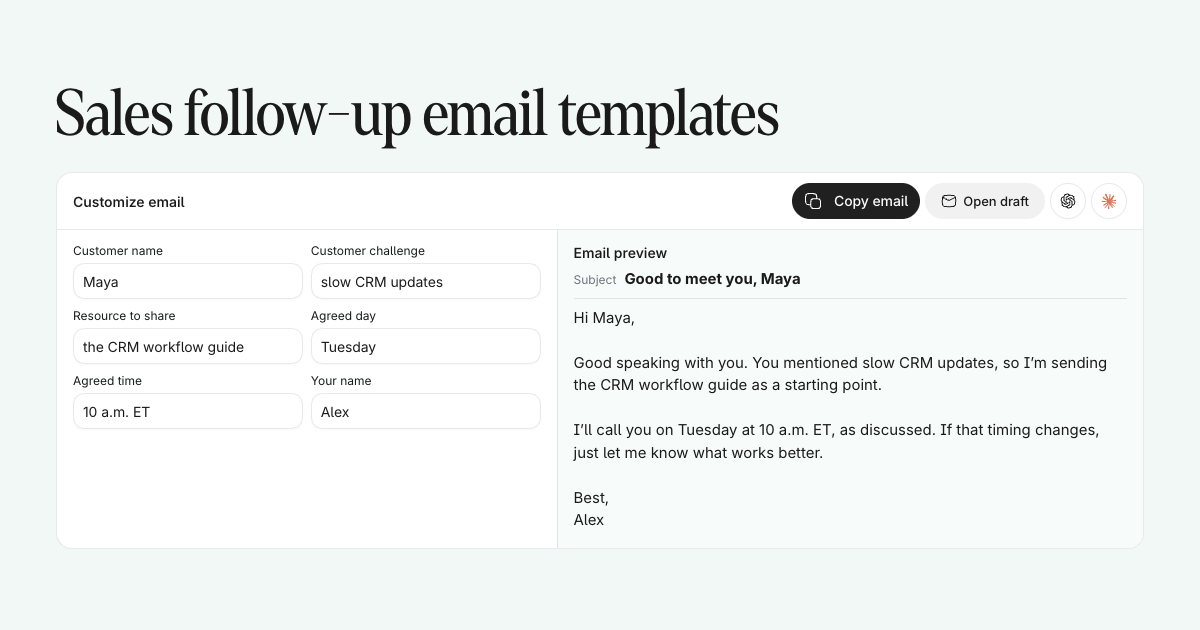
SubjectGood to meet you, {first_name}
Hi {first_name}, Good speaking with you. You mentioned {challenge}, so I’m sending {resource} as a starting point. I’ll call you on {day} at {time}, as discussed. If that timing changes, just let me know what works better. Best, {your_name}
Recap email after a call with several stakeholders
When to use it. Use after a group sales call when several people need the same record of decisions and responsibilities.
How to adapt it. Keep decisions separate from unresolved questions and give every action one owner and deadline. Check who should receive the recap.
Customize email
Email preview
Subject{company}: decisions and action items
Hi all, Here’s the recap from today so everyone has the same next steps. - Decisions: {decisions} - Open questions: {open_questions} - {owner_1}: {action_1} by {date_1} - {owner_2}: {action_2} by {date_2} We’ll meet again on {date_time}. Please flag anything I missed. Best, {your_name}
Get one recap out to the whole buying group
Keep the call notes and action items in a shared channel so your account lead and solution engineer can check the recap together.
Rescheduling email after a missed sales call
When to use it. Use after a prospect misses one scheduled call and you still have a reason to meet.
How to adapt it. Offer two available times with a time zone. Include a booking link if it helps them find another slot.
Customize email
Email preview
SubjectCan we find a new time?
Hi {first_name}, We missed each other at {time}. I can do {option_1} or {option_2} if you’d like to reschedule. If neither works, you can pick another time here: {calendar_link}. Best, {your_name}
Follow-up emails when there’s no response
Start with the unanswered recap. Pick the email that matches what you can add, how long the thread has been quiet, and whether the next step still makes sense.
First follow-up email after no response
When to use it. Send after an unanswered recap and after any reply date you agreed on. With no date, a few business days is a reasonable starting point.
How to adapt it. Reply in the original thread and ask about the specific next step. If the proposed day has passed, offer a new day.
Customize email
Email preview
SubjectRe: {original_subject}
Hi {first_name}, Checking back on the next step we discussed. Does {next_step} on {day} still work for you? Thanks, {your_name}
Keep track of who owes the next reply
Record the last touch and the next agreed date in the deal channel so the team can pick up the conversation without sending duplicate reminders.
Second follow-up email with something useful
When to use it. Use when the first reminder went unanswered and you have a relevant answer, example, or document to share.
How to adapt it. Link to the resource directly and explain what it answers. If the buyer can act on it themselves, keep the ask simple.
Customize email
Email preview
SubjectA resource for {goal}
Hi {first_name}, I thought {new_resource} on {topic} might help with your question about {question}. Would it be useful to spend 15 minutes on it next week? Best, {your_name}
Short check-in email when the buyer goes quiet
When to use it. Use when the buyer has the recap and a brief status check would tell you whether to follow up again.
How to adapt it. Ask about one known goal and use the buyer’s timeframe.
Customize email
Email preview
Subject{first_name}, is the timing still right?
Hi {first_name}, Is {goal} still a priority this quarter? Happy to reconnect when the timing makes sense. {your_name}
Give your next nudge a reason to exist
Share the buyer’s last question with an AI teammate and ask for a short follow-up that adds one useful answer or resource.
Follow-up email to find the right contact
When to use it. Use when you have a reason to believe responsibility moved to another person or team.
How to adapt it. Name the project and make the introduction optional. Give the current contact room to correct the assumption.
Customize email
Email preview
SubjectWho’s leading {topic}?
Hi {first_name}, Is {topic} still with your team? If someone else is leading it now, would you mind pointing me in the right direction? Thanks, {your_name}
Final follow-up email to close the loop
When to use it. Use for your last message when the buyer hasn’t replied and there’s no next step on the calendar.
How to adapt it. Reply in the original thread and stop the sequence afterward. If the buyer has already declined or opted out, close it without another email.
Customize email
Email preview
SubjectClosing the loop
Hi {first_name}, It sounds like the timing may not be right, so I’ll close the loop here. If you want to pick this up later, reply to this thread and we can start where we left off. Best, {your_name}
Leave a handoff for the next person on the account
Save who you contacted, what they said, and when it makes sense to try again in the channel your team already uses.
Follow-ups after a proposal, trial, or objection
Once the deal has moved into evaluation, follow up on the specific decision the buyer needs to make.
Follow-up email after sending a proposal
When to use it. Use once the buyer has had time to read the proposal, around the date you agreed to check back.
How to adapt it. Link to the version you sent. Use the buyer’s decision date and ask what they still need to review.
Customize email
Email preview
SubjectAny open questions on the proposal?
Hi {first_name}, I’m following up on the proposal I shared on {date}. I’m happy to walk {stakeholder} through the scope if a discussion would help. Is there anything you need from me before {decision_date}? Best, {your_name}
Follow-up email during a product trial
When to use it. Use after the evaluation team has had time to test the agreed workflow and can still act on your help.
How to adapt it. Ask what they’ve tried if you don’t know. Connect the feature to their evaluation goal and propose a check-in if it would unblock them.
Customize email
Email preview
SubjectHow’s the trial going?
Hi {first_name}, You’re {days} days into the trial. Have you had a chance to use {key_feature} for {goal}? If anything is blocking that test, would a 20-minute check-in on {day} help? Best, {your_name}
Turn trial feedback into a clear next step
Ask an AI teammate to pull the open questions from your notes and draft a check-in around one decision the buyer can make.
Follow-up email answering a sales objection
When to use it. Send once you have a useful answer to a concern the buyer raised on the call.
How to adapt it. Use their wording, give a direct answer, and attach supporting evidence if it helps. Explain which parts you still need to confirm.
Customize email
Email preview
SubjectFollowing up on {objection_topic}
Hi {first_name}, You asked about {objection}. Here’s the short answer: {short_answer}. If you’d like to go deeper, I can bring {expert} into a short call. Best, {your_name}
Follow-up email for a security or legal review
When to use it. Use when IT, security, or legal asks for a specific document or opens a formal review.
How to adapt it. Share a current approved file or a link the reviewer can access. Point them to the sections that answer the request.
Customize email
Email preview
SubjectSecurity review materials for {company}
Hi {first_name}, Here’s {security_doc} for {security_lead}. It covers {topics}. If anything is still open after they review it, have them send me their questions and I’ll route them to the right person. Best, {your_name}
Review security answers with the people who own them
Keep the buyer’s questions, supporting documents, and draft replies together so sales, legal, and security can review the same context.
Forwardable follow-up email for an internal champion
When to use it. Use when a supporter needs to explain the proposal to a manager, finance lead, or buying committee.
How to adapt it. Attach the summary before sending. Use the buyer’s business case, agreed scope, and confirmed costs so it forwards cleanly.
Customize email
Email preview
SubjectA one-page summary for your team
Hi {first_name}, You mentioned sharing the proposal with {decision_maker}. I’ve attached a one-page summary of the problem, evaluation plan, and cost that you can forward. Would it help if I joined that discussion to answer questions? Best, {your_name}
Follow-ups after a voicemail, event, or demo request
Give the recipient enough context to place the conversation, then ask for the simplest useful next step.
Follow-up email after leaving a voicemail
When to use it. Use after leaving a voicemail when email gives the recipient a simpler way to respond.
How to adapt it. Restate your reason for calling in a sentence and verify that the booking link opens the right calendar.
Customize email
Email preview
SubjectFollowing up on my voicemail
Hi {first_name}, I left you a short voicemail about {topic}. I’m reaching out because {value_line}. If it’s easier to schedule a time, here’s my calendar: {calendar_link}. Thanks, {your_name}
Give the next rep enough context to follow through
Share the agreed ask, the last touch, and the follow-up owner in one place so an internal handoff doesn’t stall the deal.
Follow-up email after meeting at an event
When to use it. Use soon after meeting a prospect at an event when you have a clear reason to continue the conversation.
How to adapt it. Name the event and one thing you discussed. Send the resource you promised or connect what you’re sharing to their question.
Customize email
Email preview
SubjectGood to meet you at {event}
Hi {first_name}, Good talking with you at {event} about {topic}. You mentioned {challenge}, so I thought {resource} might be useful. Would you be open to a short call next week? Best, {your_name}
Reply email after a prospect requests a demo
When to use it. Use when a prospect requests a demo and hasn’t booked a time yet.
How to adapt it. Offer two slots with a time zone and ask what to cover so the demo addresses their use case.
Customize email
Email preview
SubjectLet’s set up your demo
Hi {first_name}, Thanks for requesting a demo. I can do {option_1} or {option_2}. Which time works for you? If there’s one thing you’re hoping to solve with {product_category}, let me know and I’ll make sure we cover it. Best, {your_name}
Personalize incoming demo replies faster
Give an AI teammate the inquiry and any relevant notes. Ask it to draft a reply around the prospect’s use case and suggest a next step.
Re-engagement and post-signature emails
Reopen a quiet deal with a concrete reason, or hand a signed customer over to the person running kickoff. When you reopen a deal after a long pause, you can use Offloop Botmode to review the notes you share, pull out open commitments, and prepare a draft for your review.
Re-engagement email for a stalled sales deal
When to use it. Use when a deal has been quiet for weeks and something has changed since you last spoke.
How to adapt it. Connect that change to the blocker from the last conversation. Respect the date if the buyer told you when to reach out.
Customize email
Email preview
SubjectChecking back on {topic}
Hi {first_name}, When we spoke in {month}, we discussed {topic}. Since then, {relevant_change}. Would a 15-minute catch-up help you decide whether it’s worth revisiting? Best, {your_name}
Welcome email after the deal is signed
When to use it. Send after the agreement is signed, while the customer is waiting to find out how onboarding starts.
How to adapt it. Name the kickoff owner, when they will reach out, and one thing the customer can do to prepare.
Customize email
Email preview
SubjectWelcome aboard: kickoff and next steps
Hi {first_name}, Thanks for choosing {your_company}. {onboarding_owner} will reach out by {date} to schedule kickoff. To get ready, please {setup_step}. I’m still here if you have any questions in the meantime. Best, {your_name}
Carry sales commitments into onboarding
Walk through how your team can share buyer goals, commitments, and owners between sales and customer success.
When to send a sales follow-up email
| Moment | When to send |
|---|---|
| After a discovery call or demo | Same business day when possible. |
| After a missed meeting | Soon after the missed slot, or the next business morning. |
| First follow-up after no reply | After the agreed reply date. If there was none, wait a few business days. |
| After a proposal or pricing email | Around the buyer’s review date, or once they have had a few business days to read it. |
| Final follow-up | When there’s no agreed next step and further reminders would repeat the same ask. |
| Reopening a quiet deal | On the date the buyer requested, or when something relevant changes. |
Use the buyer’s timeline first. If they decline or opt out, end the sequence.
How to personalize a sales follow-up email
- Replace generic pain points with one detail from the call, such as the report the team still builds by hand.
- Keep the next step realistic. Confirm what was agreed, and frame anything tentative as a proposal.
- Check names, meeting time zones, attachments, and access permissions before sending.
- Read the email as if you missed the call. Make sure the subject, context, and request still make sense.
Sales follow-up email FAQ
When should I send a follow-up email after a sales call?
Send the first recap the same business day when possible. If the call ends late, send it the next business morning. Use any timing you agreed with the buyer for later follow-ups.
What should a follow-up email after a sales call include?
Use a recognizable subject, a short recap in the buyer’s language, what you promised to send, and one clear next step with an owner and a date.
What subject line should I use after a discovery call or demo?
Use the project or buyer’s company plus the purpose. For example, “Acme rollout: demo recap and next steps” is easy for the buyer to recognize and find again.
How do I follow up on a sales email with no response?
Wait until the agreed reply date, or give the buyer a few business days if there wasn’t one. Reply in the same thread with a useful update or a specific question. Stop if the buyer declines or opts out.
Are these sales follow-up email templates free?
Yes. All 20 templates are free to use. Fill in the details, then copy the result or open a new draft in your mail app.
Draft your next sales follow-up with Offloop
Turn your call notes into a draft your team can review. Get US$200 in free credits once per account. No card required.
Start for free