Search Google for best AI agents, and you'll probably find a list of 20 or more tools. Some are outdated, others do practically the same thing, and a few are obscure products you've never heard of. Every one of them is supposedly the best at something. By the end, you're no closer to knowing which one to use.
I don't find those lists particularly helpful.
By 2026, the leading AI agents can handle much of the same work. Writing, research, data analysis, website design, coding — Claude and ChatGPT can do all of it. Many tasks that once required specialized AI tools can now be handled by either of them.
I use AI every day and help build Offloop. I tend to use Claude for copywriting, web design, and customer support, while ChatGPT is my preferred choice for research, data analysis, and complex software development. But when someone is just getting started, I usually recommend trying both. The differences aren't significant enough for most people to spend hours comparing model benchmarks before getting anything done.
Over the past year, I've also started relying more on agents that can keep working without constant supervision. I use Grok Bot every day to monitor news and user discussions on X, follow Reddit communities, and track updates across other websites. Instead of repeatedly checking those sources myself, I read the updates it sends me.
Muse and Instinct offer another possibility: AI that becomes part of everyday life, taking care of small tasks and things we'd otherwise forget. And when work involves several people, products like Offloop are exploring how humans and agents can collaborate in the same environment.
These are the six agents I recommend trying in 2026: Claude, ChatGPT, Muse, Grok Bot, Instinct, and Offloop. Here's what each does well, how I use them, and what other users have been saying on Reddit and X.
The 6 Best AI Agents in 2026
| AI Agent | Best For | Pricing |
|---|---|---|
| Claude | Writing, web design, customer support, documents, everyday work | Free plan; Pro $20/month |
| ChatGPT | Research, data analysis, complex coding, software design | Free plan; Plus $20/month |
| Muse | Personal assistance, daily planning, proactive reminders | Limited free plan; paid tiers available |
| Grok Bot | Monitoring news, social media, websites, and running multiple agents | Premium from $30/month |
| Instinct | Booking appointments, shopping, and managing errands by text or phone | Trial available |
| Offloop | Collaboration between people and multiple AI agents | 200,000 free credits |
Pricing is based on US plans.
1. Claude and ChatGPT: Where Most People Should Start
If you're new to AI agents, start with Claude and ChatGPT.
Both handle a wide range of tasks, including research, writing, design, data analysis, coding, and document processing. They can also use tools to carry out work beyond a chat window.
I use both every day. Their capabilities overlap considerably, but over time, I've developed my own preferences.

Claude: My Go-To for Almost Everything
Writing, web design, customer support, documents, everyday work
- Best For
- Writing, web design, customer support, documents, everyday work
- Pricing
- Free plan; Pro $20/month
Pros
- Iterate on articles, marketing copy, and customer replies in the same conversation.
- Start from a reference image, then refine a site's layout, typography, and interactions.
- Create documents, spreadsheets, and slides, or use Claude Code to edit and test a project.
Cons
- The free plan has lower limits. Claude's personal subscriptions include Claude Code from Pro upward.
- Getting a web design right can take several rounds of detailed feedback.
- Working with files in other apps requires granting Claude access first.
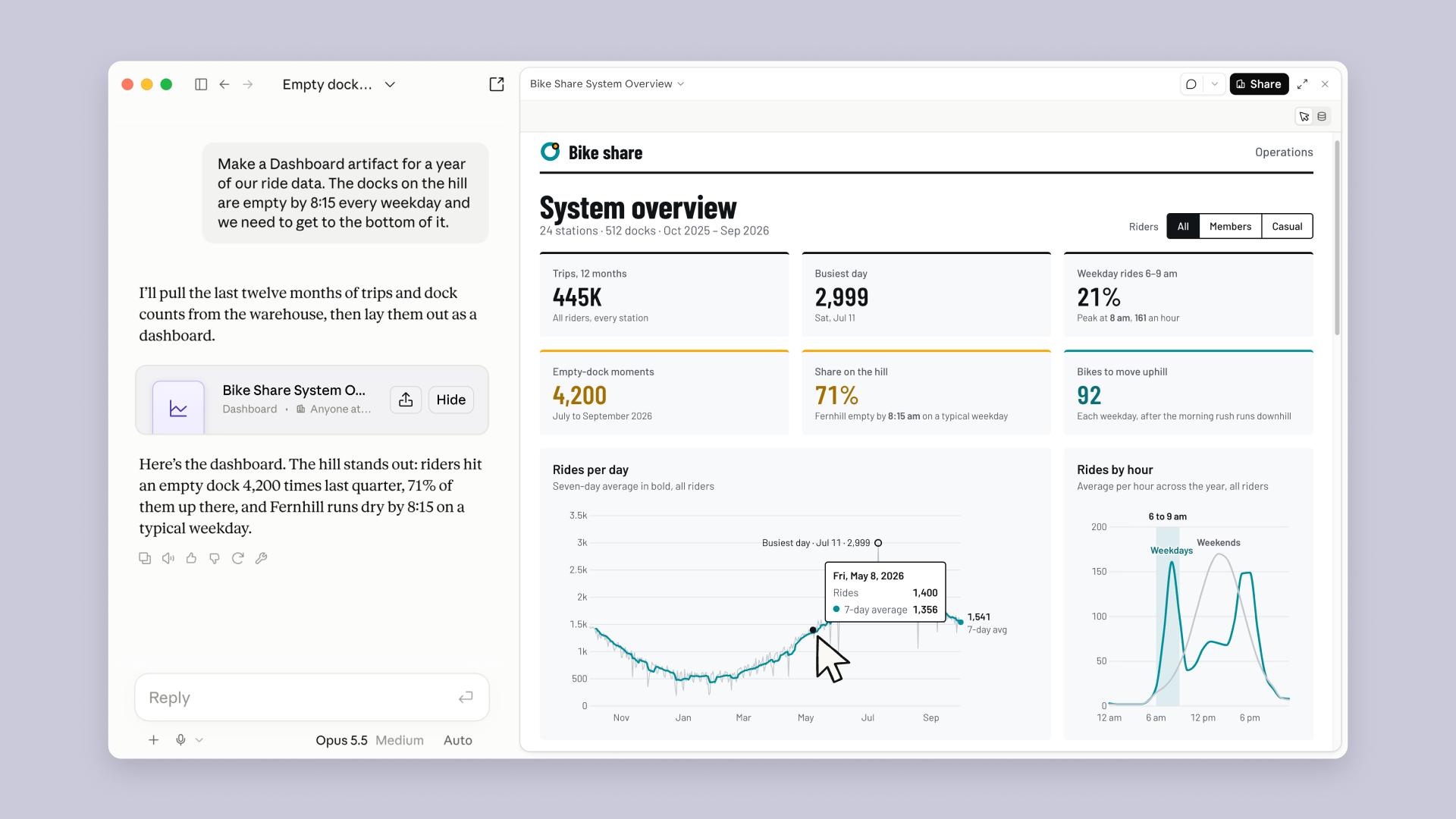
Claude is one of my most-used AI tools. I turn to it for articles, marketing copy, website design, customer support, and even small utilities I need to build on the fly.
For web design, I often give Claude a reference image or describe the visual style I want. It generates a page, and then we work through the layout, typography, animations, and interactions. Sometimes a page takes a dozen rounds of changes, but the process feels surprisingly close to working with a designer.
Writing works much the same way. I give Claude an existing draft, some reference material, and my notes. It helps restructure the piece, update information, and revise specific sections. I prefer working on an existing draft over generating a completely new article every time.
For customer support, I use Claude to organize user questions, search help documentation, draft responses, and identify recurring product issues. These are things I deal with regularly, and I can handle them without switching between a collection of specialized AI tools.
Claude can also create documents, spreadsheets, and presentations, and work with files and connected applications. Developers can use Claude Code to explore repositories, modify files, run commands, and execute tests.
Pricing: Claude has a free plan. Pro costs $20/month in the US and includes access to Claude Code with higher usage limits.
ChatGPT: My Preferred Agent for Research, Data, and Complex Development
Research, data analysis, complex coding, software design
- Best For
- Research, data analysis, complex coding, software design
- Pricing
- Free plan; Plus $20/month
Pros
- Deep Research compares sources against consistent criteria, useful for market and competitor research.
- Analyze collected data, spot anomalies, and build charts in the same workflow.
- Work can turn research into editable deliverables, and Codex can make and test changes in a codebase.
Cons
- Deep Research, Work, and Codex have usage limits that vary by plan.
- When comparing plans, you still need to check official sources, regions, and pricing terms.
- Connected apps and files need permission, and complex tasks can still require clarification or approval.
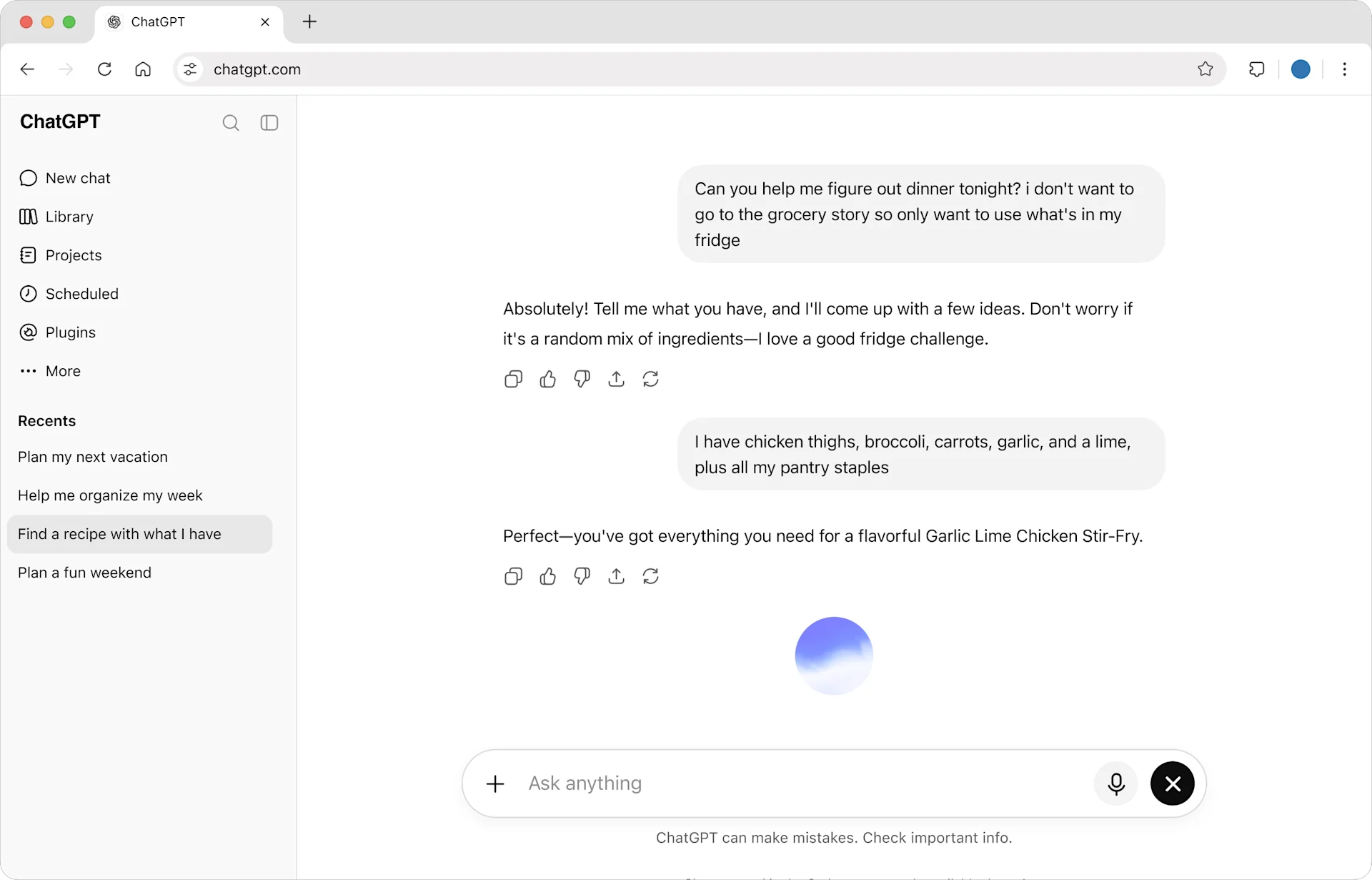
ChatGPT is the other tool I open every day. I generally use it for market research, data analysis, and larger software development projects.
When researching a new market, I might ask ChatGPT to collect competitor information, compare pricing and target customers, and organize everything into a spreadsheet. From there, I can ask it to analyze pricing patterns, identify anomalies, verify sources, or create visualizations.
Deep Research is particularly useful for work involving many sources. It prepares a research plan, searches for information, and produces a report with citations. I often ask it to prioritize official documentation and compare products using consistent criteria.
Sometimes research is only the beginning. ChatGPT Work can continue by handling files, navigating websites, using connected apps, and producing editable documents, spreadsheets, or presentations.
I also rely heavily on ChatGPT for software development. For architecture design, changes spanning multiple modules, debugging, and longer development cycles, I tend to prefer it. In my own projects, I've found it more consistent on certain demanding engineering tasks. Codex can work directly with repositories, modify code, and run tests.
Pricing: ChatGPT offers a free plan. Plus costs $20/month in the US. Deep Research, Work, and Codex have usage limits that vary by plan.
Claude vs. ChatGPT: Why Not Try Both?
My recommendation is simple: try both.
I prefer Claude for writing, design, and everyday tasks, while I lean toward ChatGPT for research, data analysis, and complex software development. Those preferences come from using both extensively. They don't mean one is incapable of doing the other's work.
You could spend an entire workday using Claude, or do the same work in ChatGPT. For most people, the way a product fits into their routine matters more than a small difference in benchmark scores.
Take something you actually need to do and give it to both. Compare the results and decide which experience you prefer. Developers can take this a step further by testing Claude Code and Codex on their own projects.
Both have free plans. Start there.
2. Personal AI Agents: Let AI Handle the Little Things in Life
I'm increasingly convinced that personal AI agents will become a new way of living.
Life is full of small things to keep track of. When is your favorite band coming to town? Does that restaurant your friend recommended have any availability? When does a subscription renew? Has something you wanted to buy gone on sale?
Then there are all the things you notice, tell yourself you'll deal with later, and promptly forget.
None of these tasks is particularly difficult. Together, though, they take up a surprising amount of attention. You have to remember them, check again a few days later, and sometimes move between several apps just to finish one thing.
I'd like a personal agent to take care of more of that. It should know what I'm interested in, remember plans I've mentioned in passing, bring useful updates to my attention, and handle errands I keep putting off.
Muse, Grok Bot, and Instinct approach that experience in three different ways.

Muse: A Personal Assistant That Takes the Initiative
Personal assistance, daily planning, proactive reminders
- Best For
- Personal assistance, daily planning, proactive reminders
- Pricing
- Limited free plan; paid tiers available
Pros
- Remembers interests and can send proactive updates about teams, artists, or nearby events.
- You can delegate through the Muse app or WhatsApp.
- Connected calendars and email help it keep track of plans and everyday tasks over time.
Cons
- The free plan has usage limits, which matter if you delegate frequently.
- Calendar and email tasks require connecting the relevant accounts first.
- Some users found proactive notifications too frequent.
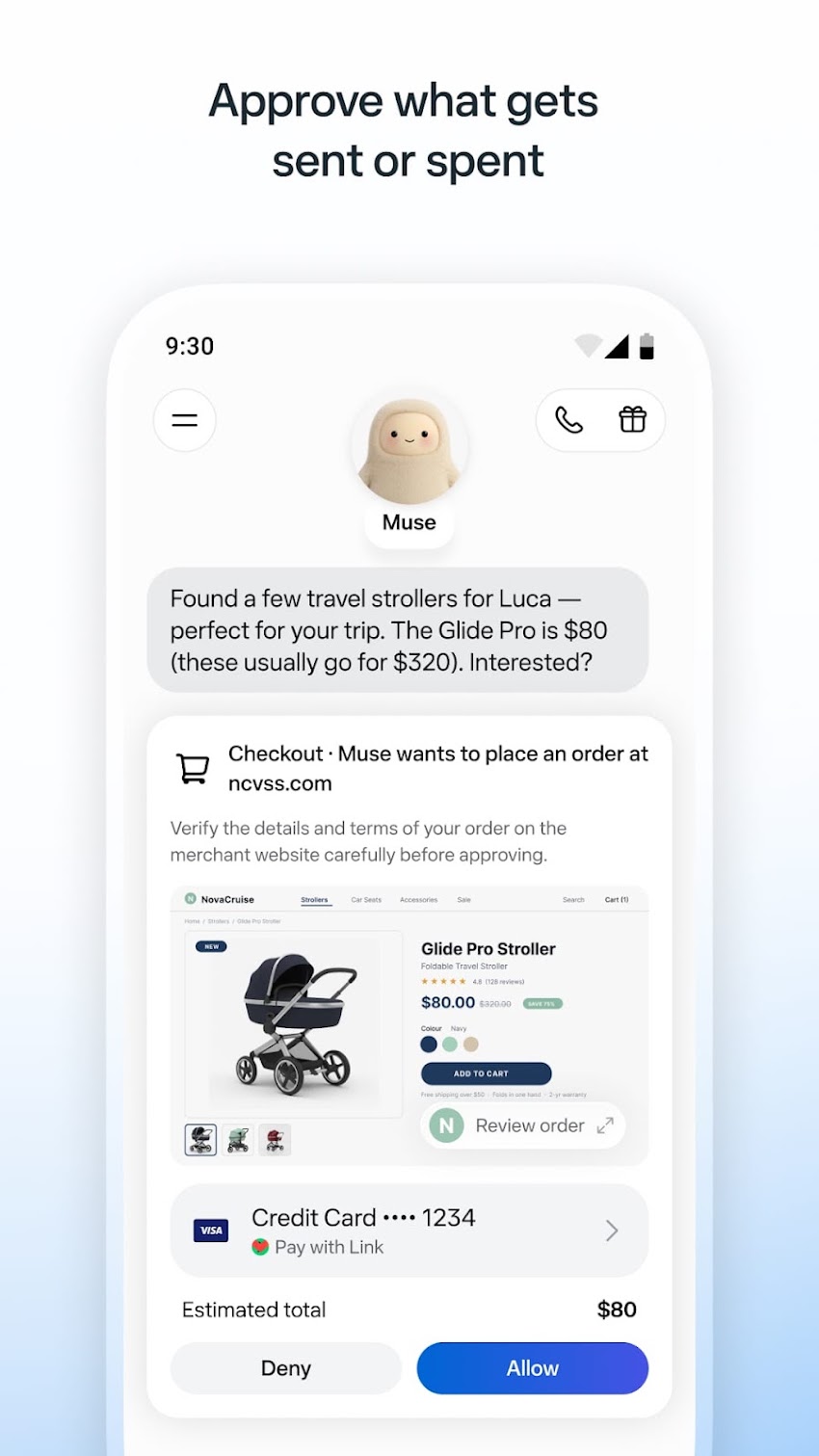
Muse is Meta's personal AI agent, launched in 2026. You can use it through its dedicated app or WhatsApp. It remembers preferences, connects to authorized services, and handles tasks in the background.
What interests me most is its ability to be proactive.
Tell Muse which bands you like or which sports teams you follow, and it can keep an eye on relevant updates. When there's a concert nearby, a schedule change, or something else worth knowing, it can bring that information to you.
That's close to what I want from a personal assistant. Quite often, I don't need AI to solve a complicated problem. I just want something to remember what matters to me and bring it up at the right time.
Muse can also help manage calendars, emails, travel plans, and shopping. It uses a cloud environment to interact with connected services and builds up personal context over time.
For someone who wants AI to fit naturally into daily life, Muse is a good place to start. You can describe your plans and preferences in ordinary conversation without building automation workflows.
Pricing: Muse offers limited free access and paid plans for heavier use. Availability is primarily focused on US users.

Grok Bot: The Personal Agent I Use Every Day
Monitoring news, social media, websites, and running multiple agents
- Best For
- Monitoring news, social media, websites, and running multiple agents
- Pricing
- Premium from $30/month
Pros
- Runs scheduled monitoring across X, Reddit, and other sites.
- Multiple Bots can run on different schedules and hand work off to one another.
- Sends findings, sources, and progress in separate messages, so ongoing work is easy to follow.
Cons
- Grok Bot is included in X personal subscriptions from Premium upward.
- Joining Google Meet, Zoom, or Microsoft Teams calls requires a Team, Enterprise, or Ultra plan.
- Broad or frequent monitoring uses more of the allowance, so it helps to define sources and cadence.
Grok Bot is one of my most-used personal agents.
My work requires me to stay on top of AI news, user feedback on social media, and competitor updates. I used to spend a significant part of every day opening X, Reddit, and various websites, looking for new information and deciding what deserved further attention.
Now Grok Bot handles much of that work.
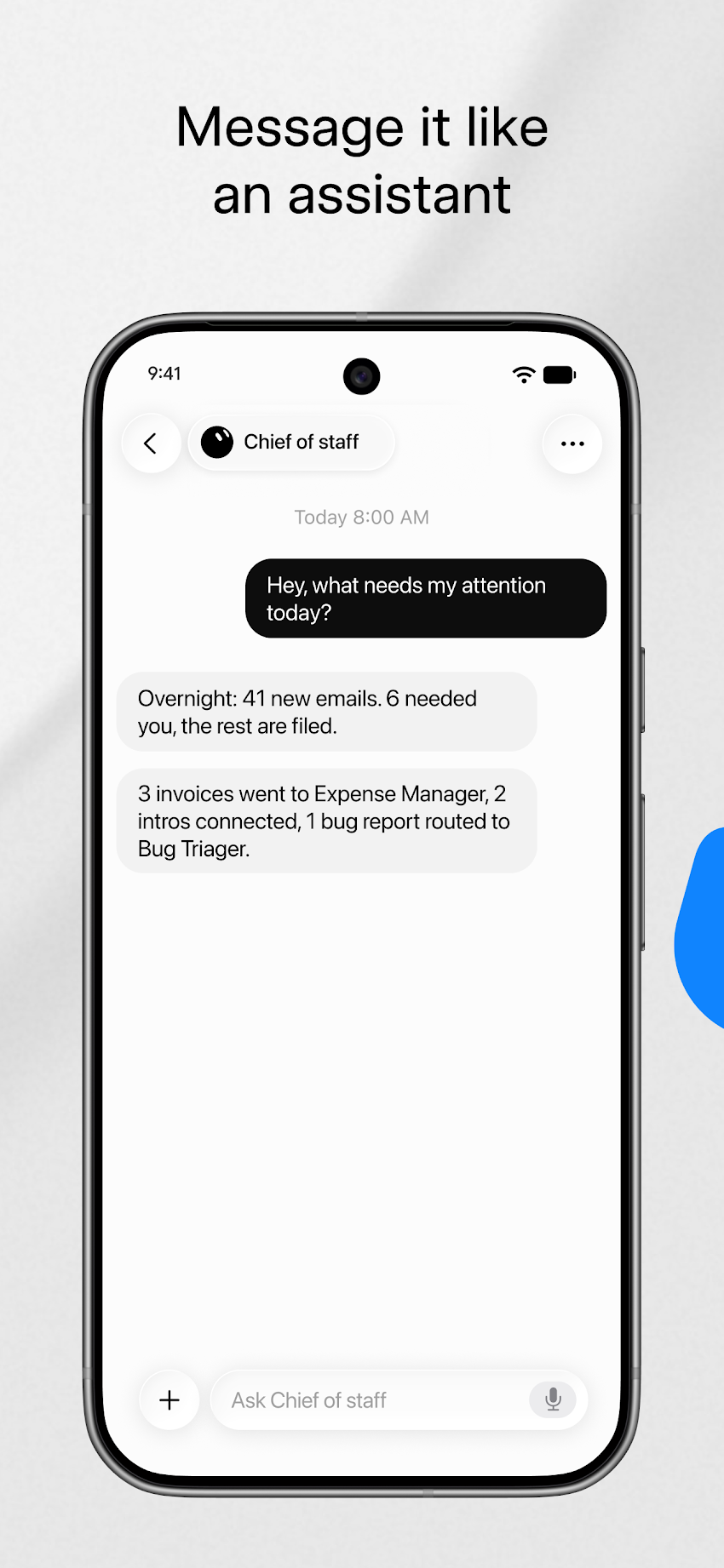
I have it check X for news and conversations, watch what users are discussing, identify emerging interests, and look for new use cases. Other bots monitor Reddit and additional websites. They run on their own schedules and send me the updates worth reading.
Most of the time, they do a good job. I open Grok Bot, read what it's collected, and follow up whenever something catches my attention.
I also really like its interface.
Instead of delivering one enormous report, Grok Bot breaks its responses into separate chat bubbles. It feels like a colleague sending messages as they work: first sharing what they found, then adding sources, then following up with new information.
It's a much more natural experience than receiving a long report every morning. Sometimes it feels like chatting with a particularly well-informed friend who happens to keep track of everything I'm interested in.
Grok Bot also supports multiple bots working on separate tasks. One can monitor news, another can research user feedback, and a third can prepare regular summaries. Each can follow a different schedule, and bots can hand work off to one another.
Although I mostly use it for work, the same setup works for personal life. You could track prices for something you want to buy, follow travel plans, or get daily updates on a subject you enjoy.
I recommend Grok Bot to anyone who wants an agent to keep watching the internet and bring back useful information.
I schedule my tasks at specific intervals to keep usage focused on the updates that matter.
Pricing: Grok Bot Premium costs $30/month, Super $100/month, and Ultra $200/month, with different usage allowances.

Instinct: Handle Everyday Errands With a Text or Phone Call
Booking appointments, shopping, and managing errands by text or phone
- Best For
- Booking appointments, shopping, and managing errands by text or phone
- Pricing
- Trial available
Pros
- Delegate bookings, shopping, or calls to businesses by text or phone.
- It can handle search, outreach, and follow-up without making you switch between sites.
- It can track changes over time, such as flight prices.
Cons
- Standard public subscription pricing is unavailable, which makes ongoing costs hard to estimate.
- A user reported slow execution or site-access problems on some cross-site tasks.
- For purchases, it's worth asking Instinct to bring the decision back to you before payment.
Instinct has an interesting approach. You can simply send it a text or call and tell it what you need.
There's no elaborate dashboard to learn or automation workflow to build.
Suppose you want to play tennis on Saturday afternoon. Tell Instinct your preferred time, location, and budget, and it can look for available courts and bring back booking options.
Other use cases include restaurant reservations, shopping, finding flights, and contacting businesses.
These are the kinds of chores we constantly put off. You know something will take only 15 minutes, but you don't feel like opening another website, comparing prices, filling out forms, or calling customer support.
Instinct is designed to take those chores off your hands.
I like the idea behind it. Most people don't care whether an AI uses a browser, an API, or some other tool. They just want the job done. Instinct makes interacting with an agent as familiar as sending a message or making a phone call.
Compared with Muse's personal context and Grok Bot's ongoing monitoring, Instinct feels more like an assistant you can contact whenever there's a specific errand to handle.
For people who frequently need to make reservations, shop, or deal with customer service, that simplicity is appealing.
Pricing: Instinct offers a trial through its website. Standard public subscription pricing has not been announced.
Muse vs. Grok Bot vs. Instinct: Which Should You Choose?
| What You Want | My Pick |
|---|---|
| An assistant that remembers your interests and proactively manages daily life | Muse |
| Continuous monitoring of news, social media, and websites, with multiple agents working independently | Grok Bot |
| A simple way to book appointments, shop, and handle errands through text or phone | Instinct |
I personally use Grok Bot the most. There's a lot I need to keep up with, but I don't want to spend my day refreshing websites.
If you want help remembering and organizing everyday life, start with Muse. If you frequently need to make bookings, purchase things, or contact businesses, Instinct offers a more direct experience.
What excites me about personal agents is the prospect of handing off all those little tasks that require remembering, waiting, and following up. We could finally stop keeping so many small obligations in our heads.
3. Offloop: When AI Work Needs to Be Shared With a Team

Offloop
Collaboration between people and multiple AI agents
- Best For
- Collaboration between people and multiple AI agents
- Pricing
- 200,000 free credits
Pros
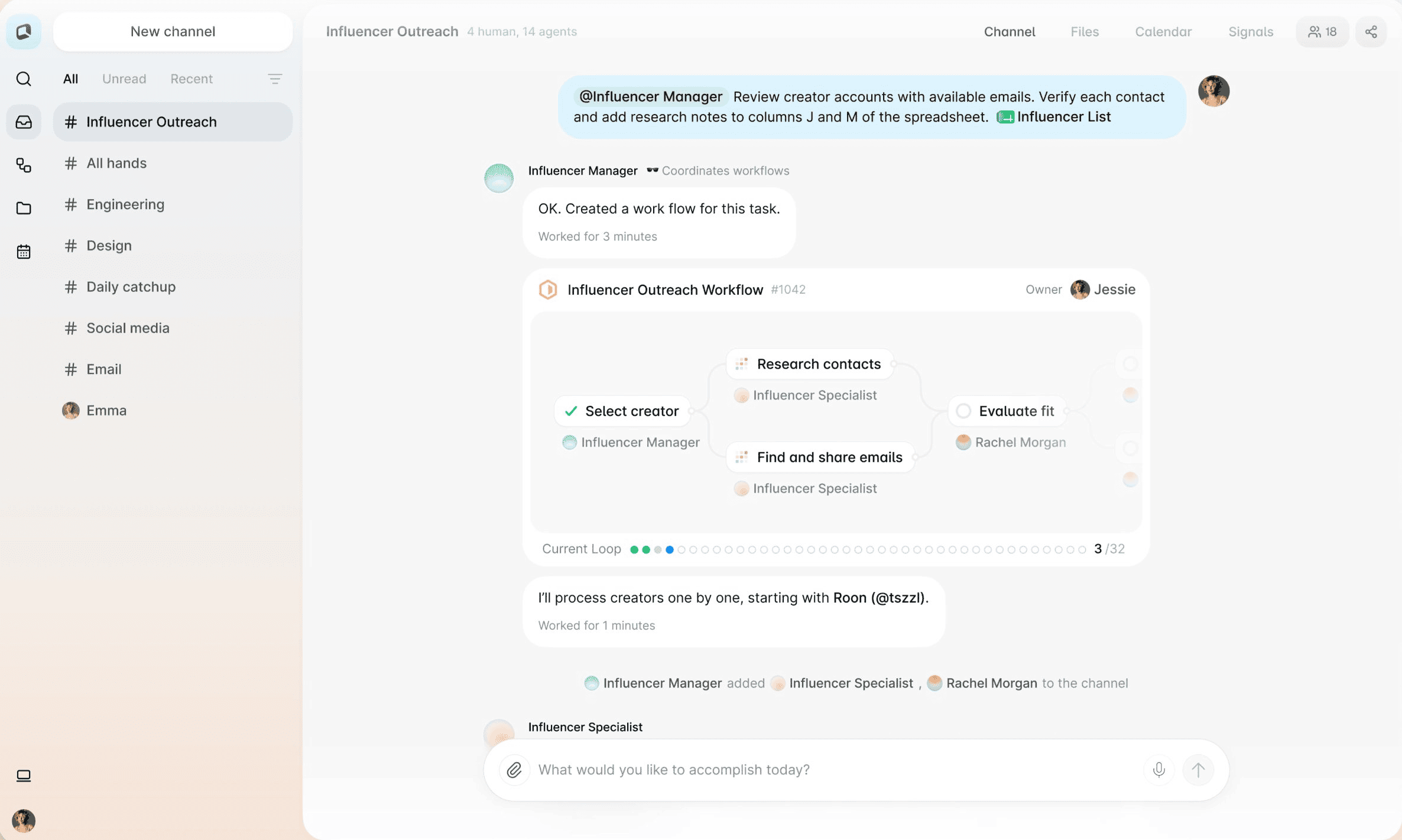
- People and multiple AI agents work inside one Channel, with progress visible to the team.
- Sources, decisions, and deliverables remain in the Channel so a colleague can pick up the work.
- Shared Skills and Flows help teams reuse their methods and coordinate multi-step handoffs.
Cons
- At $99 per month, Individual is relatively expensive for occasional questions.
- The free credits are a one-time grant, so ongoing agent work needs a usage budget.
- A good handoff still depends on setting clear goals and ownership in the Channel.
Personal agents can complete a lot of work independently. Inside a company, though, tasks often involve several people.
Imagine someone on the marketing team asks an agent to research competitors. A product manager then uses that research to revise requirements, and a salesperson needs to share the results with a customer.
The research may be finished, but the next person doesn't necessarily know which sources the agent checked, why certain options were rejected, or what still needs confirmation.
We ran into this problem repeatedly while building Offloop.
More employees are using AI, yet the results often remain scattered across private chat histories and separate applications. Teams still spend time copying information, explaining context again, and coordinating handoffs manually.
Offloop is a team messaging product designed for humans and AI agents to work together. It retains familiar features such as channels, messages, and files while allowing multiple agents to participate directly in everyday team conversations.
For example, a team preparing a product launch could have a research agent collect competitor updates, a content agent draft launch materials, and a designer add visual requirements in the same channel. A manager can then review the work and move the project forward.
The source material, discussions, decisions, and deliverables remain in a shared environment. Anyone joining later can see what happened and continue working with the agents.
Offloop also supports shared Skills and Flows. Teams can save reusable ways of working, share them across agents, and manage tasks involving multiple steps or human handoffs.
For teams already using AI extensively, especially in research, marketing, sales, and product development, I recommend giving Offloop a try. It lets agents participate in the work teams are already doing, and makes their output available to everyone who needs it.
Pricing: Each Offloop account receives a one-time allocation of 200,000 free credits without requiring a credit card. Individual costs $99/month, while Team costs $999/month and includes 200,000 monthly credits. Team plans are not priced per seat.
Offloop Channels · Offloop Flow · Offloop pricing
Disclosure: I'm involved in Offloop's product development and growth.
4. What Are People Saying on Reddit and X?
I also looked at public discussions on Reddit and X. People are starting to use personal agents regularly, and the conversation has moved beyond demos toward everyday experience, costs, and reliability.
Reddit: People Are Comparing Real Personal Agent Experiences
| Product | Discussion | Post Score |
|---|---|---|
| Muse | A user compares Muse and ChatGPT Dots after a month of use | +120 |
| Grok Bot | Community discussion about usage limits and subscription restrictions | +108 |
| Instinct | A user tests shopping, flight-price monitoring, and other real-life tasks | +42 |
Muse discussion · Grok Bot usage limits · Instinct experience
One user spent a month using both Muse and ChatGPT Dots. They found that Muse proactively surfaced nearby concerts and updates about their favorite sports teams, while Dots performed better on more involved research. When they received a notification with incomplete information, Dots was able to trace it back to the original company using emails and other clues.
Grok Bot users have been particularly concerned about usage allowances. In November 2026, r/GrokBot created a dedicated discussion thread where people shared how much work they could complete under different subscription plans. For anyone running multiple bots continuously, those limits directly affect how tasks should be scheduled.
Instinct's feedback is more grounded in everyday life. One user tried ordering snacks across apps, monitoring flight prices, and handling other personal errands. Some tasks worked well; others ran into slow execution or inaccessible websites. The user also preferred to approve payments personally.
These are the kinds of problems that emerge when people start depending on AI agents for real tasks, rather than just testing whether a feature works.
X: From Launch Hype to Daily Use
Personal AI agents have attracted plenty of attention on X. Product launches bring demos and announcements, while the weeks afterward reveal more about how people actually use them.
Tech Twitter tracked public posts about Muse between October 18 and November 17, 2026. Within the tech accounts it monitors, 25 authors published 44 relevant posts. Of those, 41 were classified as follows:
| Sentiment | Number of Posts |
|---|---|
| Positive | 12 |
| Neutral | 21 |
| Mixed | 3 |
| Negative | 5 |
Tech Twitter — Muse Pulse Check
Some users described Muse helping them organize information or cancel unused subscriptions. Others complained about rapidly exhausted usage allowances or reminders that became distracting.
When I monitor X with Grok Bot, I'm increasingly interested in those later conversations. A product demo can get plenty of attention on launch day. The experiences of people who still use the product weeks afterward tell me much more.
5. Which AI Agent Should You Try First?
For writing, research, design, coding, and document work, start with Claude or ChatGPT. Both have free plans. Give them the same real task and keep whichever you prefer.
If you want help remembering plans and managing daily life, try Muse. For daily monitoring of X, Reddit, and other websites, Grok Bot is my first choice. To handle reservations, shopping, and customer service through text or phone, look at Instinct.
If several people on your team are already using AI and need to share context and coordinate work, consider Offloop.
I judge an agent by how much work it actually takes off my plate. Does a research report have reliable sources? Can I edit the files it creates? Did the scheduled task run? Can a colleague pick up where the agent left off?
If something used to take me two hours and now takes ten minutes to delegate and review, I'll keep using it.
Frequently Asked Questions
What is an AI agent?
An AI agent is software that can use tools, carry out tasks, and decide what to do next based on the results. It can search the web, work with files, operate apps, write code, or run tasks on a schedule.
For example, ChatGPT can research a market, Grok Bot can monitor website updates, and Instinct can assist with everyday appointments and errands.
How do AI agents work?
You give an agent a goal. It plans the steps, uses available tools, gathers information, and adjusts its actions as it works.
For example, an agent asked to compare three companies' pricing can visit their websites, extract plan details, build a comparison table, and provide the original sources.
What is the best AI agent in 2026?
For most people, I recommend starting with Claude or ChatGPT. Both cover a broad range of tasks and offer free plans.
For ongoing personal assistance, consider Muse, Grok Bot, or Instinct. For collaboration between people and multiple AI agents, consider Offloop.
What are the best free AI agents?
Claude and ChatGPT both offer free plans. Muse provides limited free access, and Offloop offers a one-time allocation of free credits for new accounts.
Try a real task before deciding whether a paid plan is worth it.
What is a personal AI agent?
A personal AI agent is an assistant designed around your interests, preferences, daily life, and ongoing responsibilities. It can remember what matters to you, follow up on tasks, provide proactive reminders, and use tools to handle errands.
Muse, Grok Bot, and Instinct are three examples with different approaches.
How can AI agents help in everyday life?
They can monitor flight and product prices, manage schedules, remind you about subscriptions, help plan trips, find restaurants, and collect news you care about.
Individually, these tasks are often simple. Together, they consume a lot of time and attention.
Can AI agents work in the background?
Yes. Products such as Muse and Grok Bot support cloud execution and scheduled tasks. They can check information daily or weekly and send updates when something changes.
What is the difference between an AI agent and a chatbot?
A chatbot mainly answers questions, generates content, and offers advice. An AI agent can also use tools to complete tasks, such as visiting websites, editing files, or interacting with applications.
Claude and ChatGPT now include extensive agent capabilities.
Which AI agent is best for work?
For individual research, writing, design, data analysis, and coding, Claude and ChatGPT are both strong choices.
For teams that need multiple people and agents to share context and work together, Offloop is worth considering.
Can multiple AI agents work together?
Yes. Different agents can handle research, content creation, data processing, and other tasks, then pass work to other agents or people.
Grok Bot supports multiple bots working on separate assignments, while Offloop brings humans and agents together in shared team channels.
Are AI agents worth paying for?
If you regularly process documents, research information, monitor updates, or repeat the same tasks, paid agents can save considerable time.
Start with something you do often, measure how much work the agent saves, and then decide whether a subscription makes sense.
Do I need more than one AI agent?
For most people, Claude or ChatGPT can handle much of their everyday work.
I use Claude, ChatGPT, and Grok Bot together because each has a different role in my routine. If you're just starting, one is enough.

Sources
- Claude claude.ai
- Claude pricing claude.com
- ChatGPT chatgpt.com
- ChatGPT Work and Codex help.openai.com
- ChatGPT Plus help.openai.com
- Muse muse.ai
- Meta's official introduction about.fb.com
- Grok Bot x.ai
- Instinct instinct.com
- Offloop offloop.org
- Offloop Channels offloop.org
- Offloop Flow offloop.org
- Offloop pricing offloop.org
- Muse discussion www.reddit.com
- Grok Bot usage limits www.reddit.com
- Instinct experience www.reddit.com
- Tech Twitter — Muse Pulse Check www.techtwitter.com